
Bookmark Shortcuts Extension
Description
Reviews (9 cached)
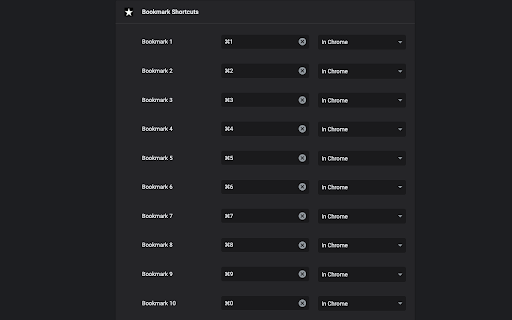
What is "Bookmark 1", "Bookmark 2", etc.? Which bookmarks would those correspond to? The 1st, 2nd, etc. in my bookmarks bar? It's vague and ambiguous, so it's functionally useless. Dashed hopes.
does nothing.
Doesn't work worth a damn.
Does not work at all. I installed the extension, went to chrome://extensions/shortcuts, assigned "Bookmark 1" with a hotkey of Alt-1, closed the tab and went back to it to confirm the settings took effect and were saved. I confirmed that I have bookmarks IN my actual bookmark bar. I go to any of my tabs, press Alt-1 and nothing at all happens. I tried other key combinations. Same things. I even tried deleting the bookmarks from my bookmark bar and recreating them, then recreating the shortcuts. Nothing. Pressing hotkeys with this extension does absolutely nothing in Chrome. If I'm being a complete idiot, by all means, please correct me and I will update my review!
How does this work; I don't see a dashboard or right-click on the existing bookmark' anyone?
does not work?
Just a note to the developer that this doesn't seem to be working in Chrome anymore as of March 2026. Hoping for an update soon! Thank you!
I followed the instructs and tips from dev. Linus, Miguel Garza and Rob Penfold. When it didn't work I removed the extension, turned my 3 other extensions off, started again and followed it to the letter. Still, no. I'm certain it's user error. First, I renamed my bookmark bar items - Calendar is Cal1 for bookmark 1, Translate2 for bookmark 2, etc., up to 10. I used ALT 1 for Bookmark 1 (it enters as ALT + 1, yes?), etc., chose "In Chrome" in the dropdown. I closed out Bookmark Shortcuts Extension, went back in. It's installed w/ the keyboard shortcuts I used...ALT + 1... Could it be something in my site settings? Also, I allowed incognito, for luck. I don't know why.
It does what I need but why does the extension need to read by browsing history?
Permissions (2)
Permissions
Details
| Version | 1.3.0 |
| Updated | Mar 3, 2023 |
| Size | 10.04KiB |
| First Seen | Mar 25, 2026 |
More by Potato Extensions


Popular in workflow




Popular Extensions
