
✅Recently updated
Description
Tired of clicking each video one by one in your subscriptions? QueueTube adds a single button to your YouTube subscriptions page that instantly queues everything up and autoplays them in order, with full skip and navigation controls.
No Permissions Required, No Data Collected
Features:
▶️ One-click queuing — hit the button and your subscriptions start playing immediately
⏭️ Autoplay — when a video ends, the next one starts automatically
⏮️ Skip controls — jump forward or back in your queue at any time
📋 Queue panel — shows all queued videos with real titles so you know what's coming next
🔴 Watch progress bars — videos you've partially watched show a red progress bar in the queue panel, just like YouTube's own thumbnails, so you can decide whether to skip
🖱️ Click to jump — click any video in the panel to skip straight to it
📜 Load more with scrolling — scroll down your subscriptions before hitting Queue to load even more videos (you can queue 300+ this way!)
🔀 Guilt-free sidebar browsing — spot something interesting in the sidebar? Click it and watch it normally — your queue is still saved, so just hit ▶ in the panel to jump straight back to where you were. Or open it in a new tab to keep your queue playing uninterrupted in the original tab
🔒 Private & zero permissions — no data collected, no permissions required, queue lives only in your current tab
How to use
Go to youtube.com/feed/subscriptions
The page will briefly refresh — this is normal, it ensures your videos load correctly
A red "Queue Subscriptions" button will appear near the top of the page
(Optional) Scroll down to load more videos before clicking — the further you scroll, the more videos get queued. You can load 300+ this way!
Click the Queue Subscriptions button
The first video starts playing automatically
A queue panel appears in the bottom-right corner showing all your upcoming videos
Queue panel controls
Button Action
◀ Go to previous video
▶ Skip to next video
✕ Stop the queue
Click a title Jump straight to that video
Reading the progress bars
Videos you've already partially watched will show a small red bar beneath their title in the queue panel — identical to the progress bars YouTube shows on thumbnails. Use these to decide whether to skip a video you've already seen a bit of.
Browsing the sidebar without losing your queue
See something interesting in YouTube's suggested sidebar while watching a queued video? You have two options:
Click it directly — QueueTube saves your queue in the background. Watch the video, then hit ▶ in the panel to jump straight back to your next queued video
Right-click → open in a new tab — that tab is completely independent with no queue panel, leaving your original tab playing uninterrupted
Tips
More videos = better experience. Scroll all the way to the bottom of your subscriptions before clicking Queue to get the maximum number of videos loaded. YouTube loads them in batches as you scroll.
Past videos scroll up. The queue panel always shows the currently playing video at the top — scroll up in the panel to see what you've already watched.
Click ✕ on the panel at any time to stop the queue and go back to browsing normally.
Privacy
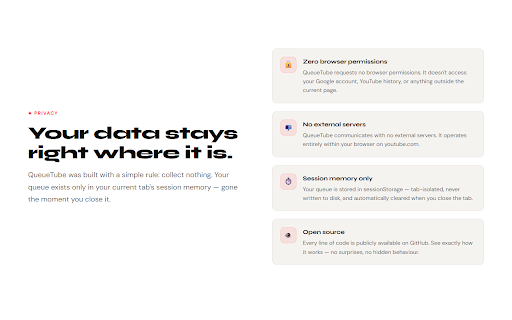
QueueTube requires zero browser permissions and stores your queue in your current tab's session memory only — it's gone the moment you close the tab. No browsing data, no personal information, and nothing is ever sent anywhere. See PRIVACY_POLICY.md for full details.


Reviews
Loading reviews...
Permissions (1)
Permissions
storageℹ Can store data locally in your browser
Details
| Version | 1.0.0 |
| Updated | Mar 6, 2026 |
| Size | 12.99KiB |
| First Seen | Mar 26, 2026 |
Popular in functionality

Hola VPN - Your Website Unblocker
by Hola VPN LTD.
5M
★ 4.84
functionality
5M
★ 4.84
functionality

Video Speed Controller
by igrigorik
3M
★ 4.54
functionality
3M
★ 4.54
functionality

SponsorBlock for YouTube - Skip Sponsorships
by Ajay
2M
★ 4.65
functionality
2M
★ 4.65
functionality

OneTab
by OneTab
2M
★ 4.45
functionality
2M
★ 4.45
functionality

VPN Chrome extension - Best VPN by uVPN
by uVPN
900K
★ 4.52
functionality
900K
★ 4.52
functionality
Popular Extensions

Adobe Acrobat: PDF edit, convert, sign tools
by Adobe Inc.
331M
★ 4.40
workflow
331M
★ 4.40
workflow

AdBlock — block ads across the web
by AdBlock
62M
★ 4.48
workflow
62M
★ 4.48
workflow

Grammarly: AI Writing Assistant and Grammar Checker App
by Grammarly
42M
★ 4.50
communication
42M
★ 4.50
communication

Adblock Plus - free ad blocker
by eyeo GmbH
41M
★ 4.39
workflow
41M
★ 4.39
workflow

Chrome Remote Desktop
by Chrome Remote Desktop Release Managers
38M
★ 3.14
workflow
38M
★ 3.14
workflow