Mark tab manager icon

Mark tab manager

by bradcush

v0.1.46 Updated Aug 14, 2023 47.08KiB
CWS
8K
Users
★ 4.38
34 reviews
#8714
of 207.4K
workflow
#2562 of 31.9K
⚠️Not updated in over 2 years ⚠️Requests 1 sensitive permission

Description

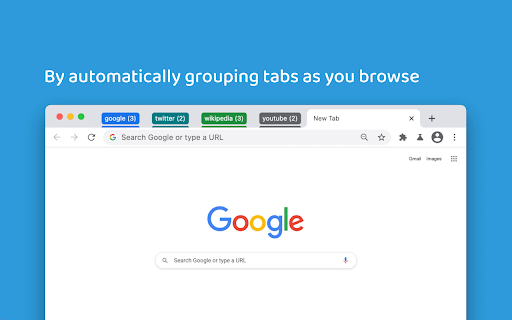
Mark is a minimalist tab manager that organizes tabs as you browse. With Mark, tabs are automatically grouped by domain and sorted alphabetically so you can easily find them later. Mark uses the native tab groups feature of Chrome, meaning there’s no learning curve to get started. Simply install Mark and any open and newly created tabs will be grouped and sorted. Mark can be configured to only group tabs or only sort tabs depending on how you like to browse. Additionally, you can enable Mark to consolidate tabs across windows - meaning you won’t lose a tab because it’s hiding in its own window. You can pin the extension to your browser toolbar by clicking the puzzle looking icon located in the top right of your toolbar, scrolling down to Mark, and clicking the “Pin” icon. Pinning the icon makes it easily accessible for clicking to manually organize tabs in cleanup mode, which will collapse any open groups. Change one of the configuration settings by right clicking on the Mark extension icon, navigating to the “Settings” menu, and toggling one of the settings. Depending on the way you would like to browse, customizing some things could make for an even better experience. If you find yourself more curious about how Mark works or what other options and functionality are available, visit the “Resources” menu at any time by right clicking the Mark extension icon.
Mark tab manager screenshot 1Mark tab manager screenshot 2Mark tab manager screenshot 3

Reviews (3 cached)

★☆☆☆☆2024-05-08
Not Today

Seemed promising but didn't work for me. The tabs kept moving out of tab groups I made and no matter what the settings were nothing would stop it. I created new groups and added tabs to those groups. Clicked the save the group toggle. And when I would click on another tab in a different group or outside of any group it would remove the tabs from the previous group and set them outside of all groups. I changed the settings to not auto group and that didn't help. To make matters extremely worse, I can not remove it from Brave now. I am stuck with this nonfunctional plugin for life, I guess. I have installed it and tried to remove it multiple times now and it shows to be removed but the tabs are still like they were when it was installed. I restarted my browser and my computer and it is still installed (even though it doesn't show up in my list of plugins now). So, yeah, not happy with this plugin.

★☆☆☆☆2022-04-08
Heath “rolltidehero” B.

Unfortunately, this doesn't work in Vivaldi, which is a Chromium browser. It will only sort the tabs alphabetically. It doesn't group them. I can not get the Settings page to load either. Please look into making this work for all Chromium-based browsers. Thank you.

★★★☆☆2024-06-05
Musfiquer Rhman

It ungroups my custom groups and keeps moving tab

Permissions (5)

Permissions

contextMenus Can add items to the right-click menu management Can manage other installed extensions storage Can store data locally in your browser tabGroups Can organize tabs into groups tabs Can see your open tabs and their URLs

Details

Version 0.1.46
Updated Aug 14, 2023
Size 47.08KiB
First Seen Mar 26, 2026
