
Description


Reviews (16 cached)
Used to work great but hasn't successfully synced in probably over a year
doesn't work
Doesn't work. Keep saying I am offline even though I am online and logged in to my google account in the extension.
worked great for a year but stopped working :(
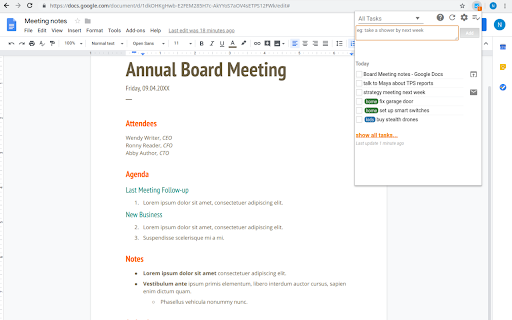
Good concept, but with two big flaws: 1. Code is apparently not open source, a serious risk given the permissions. 2. Tasks are arbitrarily scheduled for today. That should be selectable, including unscheduled. Uninstalled.
Looks nice but I was very disappointed that it is not possible to choose no due date. The extension is not useful for me in this form. Why not give this option? I would again use it and rate higher if this changes.
Horrible design
Very unreliable, often not updating the list when I complete or modify a task...
It's a good idea but needs improvement. I like that you can quickly add tasks directly from the extension but when you change due dates the tasks do not update in the extension. Also other issues that previous reviewers mentioned. I'm removing this extension for now.
Hello. It's a good extension app plus it's free (from premium settings), but when I am posting directly-copied links, it won't paste as a hyperlink. The font sizes and the overall look may also be improved. Check the todoist extension out for reference.
i can't sync it with my My Note 20 calendar, i find it non since that i can't view my tasks on my calendar?
Can't Use with EDGE Chrome microsoft
It's one of the most useful extension for nowadays. I really like the feature of accessing URLs with specific tasks. But I am facing some issues: # It takes time to update and sync with my Google Task app. # Sometimes it's showing every task triple times. For example: Today I have 17 tasks to complete. But right now, its showing total 17*3= 51 tasks! This big number at the right corner of my address bar is disturbing for me. Hope these problems will be solved soon.
It's okay, but has problems. For example, sometimes when I check a task as completed, it automatically deletes the task and sometimes it doesn't. It seems random as to which gets deleted and which doesn't. Also sometimes when I reschedule a task for this week it will move it to the "this week" category and sometimes it won't. Even if I write in a date in the note for it, sometimes it won't move. That too seems random. If there is a formula for getting it to move a task, I haven't been able to find it. I certainly like the idea of this extension and I may eventually figure out how to make it work, but so far I haven't.
How can I add a task with no due date? When I do not specify a date it will always schedule it for later today? How can I add a specific time to a task? Seems only a date is possible. Once this is answered and if it would be possible to get notifications when a task is due, it would be worth 5 stars.
I like the the way prioritizes "overdue" and "today"... but if these are empty, it should immediately show all tasks. However, I'm getting a bunch of phantom tasks with empty titles that are not actually present in my GTasks. There is also bug where you can't edit or delete a task with an empty title, because it only allows you to click on the text. It should allow you to click anywhere on the line of a task to open the popup editor. If these things were fixed it would be top notch!
Permissions (8)
Permissions
Details
| Version | 3.0.1 |
| Updated | Aug 12, 2025 |
| Size | 435KiB |
| First Seen | Mar 26, 2026 |
More by nt

Popular in workflow




Popular Extensions
