Salesforce Tool Suite icon

Salesforce Tool Suite

by concret.io

v4.0.0 Updated Jan 22, 2026 4.29MiB
CWS
10K
Users
★ 4.78
122 reviews
#5383
of 207.1K
developer
#459 of 18.1K
⚠️Requests 1 sensitive permission Highly rated

Description

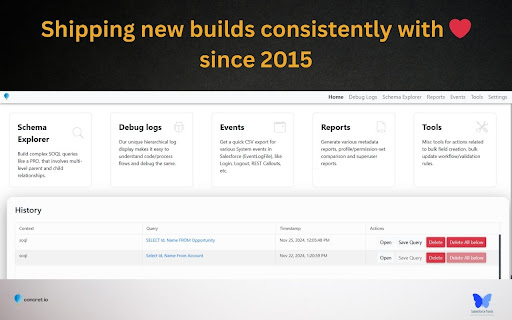
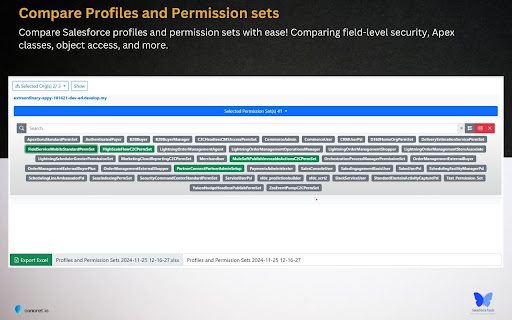
Enhance your Salesforce productivity with our comprehensive toolkit tailored for administrators, developers, architects, and consultants. This all-in-one solution enables you to compare profiles and permission sets, manage debug logs, and explore schemas seamlessly on your device. Your data remains secure, stored exclusively on your local machine. #Key Features: 1. Reports - Profile and Permission Set Comparison: Analyze and compare profiles and permission sets across different Salesforce organizations. - Metadata Export: Export critical components such as classes, triggers, process builders, flows, validation rules, Visualforce pages, and workflow rules to Excel for streamlined analysis. - Super User Report: Quickly identify potential security vulnerabilities in your Salesforce org by auditing privileged users. - Approval Process Details: Access and export approval process configurations effortlessly. 2. Debug Logs - Hierarchical Log Viewer: Delve into Salesforce's core with an organized log viewer. - Tail Logs: Monitor real-time logs without additional installations or configurations. - Trace Flags and Debug Levels Management: Efficiently manage trace flags and debug levels. - User-Specific Debugging: Instantly debug errors reported by specific Salesforce users. 3. Schema Explorer - Schema Navigation: Navigate Salesforce schemas without memorizing fields or relationships. - SOQL Query Builder: Construct complex SOQL queries with ease. - Data Management: Sort, filter, edit records in batches or inline, and export data to Excel. 4. Event Monitoring - Comprehensive Event Logs: Monitor and download logs for over 50 critical Salesforce events. - Exclusive API Access: Leverage features not available in standard Salesforce setup. 5. Salesforce Tools - Apex Testing: Execute test suites and obtain code coverage metrics. - Bulk Management: Efficiently manage validation rules, workflow rules, fields, and objects in bulk. - Object Limits Monitoring: Stay informed about Salesforce object limits. - Bulk Operations: Create or delete multiple fields or objects simultaneously. - Report and Dashboard Management: Clone, delete, and manage reports, dashboards, flows, and record types in bulk. Release Notes : https://github.com/concretios/salesforce-tool-suite-wiki/blob/main/release-notes.md
Salesforce Tool Suite screenshot 1Salesforce Tool Suite screenshot 2Salesforce Tool Suite screenshot 3Salesforce Tool Suite screenshot 4Salesforce Tool Suite screenshot 5

Reviews (5 cached)

★★☆☆☆2023-10-30
Vimal Ramkalawon

It doesn't find all fields in an object. I created a test field to use when doing a demo to use the bulk delete function, it could not find that field >> i then used the bulk field creator tool which managed to create a field but when i did a fetch it still couldn't find the field that it created. When I try to bulk delete, it shows this error "2 Fields were not deleted due to some (Some Dependency exits)" yet I can delete those fields individually on Salesforce.

★★☆☆☆2022-09-08
Youpi “youpioou” oou

I can't understand. This app was usefull and user-friendly to check apex log debug. And now, new feature disable all button (example : show debug only) and all tabs is set with old color. Why change all and disable feature ? I can't use this extension now because she is slow and not user friendly.

★★☆☆☆2017-03-01
Fernando Machado

The idea behind this is amazing. It would be awesome if it worked. Most of the logs I try viewing give me a "didn't understand the input" error, which makes the plugin a bit useless... There's a bug opened for this issue (around 9 months ago) but apparently it was not addressed yet.

★★★☆☆2023-01-30
Sunny Yadav

When I am trying to open it from my SF org its throwing "Session expired or invalid " error. i am unable to use it. what could be the issue? Pls help

★★★☆☆2021-04-30
Ryan MacAlmon

This is a helpful tool for me when I do not know exactly fields I want to query. Are their any plans to add the ability to filter or sort using the UI? I think this would be great for newbies that are not good with the query syntax. Also what about tooling api? this would be a great value add

Permissions (6)

Permissions

background cookies Can read and modify browser cookies downloads Can manage and monitor downloads notifications Can show desktop notifications storage Can store data locally in your browser tabs Can see your open tabs and their URLs

Details

Version 4.0.0
Updated Jan 22, 2026
Size 4.29MiB
First Seen Mar 26, 2026




