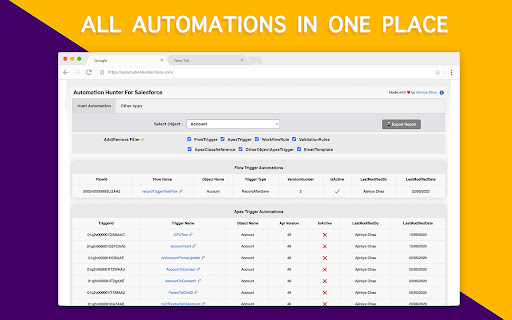
Automation Hunter is a powerful Chrome extension designed to revolutionize your Salesforce experience by providing a comprehensive solution for discovering automations on any Salesforce object. Whether you're an administrator, developer, or power user, this extension empowers you to quickly and efficiently uncover all the automations in your Salesforce environment.
With Automation Hunter, the days of manually sifting through countless configurations and settings are over. This user-friendly tool employs cutting-edge technology to scan and analyze your Salesforce org, effortlessly identifying and displaying all relevant automations associated with a specific Salesforce object.
Available for all Admin /Developer /Consultants
Don't Find The Automation, Hunt The Automation In Salesforce.
*************** Features ***************
* Available in both Classic ☁️ and Lightning ⚡️
* Just select the object and find all automations in just 2 clicks 🪄
* Download Object Automation Report 🖨
* Privacy : This Extension process your data within your browser and do not send it outside your browser.
****** Automation Report Includes ******
1. Flows Automation
2. Apex Triggers Automation
3. Workflow Automation
4. Validation Rules
5. Apex Classes With Selected Object Reference
6. Other Apex Triggers With Selected Object Reference
7. Email Template With Selected Object Reference
It will give you all the above automations written on selected object.
****** How To Use It ******
Once extension is installed in your chrome browser
* In Lightning
Login To Salesforce -> Setup -> SetupHome (Extension will be loaded on right side)
*In Classic
Login To Salesforce -> Setup -> HomePage (Extension will be available above recent items)
* Now select Object on which you would like to find all automations and click on 'Load Automation'
*Within few seconds all your automation written on that selected object will be organised at one place for you.
* You can download this automation pdf report and share it with your team if you want.
****** Feedback ******
* If this tool helps you to save your time while working on projects in any way. Please help to share your valuable feedback.
And at the end purpose of creating this extension is to save your time. Smile Please 😊
****** Disclaimer ******
This is not a Salesforce.com product
The information provided by Automation Hunter ('we', 'us', or 'our') on extension is as a utility purposes only. We do not store any of your personal information. All information on the extension is provided in good faith, however we make no representation or warranty of any kind, express or implied, regarding the accuracy, adequacy, validity, reliability, availability, or completeness of any information on the Site. UNDER NO CIRCUMSTANCE SHALL WE HAVE ANY LIABILITY TO YOU FOR ANY LOSS OR DAMAGE OF ANY KIND INCURRED AS A RESULT OF THE USE OF THIS EXTENSION OR RELIANCE ON ANY INFORMATION PROVIDED REGARDING THE EXTENSION. YOUR USE OF THE EXTENSION AND
YOUR RELIANCE ON ANY INFORMATION ON THE EXTENSION IS SOLELY AT YOUR OWN RISK.
#Update v1.0.1/v1.0.2 :
======
- Results not loading sometimes fixed.
#Update v1.0.3/1.0.4 :
- Fixed apex classes references are not displaying correctly sometimes.
#Update v1.0.5 :
- Fixed: Added support to new 'salesforce-setup.com/' url.