
⚠️Not updated in over 2 years
Description
This handy tool helps you personalize your web browsing experience by removing posts containing certain keywords. It's simple, efficient, and easy to use. Follow these steps to get started:
Installation: After installing our extension from the Chrome Web Store, you'll see a small icon appear in the top-right corner of your browser. This is your gateway to a more customized browsing experience.
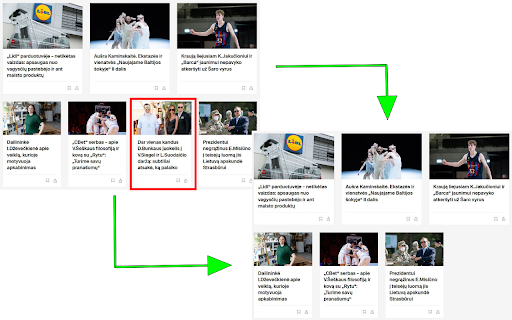
Customize your Experience: Click on the extension's icon and a small window will pop up. Here you'll find a text field awaiting your input. You can enter any keywords that you'd like to avoid seeing in posts. For instance, if you prefer not to see posts containing the words "Siegel" and "Suodaitis", just type in "Siegel,Suodaitis". Once you're done, click the "Submit" button and our extension will take care of the rest.
Updating your Preferences: Changing your mind or want to add new keywords? Easy! Just click on our extension's icon, enter your new keywords into the text field, and click "Submit". Our extension will update immediately and start screening posts based on your new keywords.
Enjoy Your Browsing: Now, you're all set! Continue browsing as you normally would. Our extension works silently in the background, filtering out any posts that contain the keywords you've entered. Every time you scroll, the extension keeps checking for new posts and filtering them based on your preferences.
A little tip: When you open our extension's pop-up window, you might see "Siegel,Suodaitis" already present in the text field. These are just default keywords and you're free to replace them with your own.
Happy browsing! Enjoy a personalized web experience tailored just for you.
Reviews
Loading reviews...
Permissions (2)
Permissions
activeTabℹ Can access the current tab when you click the extension storageℹ Can store data locally in your browser
Details
| Version | 0.3 |
| Updated | Jun 13, 2023 |
| Size | 15.54KiB |
| First Seen | Mar 27, 2026 |
More by Mantas

Popular in workflow

Adobe Acrobat: PDF edit, convert, sign tools
by Adobe Inc.
331M
★ 4.40
workflow
331M
★ 4.40
workflow

AdBlock — block ads across the web
by AdBlock
62M
★ 4.48
workflow
62M
★ 4.48
workflow

Adblock Plus - free ad blocker
by eyeo GmbH
41M
★ 4.39
workflow
41M
★ 4.39
workflow

Chrome Remote Desktop
by Chrome Remote Desktop Release Managers
38M
★ 3.14
workflow
38M
★ 3.14
workflow

Microsoft Single Sign On
by Microsoft
36M
★ 2.27
workflow
36M
★ 2.27
workflow
Popular Extensions
Adobe Acrobat: PDF edit, convert, sign tools
by Adobe Inc.
331M
★ 4.40
workflow
331M
★ 4.40
workflow
AdBlock — block ads across the web
by AdBlock
62M
★ 4.48
workflow
62M
★ 4.48
workflow

Grammarly: AI Writing Assistant and Grammar Checker App
by Grammarly
42M
★ 4.50
communication
42M
★ 4.50
communication
Adblock Plus - free ad blocker
by eyeo GmbH
41M
★ 4.39
workflow
41M
★ 4.39
workflow
Chrome Remote Desktop
by Chrome Remote Desktop Release Managers
38M
★ 3.14
workflow
38M
★ 3.14
workflow