
⚠️Not updated in over 2 years
Description
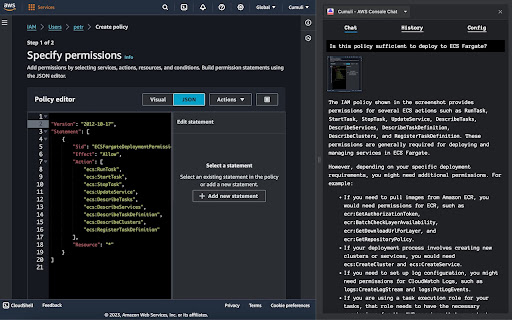
Cumuli Chrome extension adds a side panel with LLM chat to all AWS pages, and lets you add screenshots of the console to your queries to get context-aware responses. It's similar to Amazon Q but uses GPT-4 Turbo with vision.
Use cases:
- AWS learners: Get unblocked by asking AI how to fix errors or use unfamiliar features.
- AWS professionals: Quickly resolve questions while prototyping, monitoring, or debugging.
- Everyone: Pair with AI without context-switching for increased productivity.
Features:
- AI Contextual Understanding: Pass screenshots as context to the language model.
- Conversation History: View previous messages and resend with edits.
- Adaptive UI: Dark and light mode theme selection is automatic based on your system settings.
Security & Privacy:
The extension requests the minimum permissions required to function.
Calls to OpenAI API are made directly from the extension. Your data is never sent anywhere else and is stored locally in the extension-specific browser storage. The model does not get context about your screen by default, and the screenshot feature is optional. OpenAI Terms and policies apply to the data you send to their API.
Cumuli vs. Amazon Q:
Cumuli is a simple chat application with a focus on the core use case of easily sharing your screen with the LLM and getting contextual help. Amazon Q cannot see your screen but has a lot more other capabilities and integrations. In terms of the model quality, Cumuli uses GPT-4 Turbo, which is the most capable LLM model available today. Amazon Q is powered by Bedrock, which has performance in the GPT-3.5 range (there are no official benchmarks for Amazon Q, so this is an estimate).
For a more detailed comparison, see the GitHub Readme: https://github.com/petrgazarov/cumuli-aws-console-chat
Requirements:
- An OpenAI account and an API key are required to use this extension (get your API key here: https://platform.openai.com/api-keys).
- Your OpenAI account must have access to the GPT-4 model. OpenAI automatically enables it in most cases, but it may be disabled if you never previously paid for the API. If that's the case, you can purchase $5 in credits at https://platform.openai.com/account/billing/overview, and that should automatically enable it.
Usage:
1. Activate the extension.
Click on the extension icon to open the Side panel. The extension can only be activated on AWS pages. Keyboard shortcut for the activation can be configured in chrome://extensions/shortcuts.
2. Add your OpenAI API key in the "Config" tab.
3. Start chatting.
"Enter" key sends a text-only message. The model does not get context about your screen by default. To include a screenshot with the message, press "Shift + Cmd + I" (Mac) or "Shift + Ctrl + I" (Linux/Windows).
FAQ:
- Why doesn't the keyboard shortcut work?
The provided keyboard shortcuts are suggested defaults, and the bindings are handled by the browser. You can visit chrome://extensions/shortcuts and verify that the correct shortcuts are set for this extension. If there is a conflict, you can change the shortcuts to something else.
- I'm getting "404 The model `gpt-4-vision-preview` does not exist or you do not have access to it" error.
This means GPT-4 is not enabled for your account. You can purchase $5 in credits at https://platform.openai.com/account/billing/overview, and that should automatically enable it.
- Why doesn't clicking on the extension icon do anything?
The extension can only be activated on AWS pages. These include the following domain namespaces:
- "aws.amazon.com"
- "amazonaws-us-gov.com"
- "amazonaws.cn"
- "aws.training"
- "aws" (top-level domain)
It is disabled on all other pages.


Reviews
Loading reviews...
Permissions (5)
Permissions
activeTabℹ Can access the current tab when you click the extension sidePanel storageℹ Can store data locally in your browser tabsℹ Can see your open tabs and their URLs unlimitedStorage
Details
| Version | 0.1.7 |
| Updated | Jan 8, 2024 |
| Size | 502KiB |
| First Seen | Mar 27, 2026 |
Popular in developer

GoFullPage - Full Page Screen Capture
by GoFullPage
10M
★ 4.89
developer
10M
★ 4.89
developer

TouchEn PC보안 확장
by 라온시큐어
8M
★ 1.33
developer
8M
★ 1.33
developer

React Developer Tools
by Meta
5M
★ 3.95
developer
5M
★ 3.95
developer

Meta Pixel Helper
by Meta
4M
★ 3.91
developer
4M
★ 3.91
developer

ColorZilla
by colorzilla.com
4M
★ 4.59
developer
4M
★ 4.59
developer
Popular Extensions

Adobe Acrobat: PDF edit, convert, sign tools
by Adobe Inc.
331M
★ 4.40
workflow
331M
★ 4.40
workflow

AdBlock — block ads across the web
by AdBlock
63M
★ 4.48
workflow
63M
★ 4.48
workflow

迅雷下载支持
by Shenzhen Xunlei Network Technology Co., Ltd.
59M
★ 2.77
workflow
59M
★ 2.77
workflow

Grammarly: AI Writing Assistant and Grammar Checker App
by Grammarly
42M
★ 4.50
communication
42M
★ 4.50
communication

Adblock Plus - free ad blocker
by eyeo GmbH
41M
★ 4.39
workflow
41M
★ 4.39
workflow