modern scroll icon

modern scroll

by Christoph142

v4.3.1 Updated Jun 11, 2025 115KiB
CWS
8K
Users
★ 4.82
343 reviews
#8714
of 207.5K
functionality
#220 of 7.7K
Highly rated

Description

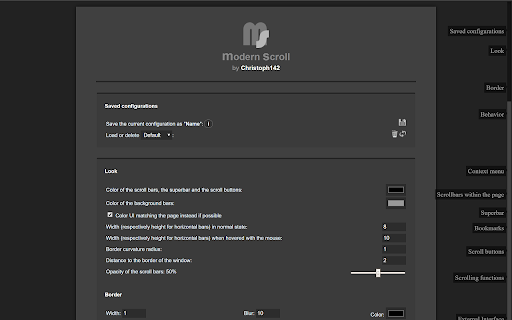
One of Opera's most popular and highest-rated extensions of all times is finally available here! Check it out and experience its beauty and simplicity for yourself. :) modern scroll takes scrolling to a whole new level. What's so awesome about it? + scroll bars don't take up any space so the whole screen width can be used to display what a browser is made for: websites + elements or whole pages don't shift by some pixels when content changes and bars become (un)necessary + scroll bars are usable in fullscreen mode as well + scroll bars automatically hide when they are not needed + behavior and appearance is fully customizable + can boost your scrolling performance + scrolling speed and behavior is adjustable + unique "superbar" which makes it possible to scroll horizontally and vertically at the same time + buttons for scrolling to top and bottom of the page + JavaScript interface for custom mouse gestures / bookmarklets
modern scroll screenshot 1modern scroll screenshot 2

Reviews (6 cached)

★☆☆☆☆2025-07-12
Iamhated

looks nice but I installed for PDFs.... so it doesn't work on those. uninstalled.

★☆☆☆☆2025-05-16
Page Petty

since I couldn't get it to work

★☆☆☆☆2024-07-16
Ser Yoshka

yotube not work fullscrean

★☆☆☆☆2022-07-25
Peter Agnew

This app doesn't allow me to scroll to where I wish to scroll. It stops part way through the process and returns me to where I started scrolling. It also distorts my screen so I'm unable to read as I scroll.

★☆☆☆☆2020-07-07
Radoslaw Dutkiewicz

Does not work. Asks me for transfering license from Chrome on Chrome.

★★★☆☆2026-03-24
Gregory Em

Looks nice but some weird artifacts on webpages happend, when extension is active. Some part of content is showed under rectangular, translucent area and clicking links inside that area not working at all. When extension is disabled everything works ok. Litle edit: I found it happend only when "scrooling sheet" (scrooling horizontaly and verticaly) option is enabled.

Permissions (3)

Permissions

activeTab Can access the current tab when you click the extension contextMenus Can add items to the right-click menu storage Can store data locally in your browser

Details

Version 4.3.1
Updated Jun 11, 2025
Size 115KiB
First Seen Mar 27, 2026

