
⚠️Not updated in over a year
Description
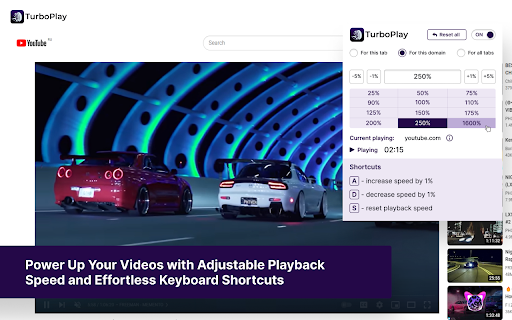
🚀 TurboPlay Video Manager - Power Up Your Videos with Adjustable Playback Speed and Effortless Keyboard Shortcuts
✨ Elevate Your Video Experience with TurboPlay Video Manager!
TurboPlay Video Manager is the ultimate browser extension for video enthusiasts, providing customizable playback speed and intuitive keyboard shortcuts. Whether you're watching content on YouTube, Vimeo, or any generic HTML5 video player, TurboPlay ensures you have full control over your viewing experience.
🎥 Key Features:
- 🌍 Universal Compatibility: Works seamlessly with popular platforms like YouTube, Vimeo, and most HTML5 video players.
- 🎚️ Adjustable Playback Speed: Set your desired speed in percentage to watch videos at your preferred pace.
- ⌨️ Intuitive Keyboard Shortcuts:
- ➕ Press "A" to increase playback speed by 1%
- ➖ Press "D" to decrease playback speed by 1%
- 🔄 Press "S" to reset speed to normal
📌 Use Cases:
- 🎓 Students & Researchers: Speed up lectures or slow down tutorials for better comprehension.
- 🎬 Content Creators: Review and analyze videos more efficiently.
- 🍿 Casual Viewers: Enjoy entertainment at your own pace, whether speeding up slow content or savoring details in slow motion.
- 🌍 Language Learners: Adjust speed to better understand spoken language in foreign videos.
🎯 Who Benefits from TurboPlay Video Manager?
- 📚 Students & Educators: Optimize learning with flexible playback speeds.
- 🎞️ Video Editors & Reviewers: Quickly navigate through content.
- 🎧 Podcast & Audiobook Listeners: Speed up or slow down spoken content for better retention.
- 🎮 Gamers & Streamers: Rewatch gameplay at custom speeds for strategy analysis.
💡 Why Choose TurboPlay Video Manager?
- ✅ User-Friendly: Simple and intuitive controls.
- ⏳ Time-Saving: Adjust video playback effortlessly.
- 🔗 Seamless Integration: Works across multiple platforms without hassle.
- 🚀 Boost Productivity: Learn faster, review quicker, and consume content more efficiently.
🔥 Take control of your video experience with TurboPlay Video Manager today!
Reviews (2 cached)
★☆☆☆☆2023-09-22
ismet soner عصمة سونر
when you speed up even only %25 video and voice asynchronied.
★★★☆☆2023-12-20
Andi K
Looks like a fork/copy of extensions "Super Video Speed Controller" and "Video Speed Pro". What are those forks good for besides getting more installs of the same software? This is why have removed an additional star. Works as expected, but has the same weaknesses as the clones: - completely deactivates regular speed controls (e. g. on Youtube) even if switched off - too small hotkey steps for increasing / decreasing (just 1%). Using A/D with greater or user defined steps (1.25, 1.33, 1.5, 1.67, 2 etc.) would be better.
Permissions (3)
Permissions
alarmsℹ Can schedule periodic background tasks scriptingℹ Can inject scripts into web pages storageℹ Can store data locally in your browser
Details
| Version | 1.0.4 |
| Updated | Mar 11, 2025 |
| Size | 1.35MiB |
| First Seen | Mar 30, 2026 |
Popular in workflow

Adobe Acrobat: PDF edit, convert, sign tools
by Adobe Inc.
331M
★ 4.40
workflow
331M
★ 4.40
workflow

AdBlock — block ads across the web
by AdBlock
62M
★ 4.48
workflow
62M
★ 4.48
workflow

迅雷下载支持
by Shenzhen Xunlei Network Technology Co., Ltd.
59M
★ 2.77
workflow
59M
★ 2.77
workflow

Adblock Plus - free ad blocker
by eyeo GmbH
41M
★ 4.39
workflow
41M
★ 4.39
workflow

Chrome Remote Desktop
by Chrome Remote Desktop Release Managers
38M
★ 3.14
workflow
38M
★ 3.14
workflow
Popular Extensions
Adobe Acrobat: PDF edit, convert, sign tools
by Adobe Inc.
331M
★ 4.40
workflow
331M
★ 4.40
workflow
AdBlock — block ads across the web
by AdBlock
62M
★ 4.48
workflow
62M
★ 4.48
workflow
迅雷下载支持
by Shenzhen Xunlei Network Technology Co., Ltd.
59M
★ 2.77
workflow
59M
★ 2.77
workflow

Grammarly: AI Writing Assistant and Grammar Checker App
by Grammarly
42M
★ 4.50
communication
42M
★ 4.50
communication
Adblock Plus - free ad blocker
by eyeo GmbH
41M
★ 4.39
workflow
41M
★ 4.39
workflow