Freezetab icon

Freezetab

by Freezetab

v2.0.4 Updated Oct 30, 2023 1.13MiB
CWS
5K
Users
★ 3.55
56 reviews
#1324
of 29.4K
workflow
#362 of 3.7K
⚠️Not updated in over 2 years

Description

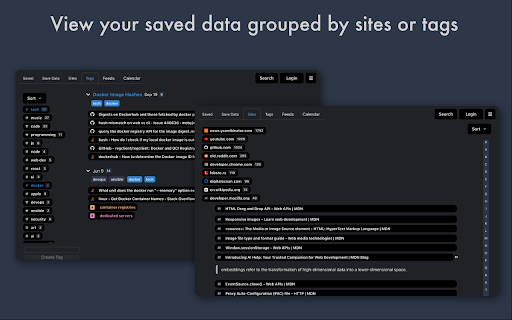
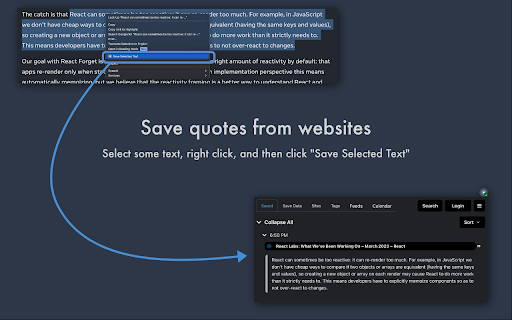
Freezetab is a browser extension designed to help you save content from the web. You can use the extension to save links from your tabs and tab groups, articles, quotes from websites, and even RSS and Atom feeds. ★ Privacy This extension has a detailed privacy policy which you can read on our website, but the gist of it is that your private data won't be sent to our servers unless you log in to our website. You can absolutely use this extension 100% locally, and even without an internet connection. ★ Save tabs and tab groups Saving tabs and tab groups is the primary feature of this extension. The extension can save and reopen any of your tabs and tab groups. You can also choose to close the tabs after saving. The extension will remember the names and colors of your tab groups as well as the links they contain, and restore them appropriately. While choosing which tabs to save, you can select the current tab, everything except the current tab, everything to the left or right of the current tab, tabs you've highlighted, or just specific tabs you've selected within the extension. The extension allows you to choose tabs from specific windows as well. ★ Save articles This extension empowers you to save articles from the web. The extension contains a polished article reader which not only allows you to read content from the web, but to edit that content. The article editor is a full rich text editor with the ability to add notes, highlight text, and apply complex text styling. You can apply all of the traditional text styles like bold, italic, underline, and strikethrough, as well as more complex styling constructs like lists, block quotes, links, and headers. If you've saved an article which contains source code, the article reader will even apply syntax highlighting with support for most popular programming languages! ★ Save quotes The extension can save quotes from websites. Just select a passage of text on a website, right click, and then click 'Save Selected Text'. The extension will save the selected text, as well as a text fragment link. When you click the link in a browser that supports text fragments, it'll take you to the original website and visually highlight the text you saved. ★ Feeds The extension can notify you if it finds an RSS or Atom feed on the current page (by updating the extension's icon with the number of feeds found). If you save a feed, the extension will fetch new links from the feed in the background, and you can choose to save or delete any of the fetched links. ★ Sort by site, tag, or time period Want to find all of your saved data from a specific site, or annotated with a specific tag? This extension allows you to filter your data based on specific sites and tags, as well as view your data chronologically in a calendar view. ★ Search The extension supports fast full-text search, which you can access quickly from within the extension popup with a keyboard shortcut. ★ Keyboard Shortcuts You can open the extension by holding Command + Shift + O on a Mac or Ctrl + Shift + O in any other operating system. Once the extension popup is open, you can use shortcuts to: - Save All Tabs - Save the Current Tab - Save Everything Except the Current Tab - Save an Article - Search - Open the extension popup in a new tab - Toggle Privacy Mode ★ Sharing Securely and privately share your data with friends! Click the settings icon next to any collection of saved data to share that collection with others. The extension will generate a shareable url which compresses the data and appends it to the hash portion of the url. When you (or someone else) open the link in your browser, the page's code will decompress the data and present it to you. Data stored in the hash portion of a url is never sent to external servers by web browsers, which means only the people you share the link with will ever have access to that data.
Freezetab screenshot 1Freezetab screenshot 2Freezetab screenshot 3Freezetab screenshot 4Freezetab screenshot 5

Reviews (17 cached)

★☆☆☆☆2024-05-05
ISLAM

Can't understand a thing and nothing works

★☆☆☆☆2024-03-30
SAGE SH

my every thing got removed after this idiotic updates give me my data back better to use bookmarks instead of this trash alteast ur data wont be removed without ur will and they want us to pay for this little extension its not that kind of extension to pay for it and even monthly ha funny

★☆☆☆☆2023-11-01
Arno Nymous

This ist total Garbage. Do not install this!!! Programm is outdated and knows nothing of tab groups. This will destroy your data instead of saving it.

★☆☆☆☆2023-10-02
abm10v

After the update (09.29.23), it's terrible. I am an invalid, I worked with one hand with a mouse. It was a good app. Now I want to call you a swear word.

★☆☆☆☆2022-05-15
way pi

the stupid "quicksave" closed all tabs without any warning... for a new user!!!!!!

★☆☆☆☆2022-05-13
Emir Hećimović

PLEASE BEWARE that this extension will close ALL your open tabs when you install it. You might LOSE important work if you are not careful. Absolutely horrendous user experience. I can't even comprehend why someone thought that it would be a good idea to make closing active tabls a default behavior.

★☆☆☆☆2021-07-06
NX GD

Total piece of ****. Closed all my tabs without any warning. Option to keep tabs open after saving is not obvious at all.

★☆☆☆☆2018-06-28
Bob Rohrer

closed all my important tabs while testing... even the ones I had pinned. reopened them all but it put every tab in on window which took forever to reorganize

★★☆☆☆2019-04-06
Akim Kelar

Reopen link is placed near "Delete" link, which does not have a prompt. These are not buttons, actually links, and you can easily miss and hit to Delete, and loose yours tabs. Very sad, trust me =(

★★★☆☆2022-03-05
bahrta sai

This is pretty good, but chrome already gives you the ability to add tabs to collapsible groups. That combined with session buddy (toby is good, but session buddy is better) do most of what this does, this is just in a prettier package. The one thing session buddy has that this doesn't is in session buddy, you can click on the current session, & click on an individual tab to switch to that tab. This simply opens it again in a new tab 1 point for session buddy. If this had that & the ability to create groups containing all tabs from a specific group I might keep it. Otherwise I'll still probably continue to use session buddy. This also doesn't appear to have any way to import exported tab groups which defeats the purpose of being able to export them in the first place. Again session buddy has no problem with that. Another point for session buddy.

★★★☆☆2021-10-25
Pat MySecret

Looks like a standard session saver with a fancy name to me. Don't want to give it much time.

★★★☆☆2018-03-07
shi aquas

I wish it has the function "close all tabs except pinned tabs" as in OneTab. OneTab doesn't have Freezetab's collapse function which I need to get space. Both cannot matches the great UI of Group Tabs extension of Firefox. Wish to see a similar extention someday.

★★★☆☆2018-02-15
Katherine Elizabeth Walker

I prefer toby after trying this and also one page, which does sync. Toby allows customization and tagging that helps plus the aesthetic is better for me. This is cool but cumbersome too many tabs and options.

★★★☆☆2017-10-18
Brian Wikene, Jr

This extension has the best UI of all of the products in this category. It's easy to use and just works. I love the look and feel. The only drawback - The ability to export/import or sync would make this a 5 star app!

★★★☆☆2017-10-03
Just Sturgis

Freezetab is a really good extension in a space that is filled with really good extensions (OneTab, Tabs Outliner, Tab Snooze, Session Buddy) and a really great extension, Toby. I am a Toby fan and evangelist, but I actually like Freezetab's UI better. Unfortunately, no sync option makes Freezetab a 3 star extension instead of a 4+ star extension. I'd love to see sync added to make this extension great!

★★★☆☆2017-09-06
Fred First

Not nearly as useful since I can't sync to a common storage and access in both chrome and Opera. I was just starting to get jazzed about this extension after two days of use, and hope it will be developed into what it could potentially become.

★★★☆☆2017-09-03
Ewa Yevv

It would be good alternative to OneTab if only It were synchronized between different devices (with account). Some needed settings (according to me): - being able to choose if I want to save pinned tabs - synchronization ( like at the beginning) or possibility to choose where to store file with saved sites like on Dropbox folder on my PC) - small icons - like on tabs on chrome

Permissions (8)

Permissions

activeTab Can access the current tab when you click the extension alarms Can schedule periodic background tasks contextMenus Can add items to the right-click menu scripting Can inject scripts into web pages storage Can store data locally in your browser tabGroups Can organize tabs into groups tabs Can see your open tabs and their URLs unlimitedStorage

Details

Version 2.0.4
Updated Oct 30, 2023
Size 1.13MiB
First Seen Mar 21, 2026



