A simple highlight tool which enables anyone to highlight words on any website.
*The tool went through a slight overhaul, please check the "What's new 1.1.3" below!
Features:
- Assign color for each word
- Import from raw list or text file
- Group your words into lists for easier organization
- Sync function to transfer your lists across devices.
- Import/Export your lists.
- Sort your lists *new*
- Quickfind, ctrl-shift-f to bring up quickfind and search instantly, save later.
- Each word in the list can be case sensitive
- Can use regular expression tokens
- Blacklist sites and pages
- Can match complete words or part of a word
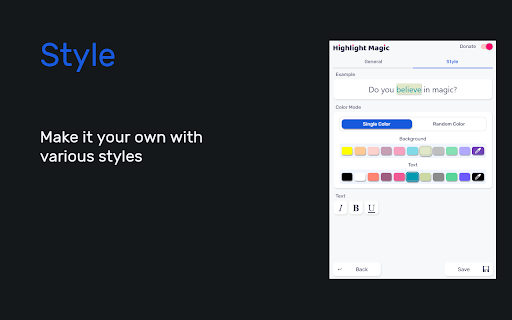
- Stylize your words in Style tab
- Dark mode
To enable Regex tokens, blacklist a site, toggle complete words on or off, go to settings.
If you have any issues please ask & I will help you out!
If you found a bug report it and I'll fix it as soon as possible!
Ideas how to make the extension better are encouraged!
What's new:
1.1.5:
Features
- Added expand button on lists to view highlight stats
- Added a save button that enables you to store changes without having to press enter
- Added sorting methods (Ascending, Descening, By background color, By text color)
- Added a warning in custom settings that when enabled the global settings are overriden
- Removed character limit in excluded/exclusive lists
Bug Fixes
- Badge indicating number of words highlighted now works more consistently and less prone to breaking
- Fixed issue where if single color is selected you couldn't change the color individually for each word
- Effectively inform users that global settings won't be enabled for lists with custom settings enabled
- Clear filter when closing lists
- Toggling the tool or a list off will less likely break a page and also work a bit faster
- Fixed a bug where changing the title of a list, returning to list menu and clicking the same list, the sheet would show the old one
1.1.4: Some bug fixes that manifested when updating from 1.1.2 to 1.1.3.
1.1.3:
-Optimized highlighting and fix slowdowns when new elements are added to the page.
- Added import options for raw lists and text files
- Can copy (crtl-c) & paste (ctrl-v) words directly to the list editor
- Press ctrl-a to select all visible words
- Filter words
- Made all lists a single random color by default, can be changed in style settings
- New style tab that let's you customize your highlighted words
- Dark mode!
- Made some stylistic changes to the GUI to make it a bit more modern looking
1.1.2: Bug fix: Replaced additional event paths that broke the mass action option when ticking the a word's checkbox.
- Toggling a list on/off now disables/enables the highlighting in the active tab.
1.1.1: Bug Fix - event path property is undefined, replaced event paths with composedPath method.
1.1.0: - Lists are now available! Group your words into lists.
- Sync function to transfer your lists across devices.
- Import/Export your lists.
- Quickfind, ctrl-shift-f to bring up quickfind.
- Bug Fix: contentEditable incompatibility elements no longer crash page.
- Highlights in iframes.
1.0.3 - Bug Fix: Text nodes & characterData changes succesfully forwarded to highlighter.
1.0.2 - Bug Fix: Text is no longer removed from textareas.
Extension icon and promotional tiles by Maria Gregoriou behance.net/MariaGregoriou
Icons By Font Awesome https://fontawesome.com/license