
⚠️Not updated in over a year ⚠️Requests 1 sensitive permission ⚠️Below average rating
Description
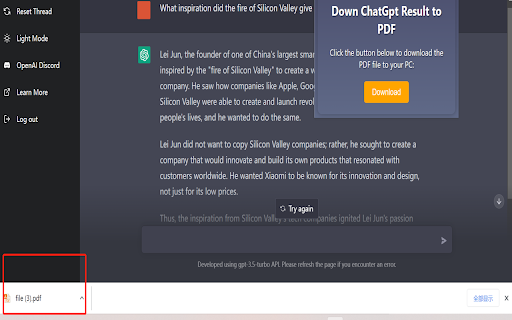
Down ChatGPT Result to PDF
Installing and Using ChatGPT to PDF Chrome Extension
ChatGPT to PDF is a Chrome extension that allows you to easily convert any text content in your browser into a PDF document. This extension is especially useful for those who frequently work with text content and need to save it for later reference or sharing. In this guide, we will walk you through the steps of installing and using the ChatGPT to PDF Chrome extension.
Installing the ChatGPT to PDF Chrome Extension
Step 1: Open your Google Chrome browser and navigate to the Chrome Web Store.
Step 2: In the search bar, type "ChatGPT to PDF" and hit enter.
Step 3: Click on the "Add to Chrome" button next to the ChatGPT to PDF extension.
Step 4: A pop-up window will appear, asking you to confirm that you want to add the extension. Click on the "Add Extension" button to proceed.
Step 5: The ChatGPT to PDF extension will now be added to your Chrome browser. You can verify this by looking for the ChatGPT to PDF icon in the top right corner of your browser window.
Using the ChatGPT to PDF Chrome Extension
Step 1: Navigate to the webpage or text content that you want to convert to a PDF document.
Step 2: Click on the ChatGPT to PDF icon in your browser's toolbar.
Step 3: A pop-up window will appear, showing you the text content that will be converted to a PDF. You can edit the text content and choose the page layout and orientation.
Step 4: You will signup and signin.
Step 5: You Choose one pay plan before to use .
Step 6: Click on the "Down PDF" button to start the conversion process.
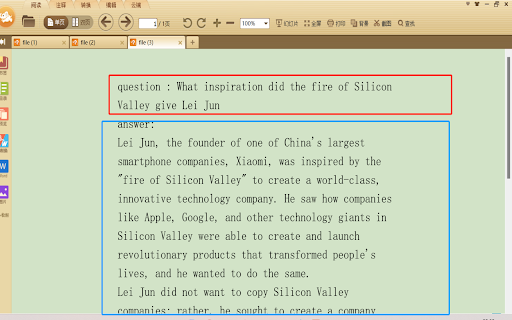
Step 7: Once the conversion is complete, the ChatGPT to PDF extension will automatically download the PDF document to your computer. You can then open the PDF document using your preferred PDF viewer.
Customizing the ChatGPT to PDF Chrome Extension Settings
The ChatGPT to PDF Chrome extension comes with several customizable settings that you can adjust to suit your preferences. Here's how to access the extension settings:
Step 1: Click on the ChatGPT to PDF icon in your browser's toolbar.
Step 2: Click on the gear icon in the top right corner of the pop-up window.
Step 3: A settings menu will appear, allowing you to customize the page layout, orientation, margins, and other settings.
Step 4: Once you have made your desired changes, click on the "Save" button to apply the changes.
Conclusion
The ChatGPT to PDF Chrome extension is a simple and useful tool for anyone who needs to convert text content to a PDF document. By following the steps outlined in this guide, you can easily install and use the extension in your Chrome browser. Additionally, you can customize the extension settings to suit your preferences and optimize your PDF output.
Last updated: Mar 31th, 2023
Terms of Service and Privacy Policy --Ensure that your privacy policy includes detailed information about user data collection, processing, storage, and sharing.
https://www.chatgpt2pdf.com/service.html

Reviews (5 cached)
★☆☆☆☆2023-10-01
Bryan “Ironman” Stark
Malicious spyware. Doesn't download a pdf. The file is binary and probably malware. Since the developer doesn't put his GitHub account on the front page of the extension and requires sign up to even use it. I am reporting and it should be taken down until the author can submit the source code to GitHub for others to review. It really looks malicious.
★☆☆☆☆2023-06-25
D. F. Wo
Totally worthless.
★☆☆☆☆2023-06-07
迷途小书童
trash!!
★☆☆☆☆2023-05-09
김도형
trash
★☆☆☆☆2023-03-22
황승연
awful
Permissions (3)
Permissions
cookiesℹ Can read and modify browser cookies downloadsℹ Can manage and monitor downloads scriptingℹ Can inject scripts into web pages
Details
| Version | 0.1.7 |
| Updated | Aug 8, 2024 |
| Size | 23.3KiB |
| First Seen | Mar 27, 2026 |
More by carl007766

Claude2PDF - Convert Claude to PDF
by carl007766
2K
★ 2.40
workflow
2K
★ 2.40
workflow

Twitter2PDF- Convert Twitter to PDF
by carl007766
610
★ 1.00
workflow
610
★ 1.00
workflow

Bard2PDF - Convert Bard to PDF
by carl007766
280
★ 2.67
workflow
280
★ 2.67
workflow
Grok2Pdf - Convert Grok AI to PDF
by carl007766
189
★ 1.00
tools
189
★ 1.00
tools

文心一言2Pdf
by carl007766
178
★ 0.00
workflow
178
★ 0.00
workflow
Popular in workflow

Adobe Acrobat: PDF edit, convert, sign tools
by Adobe Inc.
331M
★ 4.40
workflow
331M
★ 4.40
workflow

AdBlock — block ads across the web
by AdBlock
63M
★ 4.48
workflow
63M
★ 4.48
workflow

迅雷下载支持
by Shenzhen Xunlei Network Technology Co., Ltd.
59M
★ 2.77
workflow
59M
★ 2.77
workflow

Adblock Plus - free ad blocker
by eyeo GmbH
41M
★ 4.39
workflow
41M
★ 4.39
workflow

Chrome Remote Desktop
by Chrome Remote Desktop Release Managers
38M
★ 3.14
workflow
38M
★ 3.14
workflow
Popular Extensions
Adobe Acrobat: PDF edit, convert, sign tools
by Adobe Inc.
331M
★ 4.40
workflow
331M
★ 4.40
workflow
AdBlock — block ads across the web
by AdBlock
63M
★ 4.48
workflow
63M
★ 4.48
workflow
迅雷下载支持
by Shenzhen Xunlei Network Technology Co., Ltd.
59M
★ 2.77
workflow
59M
★ 2.77
workflow

Grammarly: AI Writing Assistant and Grammar Checker App
by Grammarly
42M
★ 4.50
communication
42M
★ 4.50
communication
Adblock Plus - free ad blocker
by eyeo GmbH
41M
★ 4.39
workflow
41M
★ 4.39
workflow