
Tab Scheduler with auto open and close
Description




Reviews (20 cached)
One-time purchase at 4.99? maybe. MONTHLY recurring subscription at 4.99? obscene.
It became a paid extension.
Really disappointed this is behind a paywall. You can only schedule 5 tabs to open (in the background, without bringing it to the front/focus) for free, then you have to pay $4.99 EACH MONTH for access to this extension. I think this is an absolutely ridiculous amount to expect for a subscription. I will be going back to using other extensions that do a similar thing for free.
One of the best tab openers, sadly it has entered a really nasty pay stage, as a consecuence you can only open 3 scheduled tabs per day instead of unlimited, having to pay for the latter now. Truly a horrendous choice for the average user.
Pay extension
Updating review, not working after daylight savings, opening up an hour before, even though clock on computer and web browser is updated. Updating review again, 1 star. Does not work 80% of the time, and extension just recently updated and removed features unless you pay for them. So they downgraded the extension unless you pay $50 a year, to enable the features that you previously had. Terrible.
Useless. Did not open ANY of the pages at all. No pages show up in web history, no errors found, no http requests made. Even when tested before using, it must have worked only once.
Doesn't seem to work when I want it to work... When testing it by setting it to pop up in a minute it would not work at the start then start working after 3 attempts. When leaving it overnight it only worked the first night then never worked ever again (7 nights wasted) Very inconsistent :/
Doesn't work most of the time. I got a livestream I want opened up when I am asleep and I will wake up turn my monitor on and it just didn't open. I will test it by setting it to open something in a couple of minutes and it's completely inconsistent.
Is there a way to open the tabs in the background? I don't like it opening tabs while I'm working on something. Edit: It worked fine on the first day but stopped working completely after that.
This extension was broken for me. Repeatedly opened new tabs endlessly, causing my browser to have 50+ tabs & lag, and I had to do a work around to delete the extension. Don't recommend.
Functionally a good extension, however when enabled it appears to stop the screen from sleeping, which makes it unusable. This was checked via "powercfg -requests" which, when the extension is enabled shows that a Chrome extension is making display requests.
Worked when I first got it, stopped working the last couple of months
Inconsistent, and thus useless This really does seem to be a hard problem to solve, as a lot of extensions don't work well. This is another one of them.
Don't Work
I use this extension to open tabs for esports streams, but oftentimes the tabs I have scheduled are never opened. If I don't have the page for the extension open and set to the Opentab section, it never works, and even then, the page sometimes "freezes in time" and doesn't register that any time has passed until it's refreshed. It's a useful extension in theory, but it's sadly unreliable.
The idea is great but it is not consistent. If I run a test it works, but as soon as I set 4 tabs to open on monday 17.00 it doesn't work. How can I solve?
Please provide an option to disable automatic translation in your extension. I am unable to read Korean translations in your extension.
It only works for me if the Tab Scheduler page itself is open. Is that how it is intended? That should definitely be in the directions and/or the FAQ.
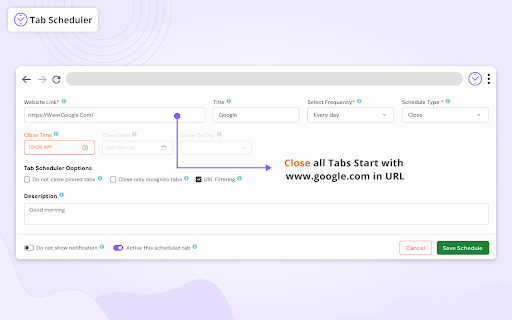
Bit odd. You can set a repeat to OPEN a particular URL, e.g. for every day, however you can't set a repeat to CLOSE a url. Apart from that, it's ok.
Permissions (6)
Permissions
Details
| Version | 2.0.11 |
| Updated | Jan 19, 2026 |
| Size | 4.97MiB |
| First Seen | Mar 31, 2026 |
More by Softpulse Infotech



Popular in workflow




Popular Extensions
