
Webflow Collection Reorder
v1.0.0 Updated Jan 8, 2023 247KiB
⚠️Not updated in over 2 years
Description
## Overview
Welcome to the Webflow Collection Sorter Chrome extension! If you use Webflow to build websites, you know it can be tedious to manually sort the items in a CMS collection. That's where our extension comes in. With Webflow Collection Sorter, you can easily and quickly rearrange the order of your CMS collection items using a simple drag-and-drop interface. No more wasted time trying to manually sort your collection items - just install the extension and organise your content.
## How to Sort CMS Collection Items
1. Once you have installed the Chrome extension, you will see a new "Sort" button on the collection listing page in Webflow.
2. Before you can use the Sort button, you need to make sure that your Collection has a "Sort Order" number field. Note that the field type should be “Number” and the field name should exactly be “Sort Order”. If this field is not present, you will need to add it in order to enable the "Sort" button.
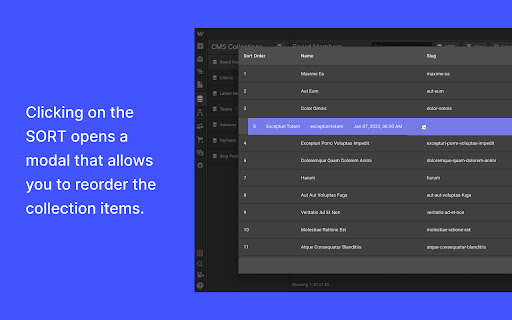
3. Click the "Sort" button to open the modal. The modal displays only the Name, Slug, Sort Order, and Creation Date fields.
4. You can sort the collection items by dragging and dropping them into the desired order. When you are finished, click the "Save" button.
5. The "Sort Order" field will be updated for each collection item to reflect the new order of the items.
6. To view the updated order on the front-end of your website, make sure that your collection is sorted by the "Sort Order" field. This will ensure that the order is displayed correctly on the front-end pages.


Reviews
Loading reviews...
Permissions (1)
Permissions
storageℹ Can store data locally in your browser
Details
| Version | 1.0.0 |
| Updated | Jan 8, 2023 |
| Size | 247KiB |
| First Seen | Mar 30, 2026 |
Popular in developer

GoFullPage - Full Page Screen Capture
by GoFullPage
10M
★ 4.89
developer
10M
★ 4.89
developer

TouchEn PC보안 확장
by 라온시큐어
8M
★ 1.33
developer
8M
★ 1.33
developer

React Developer Tools
by Meta
5M
★ 3.95
developer
5M
★ 3.95
developer

Meta Pixel Helper
by Meta
4M
★ 3.91
developer
4M
★ 3.91
developer

ColorZilla
by colorzilla.com
4M
★ 4.59
developer
4M
★ 4.59
developer
Popular Extensions

Adobe Acrobat: PDF edit, convert, sign tools
by Adobe Inc.
331M
★ 4.40
workflow
331M
★ 4.40
workflow

AdBlock — block ads across the web
by AdBlock
62M
★ 4.48
workflow
62M
★ 4.48
workflow

Grammarly: AI Writing Assistant and Grammar Checker App
by Grammarly
42M
★ 4.50
communication
42M
★ 4.50
communication

Adblock Plus - free ad blocker
by eyeo GmbH
41M
★ 4.39
workflow
41M
★ 4.39
workflow

Chrome Remote Desktop
by Chrome Remote Desktop Release Managers
38M
★ 3.14
workflow
38M
★ 3.14
workflow