Audio editor & music editor AudioStudio icon

Audio editor & music editor AudioStudio

by RedcoolMedia

v1.9.0 Updated Mar 13, 2026 847KiB
CWS
80K
Users
★ 3.39
142 reviews
#1963
of 206.5K
workflow
#635 of 31.7K
Recently updated

Description

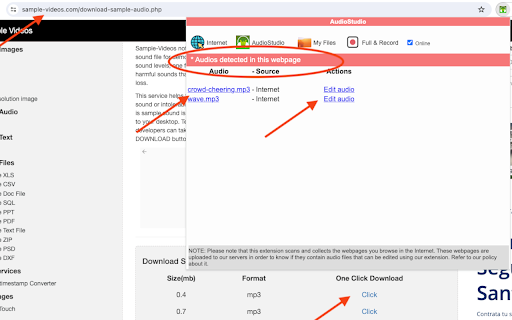
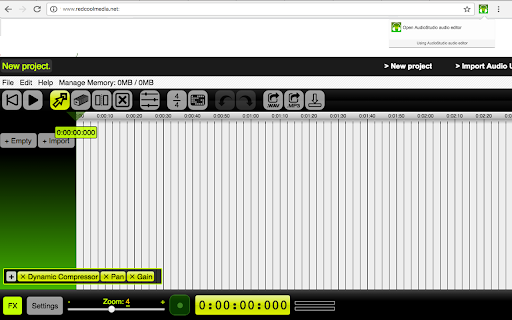
AudioStudio is an audio editor to create or modify any music or audio file. It is an integration of the "Beautiful Audio Editor" with the the RedcoolMedia platform. IMPORTANT> This extension scans and collects the webpages you browse in the Internet. These webpages are uploaded to our servers in order to know if they contain audio files that can be edited using our extension integrated with our online app. The new features of that this integration provides are: - Any MP3 or WAV URL link can be imported in AudioStudio with a simple click. - The MP3 and WAV create that the audio editor have created can be shared using the cloud platform hosted by RedcoolMedia. Additionally, AudioStudio inherits all the "Beautiful Audio Editor" features. It contains features to import, export, duplicate, split, trim, modify the speed, increase the volume, merge, etc, audio files. In order to implement this functionality, this web app includes multiple buttons that provides the following functionality: - Reset button resets the play pointer to the beginning and stops play. - Play/pause button plays or pauses audio at the current time. - Move button switches into move mode, in which you can move sections within - and across tracks by dragging them. - Duplicate button switches into duplicate mode, in which you can click sections to duplicate them. - Split button switches into split-section mode, in which you can split sections by pressing on them and then releasing upon finalizing the split location. - Remove button switches into remove mode, in which you can click sections to remove them. - Time Signature button makes the grid display in 4/4 time signature - 4 beats per 2 seconds. - Undo button undos the previous action if it exists. - Redo button redoes the previously undone action if it exists. - Share WAV button shares or downloads the project as a WAV file. - Share MP3 button shares or downloads the project as an MP3 file. MP3 exporting is slower than WAV exporting, but compresses audio, so MP3 files may be much smaller than their WAV counterparts. - Render button renders the whole project into a separate track. - Recording button. Start recording on a mono channel through your default microphone by clicking on this button. Moreover, AudioStudio includes audio modification using effects. You can apply effects to tracks and the master output. Effects range from simple ones such as gain, pan, and dynamic compression to varieties of frequency filters. It also includes Zoom in or out with the zoom slider in the footer. Higher numbers correspond to more detailed zooms. This is Open Source.
Audio editor & music editor AudioStudio screenshot 1Audio editor & music editor AudioStudio screenshot 2Audio editor & music editor AudioStudio screenshot 3Audio editor & music editor AudioStudio screenshot 4

Reviews (18 cached)

★☆☆☆☆2024-08-15
Myles Kauffman

Where are the instructions for how to begin if you've never done music editing before???

★☆☆☆☆2020-08-10
J J (bombasspssy)

Really bad sound quality, and wouldn't work when I try to edit it

★☆☆☆☆2019-11-14
Chloe Hackett

I'm a dance teacher who has to cut her own music for my dancers. I thought this app would be a easy way to edit the music, but I was wrong. I was unable to save it to my computer and when I tried to email it to myself it said "unsupported file type" dont use this ever.

★☆☆☆☆2019-05-20
FizzyIzzy14

It doesn't even work. I downloaded it in attempt to play around with creating audio, but nothing happened? Nothing even showed up when I hit "New creation" SEVERAL TIMES. Just don't download this one.

★☆☆☆☆2019-02-20
Lennox

Completely useless. Don't bother.

★☆☆☆☆2018-09-25
Jonathan Flores

This extension is horrible I recorded a 30 minute audio file and It completely crashed as soon as I hit export. DO NOT GET UNLESS YOU WANT TO HAVE NO WORK TO SUBMIT TO YOUR CLASSES OR IN GENERAL. H O R R I B L E

★☆☆☆☆2018-07-22
Atticus Belmonte

CRASHES TOO MUCH

★☆☆☆☆2018-05-21
Bryan Edenfield

It crashes when uploading larger files

★☆☆☆☆2018-04-05
Seth Beck

bad

★☆☆☆☆2017-12-08
Raymond Taylor

Wants ad blocker off, unable to use with ad blocker

★☆☆☆☆2017-10-21
Jessica Olewine

Hate this app, the quality of the audio sucks and there is no possible way to fix it

★☆☆☆☆2017-08-11
Teater tugt

very bad

★★☆☆☆2021-11-22
Frederick Liddell

Turning Off my Blue Tooth is a line crossed! Way to much Access.

★★☆☆☆2020-04-07
Brandon Akins

Either I cannot find the option or it's is not there, but I was unable to simply cut an audio file.

★★☆☆☆2018-07-03
Brenda Trott

Hoped it would be an option for my chromebook. I was able to upload and edit my file without issue, but when it came to saving or downloading, it said it was saved, but it was no where to be found. Useless if I cannot use the file I have edited.

★★☆☆☆2018-04-28
Dragomir Simeonov

Bad Bad Bad

★★★☆☆2020-12-10
Vel Omarr

Why is "The Beautiful Audio Editor" not available any longer?

★★★☆☆2017-11-07
Tim Stackpool

Needs to be able to set the quality of the output MP3. The quality is a bit low for 'professional' results

Permissions (2)

Permissions

storage Can store data locally in your browser tabs Can see your open tabs and their URLs

Details

Version 1.9.0
Updated Mar 13, 2026
Size 847KiB
First Seen Mar 30, 2026

More by RedcoolMedia

Popular in workflow

Popular Extensions