
⚠️Requests 1 sensitive permission
Description
## **FlowScribe - Chrome Web Store Description**
**Navigation to Automation**
FlowScribe is a revolutionary Chrome extension that records your web interactions and automatically generates professional automation test scripts using advanced AI technology. Whether you're a QA engineer, developer, or automation specialist, FlowScribe streamlines your testing workflow from navigation to automation.
### **🚀 Key Features**
**🤖 AI-Powered Script Generation**
- Leverage OpenAI GPT-4o, Anthropic Claude, or Google Gemini
- Intelligent locator generation with stable, reliable selectors
- Comprehensive assertions and error handling
- Self-healing test capabilities
**📹 Smart Recording Engine**
- Records clicks, form inputs, navigation, and user interactions
- Cross-frame recording support for complex web applications
- Automatic element detection with semantic understanding
- Real-time action tracking with visual indicators
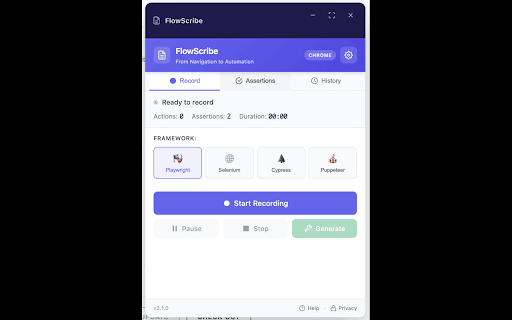
**🎯 Multi-Framework Support**
- **Playwright** - Modern, fast, and reliable automation
- **Selenium** - Industry-standard web automation
- **Cypress** - Developer-friendly testing framework
- **Puppeteer** - Chrome DevTools Protocol automation
**🛡️ Enterprise-Grade Features**
- **Self-Healing Selectors** - Automatically fix broken locators
- **Network Recording** - Capture API calls and responses (headers)
- **Page Object Model** - Generate maintainable test architecture
- **CI/CD Integration** - Export ready-to-use pipeline configurations
**⚙️ Advanced Configuration**
- Multiple AI provider support with model selection
- Customizable assertion strategies
- Export options: Scripts, POM classes, CI/CD configs
- Persistent settings across browser sessions
### **💡 Perfect For**
- **QA Engineers** - Create comprehensive test suites faster
- **Developers** - Generate integration tests from user workflows
- **Product Teams** - Document user journeys with executable tests
- **Automation Specialists** - Scale test coverage efficiently
### **🔧 How It Works**
1. **Record**: Click the record button and interact with your web application
2. **Enhance**: Let AI analyze your actions and generate intelligent locators
3. **Export**: Get production-ready scripts with assertions and error handling
4. **Deploy**: Run tests in your preferred framework and CI/CD pipeline
### **✨ What Makes FlowScribe Special**
**Intelligent Locator Strategy:**
- Prioritizes `data-testid` and semantic attributes
- Avoids brittle selectors like nth-child and dynamic classes
- Generates multiple fallback strategies for reliability
- Uses AI to understand element context and purpose
**Comprehensive Test Coverage:**
- Element presence and visibility validation
- Text content and attribute verification
- URL pattern matching and navigation checks
- Form validation and submission handling
- Loading state and dynamic content waits
**Production-Ready Output:**
- Clean, maintainable code with detailed comments
- Error handling and retry mechanisms
- Cross-browser compatibility considerations
- Best practices for test automation
### **🔒 Privacy & Security**
FlowScribe prioritizes your privacy:
- All recording happens locally in your browser
- No data sent to external servers without your explicit configuration
- AI processing only occurs when you provide API keys
- Complete control over what gets recorded and exported
### **🚀 Get Started**
1. Install FlowScribe from the Chrome Web Store
2. Configure your preferred testing framework
3. (Optional) Add AI API key for enhanced script generation
4. Start recording your first automation script!
### **🔗 Support & Resources**
- **Documentation**: Comprehensive guides and examples
- **GitHub**: Open source with active community
- **Support**: srewoo@gmail.com for technical assistance
- **Updates**: Regular feature releases and improvements
### **📊 Compatible With**
- Chrome Manifest V3 (latest security standards)
- All modern web applications and frameworks
- Single-page applications (SPAs) and traditional websites
- Cross-origin frames and complex DOM structures
**Transform your manual testing into automated workflows. Install FlowScribe today and experience the future of test automation!**
---
**Keywords**: automation testing, test recording, AI testing, Playwright, Selenium, Cypress, QA tools, web testing, test generation, script automation


Reviews
Loading reviews...
Permissions (5)
Permissions
activeTabℹ Can access the current tab when you click the extension scriptingℹ Can inject scripts into web pages storageℹ Can store data locally in your browser tabsℹ Can see your open tabs and their URLs webRequestℹ Can observe and analyze network traffic
Details
| Version | 3.0 |
| Updated | Feb 20, 2026 |
| Size | 432KiB |
| First Seen | Mar 30, 2026 |
More by Sharaj

QAtalyst - AI Test Case Generator
by Sharaj
37
★ 0.00
developer
37
★ 0.00
developer

XHRScribe - AI-Powered API Test Generator
by Sharaj
22
★ 0.00
developer
22
★ 0.00
developer

Jira Compass
by Sharaj
8
★ 0.00
developer
8
★ 0.00
developer

RepoSpector
by Sharaj
6
★ 0.00
developer
6
★ 0.00
developer

PingMeet
by Sharaj
1
★ 0.00
communication
1
★ 0.00
communication
Popular in developer

GoFullPage - Full Page Screen Capture
by GoFullPage
10M
★ 4.89
developer
10M
★ 4.89
developer

TouchEn PC보안 확장
by 라온시큐어
8M
★ 1.33
developer
8M
★ 1.33
developer

React Developer Tools
by Meta
5M
★ 3.95
developer
5M
★ 3.95
developer

Meta Pixel Helper
by Meta
4M
★ 3.90
developer
4M
★ 3.90
developer

ColorZilla
by colorzilla.com
4M
★ 4.59
developer
4M
★ 4.59
developer
Popular Extensions

Adobe Acrobat: PDF edit, convert, sign tools
by Adobe Inc.
322M
★ 4.40
workflow
322M
★ 4.40
workflow

AdBlock — block ads across the web
by AdBlock
62M
★ 4.48
workflow
62M
★ 4.48
workflow

迅雷下载支持
by Shenzhen Xunlei Network Technology Co., Ltd.
59M
★ 2.77
workflow
59M
★ 2.77
workflow

Grammarly: AI Writing Assistant and Grammar Checker App
by Grammarly
42M
★ 4.50
communication
42M
★ 4.50
communication

Adblock Plus - free ad blocker
by eyeo GmbH
40M
★ 4.39
workflow
40M
★ 4.39
workflow