
⚠️Not updated in over 2 years ⚠️Requests 1 sensitive permission
Description
Switching between tabs and clicking through multiple message windows may be overwhelming and time-consuming which leads to the unorganized workflow and attention distraction.
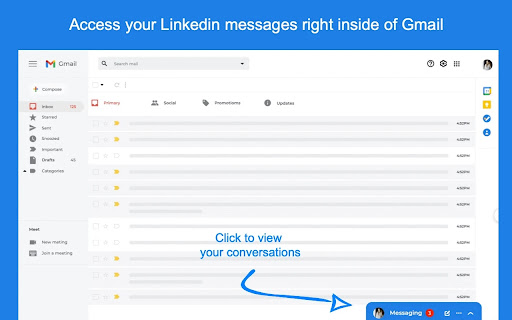
Linbox is a solution to facilitate your communication processes across Linkedin™ and Gmail™ spaces so that you focus on what really matters and manage your time reasonably.
• Simple and easy to use
It will take 30 seconds to set up an extension to your Chrome browser and get out most of it for your smooth conversations.
• Time-saving
Without leaving your Inmail box, you save your time and prevent yourself from repetitive efforts to look for appropriate messages in your Linkedin™ Messenger.
• Multi-account
You do not have to switch between windows to stay connected within multiple chats and see all your communications in one place.
• Secure
We aim to protect your privacy so that Linbox saves your messages from cyber threats.
• Free
The extension is 100% free. Just sign up once and have your Linkedin™ and Gmail™ chats at your fingertips.


Reviews
Loading reviews...
Permissions (2)
Permissions
cookiesℹ Can read and modify browser cookies tabsℹ Can see your open tabs and their URLs
Details
| Version | 1.1.12 |
| Updated | Mar 16, 2022 |
| Size | 203KiB |
| First Seen | Mar 22, 2026 |
Popular in social

Cisco Webex Extension
by cisco.chromestore
24M
★ 2.34
social
24M
★ 2.34
social

LINE
by LY Corporation
4M
★ 3.51
social
4M
★ 3.51
social

vidIQ Vision for YouTube
by vidIQ
3M
★ 4.48
social
3M
★ 4.48
social

Google Mail Checker
by Chrome Developer Relations
2M
★ 4.12
social
2M
★ 4.12
social

TubeBuddy for YouTube™
by TubeBuddy
1M
★ 4.46
social
1M
★ 4.46
social
Popular Extensions

Adobe Acrobat: PDF edit, convert, sign tools
by Adobe Inc.
330M
★ 4.40
workflow
330M
★ 4.40
workflow

Chrome Remote Desktop
by Chrome Remote Desktop Release Managers
38M
★ 3.14
workflow
38M
★ 3.14
workflow
Cisco Webex Extension
by cisco.chromestore
24M
★ 2.34
social
24M
★ 2.34
social

Kami for Google Chrome™
by Kami
17M
★ 4.56
education
17M
★ 4.56
education

Read&Write for Google Chrome™
by Texthelp
17M
★ 3.44
accessibility
17M
★ 3.44
accessibility