
✅Recently updated
Description
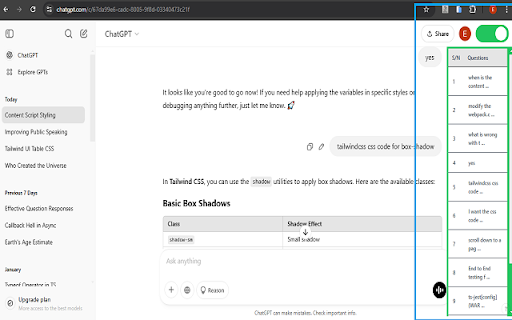
ChatGPT Question Log is a Chrome extension that helps you keep track of all the questions you ask an AI (like ChatGPT) during a chat session. It automatically collects your questions and organises them in a table for easy navigation.
#Features
- Logs all the questions you ask during a chat session.
- Displays the questions in a structured table.
- Click on a question to navigate directly to where it was asked on the page.
- Enhances your workflow by making it easy to revisit past queries.
#Installation
1. Download the extension via Chrome Web Store.
2. The extension is now ready to use!
3. Open a new ChatGPT chat session in a new tab or reload your current ChatGPT chat session.
#How It Works
1. Start a chat session in ChatGPT.
2. The extension captures each question you ask.
3. Open the ChatGPT Question Log popup to view your question history.
4. Click on any question in the table to navigate back to its original location in the chat.
5. Enable the toggle switch to keep the question log visible while browsing.

Reviews
Loading reviews...
Permissions (1)
Permissions
storageℹ Can store data locally in your browser
Details
| Version | 1.0.2 |
| Updated | Mar 16, 2026 |
| Size | 493KiB |
| First Seen | Mar 22, 2026 |
Popular in functionality

Infinity New Tab
by Infinity Teams
400K
★ 4.57
functionality
400K
★ 4.57
functionality

Go Back With Backspace
by gobackwithbackspace
300K
★ 3.16
functionality
300K
★ 3.16
functionality

Google Search Maps Button
by Publisher54321
200K
★ 4.81
functionality
200K
★ 4.81
functionality

Disable AI Overview | Turn Off AI Overview
by hideaioverviews
100K
★ 4.06
functionality
100K
★ 4.06
functionality

IPvFoo
by Paul Marks
100K
★ 4.82
functionality
100K
★ 4.82
functionality
Popular Extensions

Adobe Acrobat: PDF edit, convert, sign tools
by Adobe Inc.
330M
★ 4.40
workflow
330M
★ 4.40
workflow

Chrome Remote Desktop
by Chrome Remote Desktop Release Managers
38M
★ 3.14
workflow
38M
★ 3.14
workflow

Cisco Webex Extension
by cisco.chromestore
24M
★ 2.34
social
24M
★ 2.34
social

Kami for Google Chrome™
by Kami
17M
★ 4.56
education
17M
★ 4.56
education

Read&Write for Google Chrome™
by Texthelp
17M
★ 3.44
accessibility
17M
★ 3.44
accessibility