
⚠️Not updated in over 2 years ⚠️Below average rating
Description
Helps gmail users write email replies extremely fast using AI.
How it works:
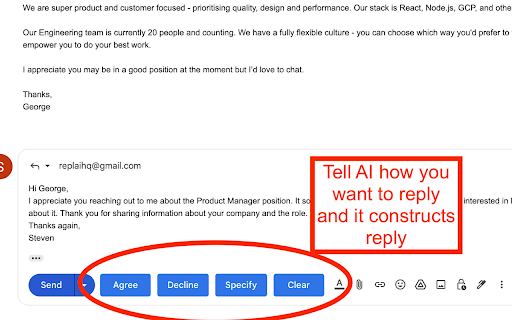
When you compose a reply to an email 4 buttons ("Agree", "Decline", "Specify", "Clear") are added next to the "Send" button that you can use as shown in the screenshot.
"Clear" only cleans the response, whereas the other 3 are used as inputs to the AI.
When you click "Agree" we feed the AI with the contents of the email and tell it to write a response that agrees to it.
When you click "Decline" we feed the AI with the contents of the email and tell it to write a response that declines to it.
For "Specify" you need to write a text in the response field of how you want the AI to reply. e.g. "schedule call tomorrow at 17:00", or "decline in a funny way". Then we feed the AI with the contents of the email and how you specified the answer to be and AI writes a response.
Reviews
Loading reviews...
Details
| Version | 0.2 |
| Updated | Dec 14, 2022 |
| Size | 76.46MiB |
| First Seen | Mar 22, 2026 |
Popular in workflow

Adobe Acrobat: PDF edit, convert, sign tools
by Adobe Inc.
330M
★ 4.40
workflow
330M
★ 4.40
workflow

Chrome Remote Desktop
by Chrome Remote Desktop Release Managers
38M
★ 3.14
workflow
38M
★ 3.14
workflow

Microsoft Power Automate
by Microsoft Corporation
10M
★ 1.99
workflow
10M
★ 1.99
workflow

Screencastify - Screen Video Recorder
by castify-ext-dev
9M
★ 3.95
workflow
9M
★ 3.95
workflow

Mendeley Web Importer
by Mendeley
3M
★ 2.25
workflow
3M
★ 2.25
workflow
Popular Extensions
Adobe Acrobat: PDF edit, convert, sign tools
by Adobe Inc.
330M
★ 4.40
workflow
330M
★ 4.40
workflow
Chrome Remote Desktop
by Chrome Remote Desktop Release Managers
38M
★ 3.14
workflow
38M
★ 3.14
workflow

Cisco Webex Extension
by cisco.chromestore
24M
★ 2.34
social
24M
★ 2.34
social

Kami for Google Chrome™
by Kami
17M
★ 4.56
education
17M
★ 4.56
education

Read&Write for Google Chrome™
by Texthelp
17M
★ 3.44
accessibility
17M
★ 3.44
accessibility