Turbo Downloader for Instagram icon

Turbo Downloader for Instagram

by igdownloader2023

v4.12.16 Updated Feb 24, 2026 257KiB
CWS
600K
Users
★ 3.56
1.3K reviews
#80
of 38.9K
social
#6 of 893
Recently updated

Description

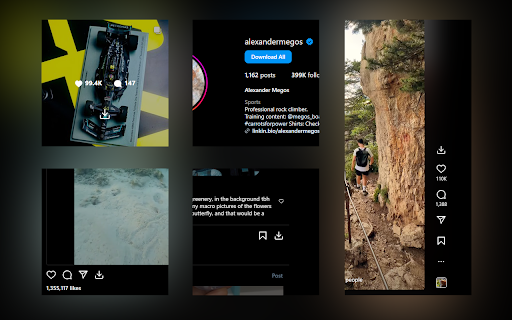
Turbo Downloader for Instagram adds a button to every Instagram post, Reel, and Story so you can quickly and easily download anything while browsing Instagram. The “Download All” button added to Instagram accounts lets you bulk download all their posts in one click. NOTE: Please reload your Instagram tabs after installing or updating to load the extension. While browsing Instagram, just hover over a post preview and click the download button to save it. If there are multiple images/videos in the post, they’ll all be saved. If you’re looking at a post or Reel, check next to the bookmark and share icons for the download button, or try the hotkey Ctrl + Shift + D or Cmd + Shift + D. A story can be saved with the download button in the top right corner. When downloading an entire Instagram account, you’ll be prompted to choose a folder. A new folder will be created inside that folder with the name of the account being downloaded. Images and videos will appear in that folder as soon as they get downloaded. For future account downloads, files with the same name in that folder will be skipped. As of February 21, 2026, version 4.12.16 of Turbo Downloader is up and running. Feel free to reach out to igdownload2023@gmail.com if you have questions. Version 4.12.16 changes: -Fixed download icon not appearing on posts with multiple images/videos. Version 4.12.15 changes: -Fixed download icon not appearing on stories from the home page Version 4.12.14 changes: -Added a download all button for stories and highlights -Fixed "Could not find post" for stories and highlights -Fixed "Download all" button not appearing on profiles Version 4.12.13 changes: -Changed name to Turbo Downloader -We were required to change our name due to Chrome Web Store policies Version 4.12.12 changes: -Fixed download icon not appearing on bookmarked/saved posts -Fixed download icon not appearing on some highlights Version 4.12.11 changes: -Fixed "Could not find post" in some cases -Fixed download icon not appearing beside the bookmark icon on some posts -Fixed download icon not appearing in some places when not signed in -Fixed some images being cropped or downloaded in a lower resolution than available Version 4.12.9 changes: -Fixed download icon not appearing while hovering Instagram posts in a grid -Added a tip for Brave users who are unable to select an accounts download folder Version 4.12.8 changes: -Fixed download icon not appearing on some Stories (again) Version 4.12.7 changes: -Fixed download icon not appearing on Stories Version 4.12.6 changes: -Remove downloads permission Version 4.12.5 changes: -Account download folder is now saved. -Added option to change your account download folder -Fixed "Could not find post" for some users. Version 4.12.4 changes: -Added options page. -Posts with multiple images/videos now show a download icon by default. Please use the options page if you would like to change this behavior. -Fixed download icon sometimes appearing in places it shouldn't. -Fixed "Could not find post" for some users. Version 4.12.2 changes: -Fixed download icon sometimes not appearing on Stories. Version 4.12.1 changes: -Fixed download icon over carousel media for some users -Fixed “Could not find post” for most users Version 4.11.2 changes: -Download icon on posts with multiple images/videos now downloads everything -Added a download icon when hovering the image/video of a carousel for only that item -Fixed “Could not find account” for some users Version 4.11.1 changes: -Fixed download icon for some users with dark mode off -Fixed “Could not find post” for some users Version 4.11.0 changes: -New bulk account download now saves files as they're downloaded instead of all at the end -Fixes bulk account downloads sometimes failing to start -Fixes bulk account downloads sometimes failing to complete Version 4.10.5 changes: -Fixes Reels downloads sometimes downloading a profile picture -Fixes for smaller screen sizes Version 4.10.4 changes: -Fixes "Cannot find post" for some users -Fixes for some Stories Version 4.10.0 changes: -Adds hover downloader -Fixes for feed downloads Version 4.9.0 changes: -Migrated to MV3 -Fixed Feed post downloads -Updated progress bar for bulk downloads -Added progress bar for reel/video post downloads
Turbo Downloader for Instagram screenshot 1Turbo Downloader for Instagram screenshot 2

Reviews (200 cached)

★☆☆☆☆2026-03-22
Leaguefan93

Extension is broken when trying to download stories, downloading profile content still works but stories gives an error saying "Unable to download requested story, please refresh the page", it has been like this for about 4 days now. Will edit my review when this is fixed, as for now it's 1 star, fix this issue and i will change it back to 5.

★☆☆☆☆2026-03-21
Tanay Rathi

not showing download option

★☆☆☆☆2026-03-20
Andy Farman

It does not download s***

★☆☆☆☆2026-03-11
Jake Ortiz

Its getting stopped while using!

★☆☆☆☆2026-03-02
Jungkook

the download all option doesn't go past a certain number of downloads at a time. No matter how much i try. pls fix that.

★☆☆☆☆2026-02-26
Jonathan Joestar

Doesn't work at all

★☆☆☆☆2026-02-22
Daniel Najafi

used to be the go-to reliable extension... but as many others have explained the bulk download button + only downloading 1 image and never the one you want. What a shame. This was SO good before. Team if you're reading this, the fix is simple, don't overdo it and try to reinvent the wheel :)

★☆☆☆☆2026-02-21
Person000

The download button never appears when you view the photo, which means you have to go to the profile to search for it in the gallery and download it from outside, ugh. It feels like the developers have lost interest in this extension.

★☆☆☆☆2026-02-18
Mitchell Yeung

Used to be able to download multiple images, now it only downloads the first image if there's multiple images. Absolute garbage. Do not use. Would rate 0 stars if I could.

★☆☆☆☆2026-02-18
Susan Redfearn

It used to work great, but now, it only downloads one image. It never used to be like this... Please fix it!!

★☆☆☆☆2026-02-16
Marco

It used to work great but now, like others, it only downloads one image. Please fix.

★☆☆☆☆2026-02-16
Shaina Grant

I'm having the same issue as everyone else here. It only downloads the first slide, but not the entire slides.

★☆☆☆☆2026-02-15
Jernau Gurgeh

Now you can only download the first photo if the post includes several pics. Dead extension.

★☆☆☆☆2026-02-15
Soutick Mallick

If post has multiple photos only able to download first photos. Most bogus extension. 0 star deserving but it's will not count if i don't give any star. NE: I came here and updating this comment. Well improvised. Make another download button on right hand top for single downloads. It is working exactly fine after going in profile. But on main feed section it isn't. Except other features started working fine. Well done for now, but need to go miles.

★☆☆☆☆2026-02-15
Alex AJ

why did you guys change it???? it was working perfectly. when i click download, it downloads the whole carousel. its perfect. but now, it only downloads the first image. why.

★☆☆☆☆2026-02-12
James Brown

Not sure if this extension was updated, but the ability to click into multiple pictures and download an individual one no longer exists. Not very useful anymore if you have to download a whole handful of images you don't want.

★☆☆☆☆2026-02-06
Logan Braveheart

Does not (Download All) work on "Reels" so this is useless! All it does is download photos from posts.

★☆☆☆☆2026-01-03
sufyan Dogar

good

★☆☆☆☆2026-01-02
Mark Hammil

I would give it zero if i could. Does not work at all.

★☆☆☆☆2025-12-28
Michel Pedrera Suen

It doesn't work

★☆☆☆☆2025-12-28
L Gerardo Telleria O

Does NOT work on Reels

★☆☆☆☆2025-11-24
sarar turkmani

its not working

★☆☆☆☆2025-11-16
Nima B

It doesn’t work properly, especially for reels.

★☆☆☆☆2025-11-14
Blessed Data

it just download the main page stuffs not the reels menu

★☆☆☆☆2025-11-04
Pikablessyouu

Needed an unpdate!

★☆☆☆☆2025-11-01
tony lecouz

Worked perefectly before, hasn't been working for months now. Every time I try to download it just says "Unable to download requested story; Please refresh the page :(" and refreshing does nothing.

★☆☆☆☆2025-10-27
Arushan

Doesn't work.

★☆☆☆☆2025-10-08
Vergil

Doesnt't find every second post. There are better extensions out there that work.

★☆☆☆☆2025-10-04
Matthew Quinn

Stopped working today. Just stuck on Finding posts

★☆☆☆☆2025-10-04
Musie Warrior

"couldn't find post" on something that's public. Thing's been broken since 1st October.

★☆☆☆☆2025-09-19
Petertronic

Does not work, no download button anywhere

★☆☆☆☆2025-09-13
Health Boost

Cant download stories, error: Unable to download requested story; Please refresh the page :(

★☆☆☆☆2025-06-10
Janne

Broken "Could not find slider index.".

★☆☆☆☆2025-06-06
Tim

Not working on reels page anymore, will update review if it gets fixed

★☆☆☆☆2025-06-01
Anonymous

Useless Extension

★☆☆☆☆2025-04-18
Ben Phillips

doesnt work

★☆☆☆☆2025-04-13
amanda kelly

worked for like 5 mins now wont even mass download

★☆☆☆☆2025-04-13
GamerSavvy

Immediately uninstalled before fully using the extension. It was asking me to enable Brave's setting for "File System Access API" which shouldn't be required. An extension like this one should prompt with a "Save As" window, which is exactly what the next extension I installed is capable of. The message I got was via a pop-up (new tab) asking to specify a local "Accounts download folder - Account folders will be created inside this folder." With the details following: "Could not browse for folder. If you are using Brave, please make sure the "File System Access API" experiment is enabled before trying again."

★☆☆☆☆2025-03-07
Patryk Baginski

i want to want to downloads pictures in png or jpg not in web or heic

★☆☆☆☆2025-03-01
Beyond Zero

not working keep showing : Finding posts... 0/120 (0.00%)

★☆☆☆☆2025-02-15
平井伸治

This extension is not able to download Instagram stories. It is a no good extension. It is totally useless.

★☆☆☆☆2025-01-30
Kyle Debrier

Can't download stories. The button appears to download all stories, but it says it's unable to and that I need to refresh. So I do, then it doesn't appear. After multiple attempts to get it back, I try again, only to be told that it's unable to and to refresh. Can't even download a single story. Since this is all I need from an extension, this wasn't worth it.

★☆☆☆☆2024-11-06
UEL Lâm Gia Huy

your extension's suck

★☆☆☆☆2024-11-02
Mohammad Azim Hossain

Not Working Body. Fake

★☆☆☆☆2024-10-24
Fleming

Making chrome crash

★☆☆☆☆2024-09-23
Nguyễn Đức Minh Nguyễn Đức Minh

bug in arc browser, cant choose folder to download, after choose the folder its stuck cant do anything on page

★☆☆☆☆2024-07-23
Mitchell

it's not working. it did not prompt to choose a folder. I did not work on my side

★☆☆☆☆2024-07-11
M0lnja

Not reliable at all , dont recommend Unable to download requested story; Please refresh the page :(

★☆☆☆☆2024-07-07
Michael

The extension hasn't been updated for two years and doesn't work for half the posts at this point. It was good, but not anymore.

★☆☆☆☆2024-06-30
Knight 11692

Fake reviewers like on Amazon. Doesn't work it just sit at 0% out of however many downloads and never does anything. You can do single downloads but that's goes against the point of being a mass downloader. You are supposed to be able to download multiple files at once instead of clicking the download on each file separate. This was a waste of time so I'm uninstalling it.

Permissions (1)

Permissions

storage Can store data locally in your browser

Details

Version 4.12.16
Updated Feb 24, 2026
Size 257KiB
First Seen Mar 22, 2026