
Scrroll In icon

Scrroll In

by Prateek Surana

v3.2 Updated Jul 18, 2021 222KiB
CWS
3K
Users
★ 4.05
41 reviews
#2721
of 49.1K
workflow
#740 of 6.1K
⚠️Not updated in over 2 years

Description

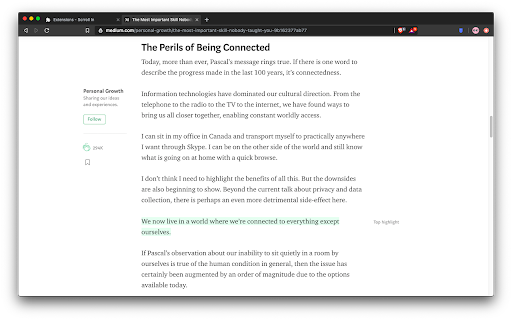
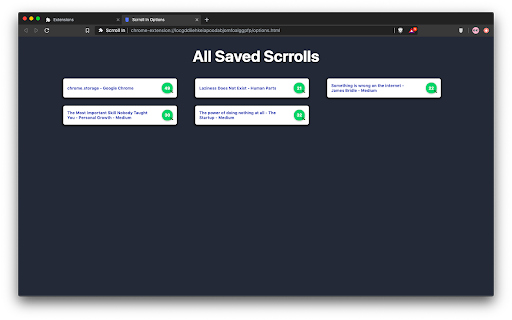
✨ What's new - - You can now save upto 20 scroll positions for any page and manage (get, update and delete) them individually. - Added an opt-in to show toasts when performing actions with a scrroll for better UX (Experimental). You must have been in a situation wherein you are reading a long article but you don't have enough time to finish it so you close the tab, and the next time you open the article again, you have no idea where you left it. Well not anymore, with this extension you can save the scroll position of the page and then revisit the page at any time to continue where you left. I know that there are other extensions similar to this, but most of them either don't work reliably or lack the features mentioned below - 🤹 Color changing icon The icon changes color whenever the extension detects that you have already saved a scroll position for a page. ✨ Sleek UI Ability to add, remove, update or delete the scroll position directly from the popup menu. 💾 Unlimited Storage Under the hood this extension uses chrome's local storage API, so you'll never run out of storage for your articles. 🤳 View all your saved scrrolls An options page to view all your saved pages, with the percentage of the page completed. 📜 Completely free and open source Scrroll In was and will always be free to use and open source. Feel free to open an issue for feature request or bug report on the issues page on Github
Scrroll In screenshot 1Scrroll In screenshot 2Scrroll In screenshot 3Scrroll In screenshot 4

Reviews (9 cached)

★☆☆☆☆2025-05-28
john mtz

Saved a scroll and the next time I opened the website there was nothing saved.

★☆☆☆☆2025-01-06
Abhiraj trivedi

Absolute trash. Doesnt work at all. Useless.

★☆☆☆☆2023-12-10
Leslie Lemon

The idea of this is great but sadly it doens't work. I had saved a long page and when I went to resume, the extension only worked for one scroll.

★☆☆☆☆2021-09-30
Dry Dessert

Does not work anymore. Previously worked 70% of the time.

★☆☆☆☆2021-06-26
Streetk53

Latest update completely broke the extensions. It doesn't fetch the scroll and it breaks the page. Good job!

★☆☆☆☆2021-04-13
Mrinal Roy Chowdhury

doesnt seem to be working for pdf file

★☆☆☆☆2019-10-21
Julie L.

Works no better than the other extension I tried. Scrolls down a little bit, but nowhere near the point that I saved.

★★☆☆☆2019-11-13
Gem Hunter

This extension works fine, and is as user friendly as it can be, with the limited storage space Google offers for scroll bookmarks. rated 2 star, because I saw it advertised on other people's scroll bookmarker extensions, with a referral link.

★★★☆☆2019-11-21
Aliez Nicola

It works fine. But I think there can be improvement in user experience. 1. I don't need fetch\update options. Just an icon to make users know that current page's scroll position has been saved is enough. 2. Auto remember position is better so that users don't need to click save button. Besides, some people may forget to click that button. 3. I think the page showing users' saved scroll bookmarks is redundant. This extension aims at remembering page scroll position, not saving bookmarks for users. Browser's bookmark feature supports that already. This extension's purpose is just to help users remember their position in a webpage. It should be as simple as possible.

Permissions (4)

Permissions

activeTab Can access the current tab when you click the extension scripting Can inject scripts into web pages storage Can store data locally in your browser tabs Can see your open tabs and their URLs

Details

Version 3.2
Updated Jul 18, 2021
Size 222KiB
First Seen Mar 22, 2026


