
⚠️Not updated in over a year ⚠️Requests 1 sensitive permission
Description
Reactime was nominated for the Productivity Booster award at React Open Source Awards 2020.
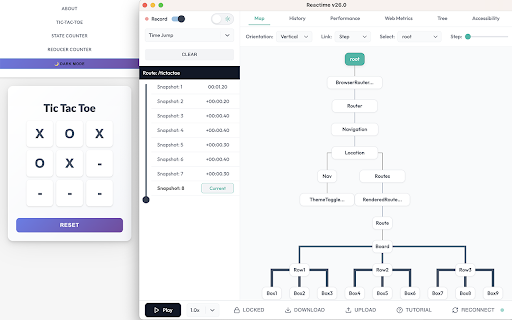
Reactime is an open source Chrome developer tool for time travel debugging and performance monitoring in React applications. Reactime enables developers to record snapshots of application state, jump between and inspect state snapshots, and monitor performance metrics such as component render time and render frequency.
Features:
- Record Snapshots of Application State and Accessibility Tree
- Provider/Consumer Panel for useContext Hook
- Import and Export Snapshots of State
- Time-Travel Debugging
- Snapshot Series Comparison
- Component Tree Visualization
- React Router Compatibility
- Component Render Time & Frequency
- Support for Gatsby, Next.js and Remix
- TypeScript Support
- Ability to Reconnect
- Web Performance Metrics
- Tutorial Walkthrough
- Prop Visualization
- Intuitive Layout and Modern Design
- Dark Mode
What’s New!
Reactime 26.0 introduces transformative updates that redefine React debugging. The groundbreaking Providers/Consumers Panel now captures and visualizes state changes from useContext hooks, offering a real-time view of provider-consumer relationships and live context state values. A revamped time travel slider delivers enhanced control over debugging with intuitive navigation and playthrough options. The extension also boasts a modernized UI with dark mode for better usability, improved reliability through critical bug fixes, and the restoration of the accessibility tree tab for addressing potential accessibility issues. With these innovations, Reactime v26 empowers developers to streamline workflows and optimize complex state flows like never before.
Troubleshooting:
❓ Why is Reactime not recording new state changes?
Reactime lost its connection to the tab you're monitoring, simply click the "reconnect" button to resume your work.
❓ Why isn’t Reactime finding my hooks?
Reactime detects and monitors hooks by traversing your application’s unminified React code in development mode. If your build process is minifying or uglifying your code—even for development builds—Reactime may not be able to properly locate and track your hooks. To fix this:
Ensure a true development build: Double-check your bundler or build tool configuration (e.g., Webpack, Babel, Vite, etc.) to make sure that your application is not minimized or uglified in development mode.
For example, with Webpack, make sure you’re running in mode: 'development', which should disable default minification.
In a Create React App project, simply running npm start or yarn start will automatically configure a non-minified development build.
Check for overrides: Ensure there are no custom Babel or Webpack plugins that minify your code, especially if you’re using frameworks like Next.js or Gatsby. Sometimes additional plugins or scripts might be running under the hood.
Restart & rebuild: After changing any build configuration, rebuild or restart your development server to ensure the new configuration is applied. Then refresh your browser tab so Reactime can detect your unminified hooks.
After changing any build configuration, rebuild or restart your development server to ensure the new configuration is applied. Then refresh your browser tab so Reactime can detect your unminified hooks.
❓ Why is Reactime telling me that no React application is found?
Reactime initially runs using the dev tools global hook from the Chrome API. It takes time for Chrome to load this. Try refreshing your application a couple of times until you see Reactime running.
❓ Why do I need to have React Dev Tools enabled?
Reactime works in tandem with the React Developer Tools to access a React application's Fiber tree; under the hood, Reactime traverses the Fiber tree through the React Developer Tool's global hook, pulling all relevant information needed to display to the developer
❓ I found a bug in Reactime
Reactime is an open-source project, and we'd love to hear from you about improving the user experience. Please read the 👩💻 Developer README, and create a pull request (or issue) to propose and collaborate on changes to Reactime.


Reviews (2 cached)
★☆☆☆☆2020-10-30
Jiří Špác
it started spamming console logs. Maintainers should definitely add eslint rule for no console logs in the codebase
★☆☆☆☆2019-11-22
Krisztian Feher
Unfortunately with our large application using antd, redux, class components and a mixture or hooks the extension does absolutely nothing.
Permissions (6)
Permissions
activeTabℹ Can access the current tab when you click the extension alarmsℹ Can schedule periodic background tasks contextMenusℹ Can add items to the right-click menu debuggerℹ Can use Chrome's debugging protocol on other tabs scriptingℹ Can inject scripts into web pages tabsℹ Can see your open tabs and their URLs
Details
| Version | 26.1 |
| Updated | Jan 8, 2025 |
| Size | 800KiB |
| First Seen | Mar 28, 2026 |
Popular in developer

GoFullPage - Full Page Screen Capture
by GoFullPage
10M
★ 4.89
developer
10M
★ 4.89
developer

TouchEn PC보안 확장
by 라온시큐어
8M
★ 1.33
developer
8M
★ 1.33
developer

React Developer Tools
by Meta
5M
★ 3.95
developer
5M
★ 3.95
developer

Meta Pixel Helper
by Meta
4M
★ 3.90
developer
4M
★ 3.90
developer

ColorZilla
by colorzilla.com
4M
★ 4.59
developer
4M
★ 4.59
developer
Popular Extensions

Adobe Acrobat: PDF edit, convert, sign tools
by Adobe Inc.
322M
★ 4.40
workflow
322M
★ 4.40
workflow

AdBlock — block ads across the web
by AdBlock
62M
★ 4.48
workflow
62M
★ 4.48
workflow

迅雷下载支持
by Shenzhen Xunlei Network Technology Co., Ltd.
59M
★ 2.77
workflow
59M
★ 2.77
workflow

Grammarly: AI Writing Assistant and Grammar Checker App
by Grammarly
42M
★ 4.50
communication
42M
★ 4.50
communication

Adblock Plus - free ad blocker
by eyeo GmbH
40M
★ 4.39
workflow
40M
★ 4.39
workflow