
⚠️Not updated in over 2 years
Description
Find the definition of any word on a web page. Uses the side panel.
- search on highlight
- popup mode (English only)
- available in 162 languages
- free and open source
Usage instructions:
- Open the side panel by clicking the extension icon.
Note: You need to enable the Side Panel feature in Chrome.
- Once the side panel is open, search Dictionary by highlighting a word.
- To change the language of Dictionary, right-click the extension icon and select "Options".
- Popup Mode: Highlight a word by double-clicking or dragging to see its definition(s) in a popup. Popup Mode is only available in English.
Alt + P is the shortcut to enable/disable popup mode. You can change this shortcut in chrome://extensions/shortcuts
Note: In PDF files, the methods above do not work. Instead, while the side panel is open, highlight a word, right-click it and select "Search on Wiktionary.org".


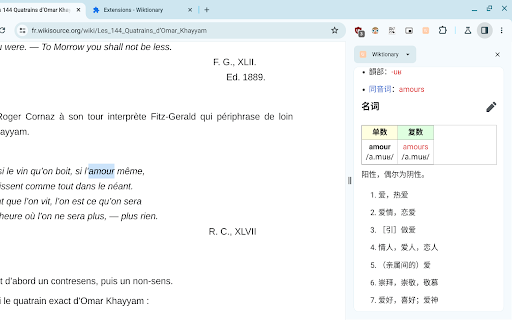
Reviews
Loading reviews...
Permissions (3)
Permissions
contextMenusℹ Can add items to the right-click menu sidePanel storageℹ Can store data locally in your browser
Details
| Version | 0.3.3 |
| Updated | Nov 1, 2023 |
| Size | 24.26KiB |
| First Seen | Mar 28, 2026 |
Popular in education

Kami for Google Chrome™
by Kami
19M
★ 4.56
education
19M
★ 4.56
education

EndNote Click
by EndNote Click
5M
★ 4.06
education
5M
★ 4.06
education

Promethean® Screen Share
by classflow
4M
★ 2.98
education
4M
★ 2.98
education

Language Reactor
by Dioco
2M
★ 4.20
education
2M
★ 4.20
education

Mote for Google Chrome™
by Mote Technologies, Inc.
2M
★ 4.55
education
2M
★ 4.55
education
Popular Extensions

Adobe Acrobat: PDF edit, convert, sign tools
by Adobe Inc.
331M
★ 4.40
workflow
331M
★ 4.40
workflow

Grammarly: AI Writing Assistant and Grammar Checker App
by Grammarly
42M
★ 4.50
communication
42M
★ 4.50
communication

Chrome Remote Desktop
by Chrome Remote Desktop Release Managers
38M
★ 3.14
workflow
38M
★ 3.14
workflow

Microsoft Single Sign On
by Microsoft
36M
★ 2.27
workflow
36M
★ 2.27
workflow

Cisco Webex Extension
by cisco.chromestore
23M
★ 2.34
social
23M
★ 2.34
social