Octab - Smart Tab Manager icon

Octab - Smart Tab Manager

by Octab

v1.70.0 Updated Oct 28, 2025 17.19MiB
CWS
1K
Users
β˜… 4.32
19 reviews
#18369
of 207.1K
workflow
#4914 of 31.8K

Description

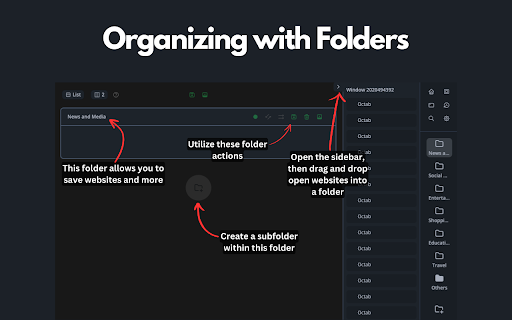
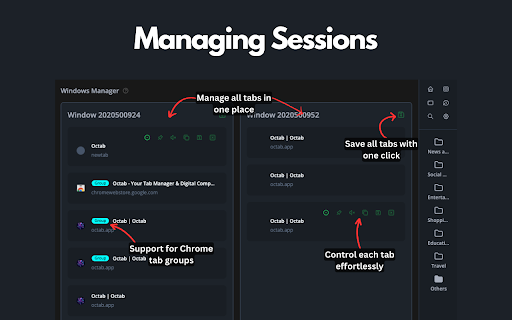
Octab is the ultimate Chrome tab management and productivity suite designed for professionals, students, and anyone who finds themselves drowning in browser tabs. Take control of your digital workspace and boost your productivity with our comprehensive all-in-one tool. πŸš€ Core Features: πŸ“‚ Smart Tab Organization * Create hierarchical folders and subfolders to organize your tabs and resources * Save entire browser sessions with a single click * Quickly search and filter across all your saved content * Drag-and-drop functionality for intuitive organization 🏠 Customizable Dashboard * Transform your new tab page into a productivity command center * Add widgets for notes, tasks, search, and more * Create up to 5 different dashboard layouts for different contexts * Custom backgrounds for personalization πŸ”„ Chrome Tab Grouping & Management * Automatically group tabs by domain or custom rules * Use regex patterns for advanced tab grouping * Sort tabs by domain, last accessed, or custom order * Quickly identify and close duplicate tabs * Suspend inactive tabs to save memory and boost performance πŸ“ Integrated Note-Taking * Create rich-text notes directly in your browser * Markdown support for advanced formatting * Automatic saving as you type * Organize notes within your tab folder structure βœ… Task Management System * Create and organize tasks with customizable priorities * Set due dates and reminders * Track progress with Kanban-style status columns (Backlog, Todo, In Progress, Done) * Convert any saved resource into an actionable task 🏷️ Advanced Tagging & Filtering * Create color-coded tags for visual organization * Quickly filter resources by tags, status, or priority * Apply multiple tags for granular organization * Tag-based color highlighting for visual identification πŸ” Powerful Search Features * Find anything with the global search (press F key) * Search across all your saved websites, notes, and tasks * Real-time results as you type * Filter search results by type or tags πŸ’ͺ Why Choose Octab? * Save Time: Quickly find tabs and resources without endless scrolling * Reduce Stress: No more "too many tabs" anxiety * Boost Focus: Keep related tabs and resources together * Improve Organization: Turn tab chaos into a structured system * Enhance Memory: Free up system resources with tab suspension * Streamline Workflow: Everything you need in one integrated tool Perfect for researchers, developers, writers, students, and professionals who work with multiple tabs and need to organize their digital workspace effectively. Contact Us: Have questions or feedback? We're here to help. Get in touch at hello@octab.app and let us assist you in making the most of your digital experience. Privacy & Security: We take your digital safety seriously. We use strong security protocols to keep your data safe, making sure your browsing experience is both private and secure.
Octab - Smart Tab Manager screenshot 1Octab - Smart Tab Manager screenshot 2Octab - Smart Tab Manager screenshot 3Octab - Smart Tab Manager screenshot 4

Reviews (4 cached)

β˜…β˜†β˜†β˜†β˜†2025-10-01
yinebeb zenaw

They did not make it obvious that this product has a free and pro version to it with some features locked behind a paywall, which would be fine if that was made clear from the beginning. There website does not mention anything about a pro product and I checked everywhere. Also, you have to sign up with an account before you can even attempt to use the basic features of the product, not giving you an opportunity to evaluate the product before creating an account to see if you want to commit to it. All in all, I downloaded Octab bc of the features look cool. But I deleted it because of the deceptive advertising practices.

β˜…β˜†β˜†β˜†β˜†2024-08-18
Ekan Vitki (iktiv)

It wants me to sign in to Google then just crashes. I can't use it.

β˜…β˜…β˜†β˜†β˜†2025-03-15
Seifer Flo

I absolutely do not understand how this extension works and what's the philosophy behind it. What's the correlation between my actual tab in my browser and the octab tab as we can't drag n drop browser's tab inside an Octab folder? When we put a tab in an Octab folder, it still still sits in the browser like nothing happened and it also still sits inside the "Unorganized list" of Octab even though I organized it in a folder. If I decide to use only Octab folders and start browsing but I don't save the current page in my folder, it's just not inside any folder. So it has to be saved in a folder everytime from what I understand. Then there is left side panel, and a right side panel. I like the right one but when I click on a folder, then a tab that right side panel just closes immediately. Why? The left panel is ok but it takes more real estate space due to all the hovering icons. As I'm using vertical tabs already it just becomes tricky. Clicking the octab icon extension doesn't do anything. I have to right click, octab, open side panel... In the dashboard, we can custom our folders position etc which is great, but when we click on a folder we get a pop with icons only and it becomes quickly messy to quickly find a tab as we have to hover an icon to see the website... I didn't try the rest after an hour I just gave up. Sorry for the bad review. I miss Simple Tab Groups from Firefox.

β˜…β˜…β˜…β˜†β˜†2025-10-06
Ashish Alexander

Bad: - cannot search by folder name - sidebar in edge not opening folder contents. have to do it from full window menu.

Permissions (8)

Permissions

alarmsβ„Ή Can schedule periodic background tasks contextMenusβ„Ή Can add items to the right-click menu notificationsβ„Ή Can show desktop notifications sidePanel storageβ„Ή Can store data locally in your browser tabGroupsβ„Ή Can organize tabs into groups tabsβ„Ή Can see your open tabs and their URLs windows

Details

Version 1.70.0
Updated Oct 28, 2025
Size 17.19MiB
First Seen Mar 30, 2026
