
⚠️Not updated in over 2 years
Description
Use this extension to:
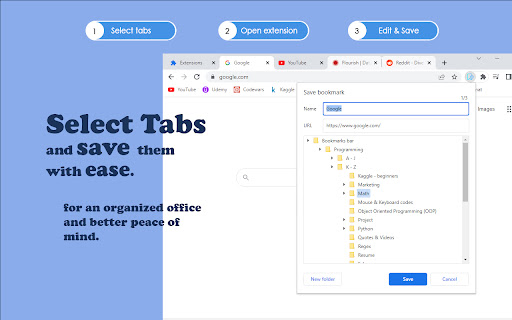
• Save multiple bookmarks simultaneously and edit them as you save.
• Create new bookmark folders.
How to use:
• Select the tabs you want to save with 'Ctrl + Left Mouse Click'.
• Activate the extension, edit the Title or URL of the shown bookmark, and choose a folder to save it to.
• Click save or press 'Enter'.
• Next selected bookmark will appear.
Full keyboard accessibility is supported.
Happy organizing!
Reviews
Loading reviews...
Permissions (2)
Permissions
bookmarksℹ Can read and modify your bookmarks tabsℹ Can see your open tabs and their URLs
Details
| Version | 1.0 |
| Updated | Oct 1, 2022 |
| Size | 191KiB |
| First Seen | Mar 26, 2026 |
More by extensions.cs


Popular in workflow

Adobe Acrobat: PDF edit, convert, sign tools
by Adobe Inc.
322M
★ 4.40
workflow
322M
★ 4.40
workflow

AdBlock — block ads across the web
by AdBlock
62M
★ 4.48
workflow
62M
★ 4.48
workflow

迅雷下载支持
by Shenzhen Xunlei Network Technology Co., Ltd.
59M
★ 2.77
workflow
59M
★ 2.77
workflow

Adblock Plus - free ad blocker
by eyeo GmbH
40M
★ 4.39
workflow
40M
★ 4.39
workflow

Chrome Remote Desktop
by Chrome Remote Desktop Release Managers
37M
★ 3.13
workflow
37M
★ 3.13
workflow
Popular Extensions
Adobe Acrobat: PDF edit, convert, sign tools
by Adobe Inc.
322M
★ 4.40
workflow
322M
★ 4.40
workflow
AdBlock — block ads across the web
by AdBlock
62M
★ 4.48
workflow
62M
★ 4.48
workflow
迅雷下载支持
by Shenzhen Xunlei Network Technology Co., Ltd.
59M
★ 2.77
workflow
59M
★ 2.77
workflow

Grammarly: AI Writing Assistant and Grammar Checker App
by Grammarly
42M
★ 4.50
communication
42M
★ 4.50
communication
Adblock Plus - free ad blocker
by eyeo GmbH
40M
★ 4.39
workflow
40M
★ 4.39
workflow