
✅Recently updated
Description
PerfTestFlow Recorder – Record browser API calls for performance testing
PerfTestFlow Recorder helps QA engineers and developers capture real API traffic from the browser and turn it into scripts and artifacts for performance testing—no manual logging or copy-paste.
What it does
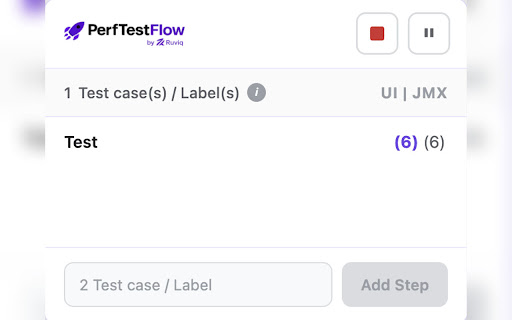
✔ Records API calls – Captures XHR and Fetch requests (URL, method, status, headers, request/response bodies, timing) as you use your web app.
✔Inspect and filter – View all captured requests, filter by domain, method, status code, or ignore static assets to focus on APIs.
✔Edit before export – Change method, URL, headers, and body so the exported file matches the scenario you want to run.
✔Export in standard formats – Download as JSON, HAR 1.2, or JMeter JMX and use the same data in PerfTestFlow, Apache JMeter, k6, Postman, or other tools.
Why use it
✔ One-click capture – Start recording, use your app, stop and export. No proxy setup or manual request logging.
✔ 100% local – Recording and export stay on your device. No data is sent to our or any other servers.
✔ Fits your workflow – Export JMX for JMeter, HAR for other tools, or JSON for PerfTestFlow and custom analysis.
How to use
✔ Install the extension and open your web app in Chrome.
✔ Click the extension icon, name your session, and start recording.
✔ Use the app (login, search, submit forms, etc.); requests are captured automatically.
✔ Stop recording, optionally edit or filter, then export as JSON, HAR, or JMX.
✔ Open the exported file in PerfTestFlow (https://perftestFlow.ruviq.com/) or load the JMX in JMeter to run and analyze performance.
Limits
• Up to 2,000 requests per session; response bodies capped at 1 MB.
• For full response bodies and network timing, use the extension with the DevTools panel open on the tab you’re recording.
Privacy
No analytics, no tracking, no upload of your recorded data. Everything is stored and exported locally on your machine.



Reviews
Loading reviews...
Permissions (6)
Permissions
activeTabℹ Can access the current tab when you click the extension downloadsℹ Can manage and monitor downloads scriptingℹ Can inject scripts into web pages storageℹ Can store data locally in your browser tabsℹ Can see your open tabs and their URLs windows
Details
| Version | 1.0.1 |
| Updated | Mar 15, 2026 |
| Size | 575KiB |
| First Seen | Mar 24, 2026 |
More by Ravi Pratap Singh


Popular in developer

GoFullPage - Full Page Screen Capture
by GoFullPage
10M
★ 4.89
developer
10M
★ 4.89
developer

TouchEn PC보안 확장
by 라온시큐어
8M
★ 1.33
developer
8M
★ 1.33
developer

React Developer Tools
by Meta
5M
★ 3.95
developer
5M
★ 3.95
developer

Meta Pixel Helper
by Meta
4M
★ 3.90
developer
4M
★ 3.90
developer

ColorZilla
by colorzilla.com
4M
★ 4.59
developer
4M
★ 4.59
developer
Popular Extensions

Adobe Acrobat: PDF edit, convert, sign tools
by Adobe Inc.
322M
★ 4.40
workflow
322M
★ 4.40
workflow

AdBlock — block ads across the web
by AdBlock
62M
★ 4.48
workflow
62M
★ 4.48
workflow

迅雷下载支持
by Shenzhen Xunlei Network Technology Co., Ltd.
59M
★ 2.77
workflow
59M
★ 2.77
workflow

Grammarly: AI Writing Assistant and Grammar Checker App
by Grammarly
42M
★ 4.50
communication
42M
★ 4.50
communication

Adblock Plus - free ad blocker
by eyeo GmbH
40M
★ 4.39
workflow
40M
★ 4.39
workflow