
Description
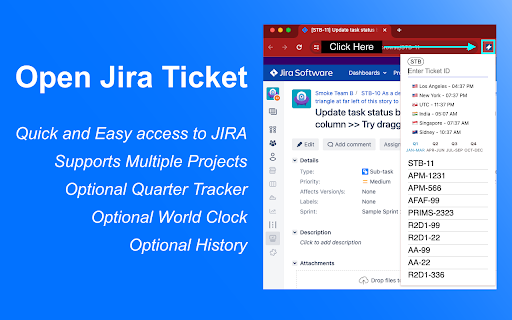
🚀 Open JIRA tickets instantly from your toolbar or address bar!
Tired of manually typing full JIRA URLs? This extension transforms how you access JIRA tickets with lightning-fast shortcuts and smart defaults.
✨ Key Features:
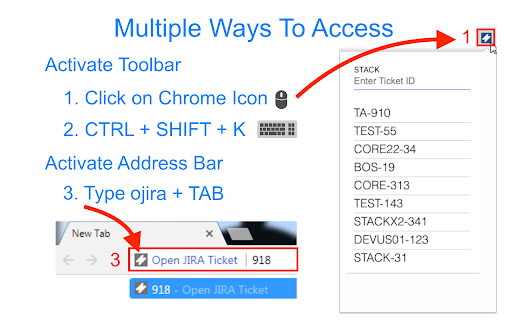
• Quick Access - Open tickets directly from toolbar or address bar
• Smart Defaults - Set your main project once, then just type ticket numbers
• Multi-Project Support - Easily switch between two different JIRA projects
• Search History - Never lose track of previously accessed tickets
• Address Bar Integration - Type "ojira" + space to search from anywhere
• Underscore Support - Works with complex project IDs like A8SIT2_IRM
🎯 Perfect For:
• Teams that share ticket numbers instead of full URLs
• Developers who frequently access the same JIRA projects
• Anyone who forgets to add dashes between project and ticket numbers
• Users who need to switch between multiple JIRA instances
⚡ How It Works:
1. Set your default project (e.g., "STACK")
2. Type just the ticket number (e.g., "123" → opens STACK-123)
3. Use the toolbar for quick access or "ojira" in address bar
4. Switch projects with one click when needed
🆕 Latest Updates:
• Enhanced multi-project support with easy toggling
• Improved UI with modern design and better user experience
• Support for complex project IDs with underscores
• Streamlined setup process
💡 Pro Tips:
• Use the address bar: Type "ojira" + space + ticket number
• Set up secondary projects for different teams or environments
• Access your search history by clicking the extension icon
• Works with any JIRA instance (Cloud, Server, Data Center)
⚙️ Setup (2 minutes):
1. Enter your JIRA URL (e.g., https://yourcompany.atlassian.net)
2. Set your default project key (e.g., "STACK")
3. Optionally configure a secondary project
4. Start using immediately!
❤️ Why Users Love It:
"Finally, no more copying and pasting JIRA URLs!" - Saves 5+ minutes daily
"Perfect for our multi-project workflow" - Seamless project switching
"Address bar integration is genius" - Faster than bookmarking
---
Perfect for Agile teams, developers, project managers, and anyone who works with JIRA tickets regularly!
---
# Changelog
* 3.3.0
* Add work hours feature
* Add options scrollbar arrow
* Reduce build size
* 3.2.0
* Add underscore support for projects
* Revamp options styling
* 3.1.2
* Prevent bad toggle state
* 3.1.1
* Minor fix for undefined button click
* 3.1.0
* Add in secondary jira projects feature
* Add in less strict filtering for projects with numbers like R2D2
* We still don't support projects with underscore
* Move UTC to a better spot
* 3.0.9
* Remove tabs permission again.
* Update timezone locations. Remove Arizona and London, replace with Sydney Australia and Los Angeles
* 3.0.8
* Allow numbers in default project setup
* Add history display preference for those who prefer a more minimal look
* 3.0.7
* Fix World Clock
* 3.0.6
* Add Q to display
* Add fun feature with ranks on usage
* Add missing i18n translations
* Minor options cleanup
* 3.0.5
* Add simple show me what fiscal quarter of the year I'm in option
* 3.0.4
* Minor modifications to clock. Disable persistent seconds update (was too slow imo)
* Remove seconds indicator
* 3.0.3
* Hotfix permission back. Need it to open toolbar with shortcut. Oops!
* 3.0.2
* Add World Clock option in toolbar
* Remove unnecessary tabs permission
* 3.0.1
* Add in omnibox support using new keyword - 'ojira', short for openjira
* Avoid conflict with simple search of 'jira' in toolbar
* 3.0
* Upgrade to manifest v3
* Update i18n implementation
* Remove favorites feature
* Disable omnibox support (unable to get it to work in v3 yet)
* Add keyboard support for history navigation
* Add Japanese, Korean and Chinese language support
* Simplify, update and remove cruft
* 2.1
* Add favorites feature
* Fix minor bugs
* 1.1
* Add localization for English, Spanish, French, German and Russian
* 1.0
* Full release of Chrome Extension.
---
# Disclaimer
I am not affiliated with Atlassian in any way. This is not an official Atlassian product.



Reviews
Loading reviews...
Permissions (1)
Permissions
storageℹ Can store data locally in your browser
Details
| Version | 3.3.0 |
| Updated | Aug 24, 2025 |
| Size | 53.64KiB |
| First Seen | Mar 21, 2026 |
Popular in workflow

Adobe Acrobat: PDF edit, convert, sign tools
by Adobe Inc.
330M
★ 4.40
workflow
330M
★ 4.40
workflow

Chrome Remote Desktop
by Chrome Remote Desktop Release Managers
38M
★ 3.14
workflow
38M
★ 3.14
workflow

Microsoft Power Automate
by Microsoft Corporation
10M
★ 1.99
workflow
10M
★ 1.99
workflow

Screencastify - Screen Video Recorder
by castify-ext-dev
9M
★ 3.95
workflow
9M
★ 3.95
workflow

Mendeley Web Importer
by Mendeley
3M
★ 2.25
workflow
3M
★ 2.25
workflow
Popular Extensions
Adobe Acrobat: PDF edit, convert, sign tools
by Adobe Inc.
330M
★ 4.40
workflow
330M
★ 4.40
workflow
Chrome Remote Desktop
by Chrome Remote Desktop Release Managers
38M
★ 3.14
workflow
38M
★ 3.14
workflow

Cisco Webex Extension
by cisco.chromestore
24M
★ 2.34
social
24M
★ 2.34
social

Kami for Google Chrome™
by Kami
17M
★ 4.56
education
17M
★ 4.56
education

Read&Write for Google Chrome™
by Texthelp
17M
★ 3.44
accessibility
17M
★ 3.44
accessibility