
⚠️Not updated in over 2 years
Description
Vector Ink is a responsive web based Vector Design application that provides convenient design tools and cloud storage for all your designs.
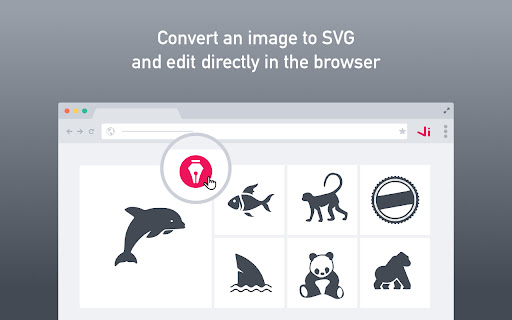
Use the Vector Ink Chrome extension to import photos, generate color palettes, or convert photos to vectors and import them directly into a Vector Ink canvas for editing.
With the Vector Ink Chrome extension installed, a pen icon will show on every image you mouse over. Clicking the pen icon will present you with four options:
- Import SVG: this option will convert the image to an SVG and import the SVG directly into a chrome tab that has an active vectorink.io project or it will create a new tab if non existent.
- Import Photo: Imports the image into a Vector Ink project.
- Import Palette: This will generate a color palette from the photo and update the palette in your Vector Ink project.
- Resize and Crop: This will import the photo into Vector Ink, adjust the document size to the photos dimensions, and open the Export panel for cropping and resizing.
Creating art in vector graphic design software should be easy but in most cases it is not. A lot of times you are wrestling with a pen tool for hours in order to get the right design you want, or taking shortcuts to give the appearance of a perfect shape. Well those days are behind us now. Vector Ink offers a smart Path Builder Tool that will merge and build the shape you want the way you want with perfect precision and little design effort.
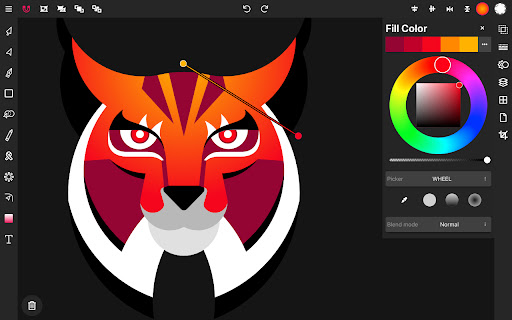
Bring your shapes to life with our color tools. Vector Ink offers linear and radial gradient options along with multiple color picker types and an advanced color palette editor so you can generate, manage, and save your own color palettes for later use.
Features:
Built-in Virtual Stylus
Draw Tool
Path Builder Tool
Distribute Tool
Pen Tool
Gradient Tool
Corner Tool
Ribbon Tool
Rectangle Tool
Circle Tool
Star Tool
Polygon Tool
Path controls
Boolean controls
Cut and join paths
Stroke sizes and stroke caps
Convert stroke to path
Outline Text (text to path)
Import Custom Fonts
PNG & JPG Import & Export
SVG Import & Export
Export Selection as SVG
Features in-depth:
Path Builder Tool
Merge multiple shapes into one.
Merge a single shape into another.
Trace over an imported illustration or logo grid with geometric precision.
Create complex shapes (that would typically take several minutes) within seconds.
Draw Tool
Freehand drawing with smart guides to stabilize strokes.
Auto connects to other strokes so you can freely lift your pen then resume drawing on the same path.
First-ever built-in Digital Stylus makes designing on touch screen devices easier by allowing you to see where you're drawing and helps accomplish tasks in tight spaces on the canvas.
Distribute Tool
Distribute copies of a shapes left-to-right or top-to-bottom.
Distribute copies of a shape around a point or around another shape.
Distribute copies of a shape left-to-right and top-to-bottom in a grid layout.
Gradient Tool & Color Picker
Multiple color pickers to choose from (wheel, RGB, HSB, hex pad, and palette picker)
Linear and radial gradient styles
Add and delete gradient stops
Color Palettes
A gorgeous library of color palettes so no matter what you design the color combination will always look legit.
Color palette generator so you never run out of color palette options.
Add an infinite number of colors to a palette and we'll automatically generate colors that compliment your palette.
Save your color palette to use in other projects.
Layers
Add and delete Layers
Group objects
Re-order layers, shapes, and groups
Overral Document
Control the width and height of the Document
Change the Document background color
Import/Export
Import PNG, JPG, and SVG
Export PNG, JPG, and SVG
Export any size
Export a PNG with a transparent Art board
Export any selected shapes as an individual SVG



Reviews
Loading reviews...
Permissions (3)
Permissions
scriptingℹ Can inject scripts into web pages storageℹ Can store data locally in your browser tabsℹ Can see your open tabs and their URLs
Details
| Version | 1.2 |
| Updated | Nov 14, 2022 |
| Size | 25.27KiB |
| First Seen | Mar 21, 2026 |
Popular in workflow

Adobe Acrobat: PDF edit, convert, sign tools
by Adobe Inc.
330M
★ 4.40
workflow
330M
★ 4.40
workflow

Chrome Remote Desktop
by Chrome Remote Desktop Release Managers
38M
★ 3.14
workflow
38M
★ 3.14
workflow

Microsoft Power Automate
by Microsoft Corporation
10M
★ 1.99
workflow
10M
★ 1.99
workflow

Screencastify - Screen Video Recorder
by castify-ext-dev
9M
★ 3.95
workflow
9M
★ 3.95
workflow

Mendeley Web Importer
by Mendeley
3M
★ 2.25
workflow
3M
★ 2.25
workflow
Popular Extensions
Adobe Acrobat: PDF edit, convert, sign tools
by Adobe Inc.
330M
★ 4.40
workflow
330M
★ 4.40
workflow
Chrome Remote Desktop
by Chrome Remote Desktop Release Managers
38M
★ 3.14
workflow
38M
★ 3.14
workflow

Cisco Webex Extension
by cisco.chromestore
24M
★ 2.34
social
24M
★ 2.34
social

Kami for Google Chrome™
by Kami
17M
★ 4.56
education
17M
★ 4.56
education

Read&Write for Google Chrome™
by Texthelp
17M
★ 3.44
accessibility
17M
★ 3.44
accessibility