
Font Finder icon

Font Finder

by unixeco

v0.6.4 Updated Jan 8, 2026 153KiB
CWS
400K
Users
★ 4.52
219 reviews
#489
of 182.9K
developer
#47 of 16K
Highly rated

Description

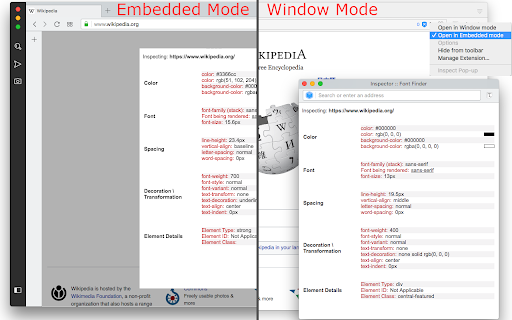
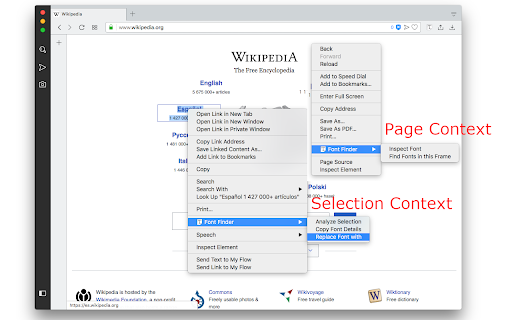
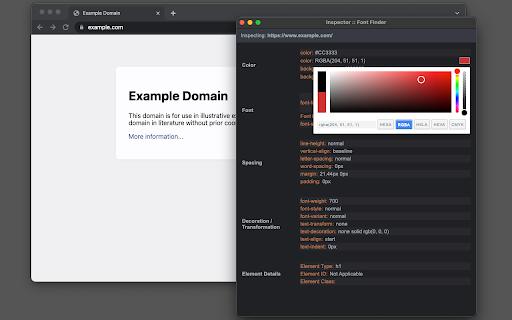
FontFinder is created for designers, developers, and typographers. It allows a user to analyze the font information of any element and copy any pieces of that information to the clipboard. Font Finder examines all the selected characters to detect the font used to display this particular character. FontFinder has three critical pieces of functionality: 1. Analyze any font on the active page. 2. Copy any piece of the element's information to the clipboard 3. Any active element can have any piece of the font's options (such as color, size, or family) adjusted inline Access these options by right-clicking the context menu over the selected text or right-clicking on the page and inspecting the element. Information Captured: 1. Font color (RGB and HEX) 2. Background color (RGB and HEX) 3. Font family (including actually rendered font!) 4. Font size 5. Line height, vertical alignment, letter, and word spacing 6. Font weight, style, variant 7. Text transform, decoration, align and indent 8. Element's type, class, and ID 9. Displays remote and local tags next to the rendered font Tools: Replace or change font family. Use custom fonts. Get the list of all fonts in the current frame. Notes: You can change the window opening mode to embedded mode from the right-click items over the toolbar button. This mode helps use the extension in full-screen mode.
Font Finder screenshot 1Font Finder screenshot 2Font Finder screenshot 3Font Finder screenshot 4

Reviews (16 cached)

★☆☆☆☆2026-01-07
Michel Foster

Sorry but it doesn<t work at all ono my end on Chrome. Some authorization needs to be granted....

★☆☆☆☆2025-08-14
Reid Friedenberg

Inaccurate

★☆☆☆☆2025-07-22
Janak Positioning India

poor

★☆☆☆☆2021-03-22
Salvatore Eriotes

not working at all for me. here is a better solution https://chrome.google.com/webstore/detail/find-that-font/alannkadjimikdglagjkfdnmcdjkahhc

★☆☆☆☆2021-03-03
Preston Comafa

i used this extension all the time back in the day but now its not working found one that works tho https://chrome.google.com/webstore/detail/find-that-font/alannkadjimikdglagjkfdnmcdjkahhc

★☆☆☆☆2019-03-16
IDontWant AGooglePlusAccount

Doesn't do anything in Chromium 72.0.3626.121.

★☆☆☆☆2017-05-18
En Zo

doesnt work at all.

★★☆☆☆2018-06-10
michelle g.a

IT DIDN'T WORK

★★☆☆☆2017-02-28
Emily Rodriguez

Seems very useful but I can't get this thing to work at all. I read the FAQ, clicking on the icon doesn't do anything or turn it orange. Right clicking an element and selecting Font FInder does nothing.

★★☆☆☆2017-01-18
Burkhard Hauck

not very intuitive. couldn't start it at all

★★★☆☆2025-11-05
Mahafuz ali

NOT GOOD

★★★☆☆2025-04-24
Ashy

I thought it was an extension to change the browser's font, it doesn't do anything like that. Also when you open the extension it's like you're editing the whole site in html, really weird

★★★☆☆2024-02-15
craig I

Keeps saying every font on fb is Segoe.

★★★☆☆2023-10-07
Arshad Ali

its helped to smooth working

★★★☆☆2023-09-19
Satish Kumar

so so

★★★☆☆2019-07-22
Roman Mohar

It really looks great and I had big hopes for, but it did not read the H2 font selection, it has showed me always data about the body text. Hmmmm... But I really like the details! (tested in Brave browser Jul 22 2019)

Permissions (5)

Permissions

activeTab Can access the current tab when you click the extension contextMenus Can add items to the right-click menu notifications Can show desktop notifications scripting Can inject scripts into web pages storage Can store data locally in your browser

Details

Version 0.6.4
Updated Jan 8, 2026
Size 153KiB
First Seen Mar 29, 2026