
Glimpse: Toggle Password with Shortcut Keys
v2.0.0 Updated Apr 7, 2025 8.95KiB
Description
Not all websites provide the option to toggle the visibility of the inputted passwords. This may be frustrating when you think you have mistyped a letter.
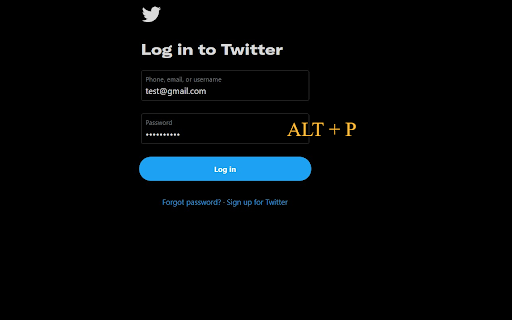
Glimpse helps you show / hide any password fields easily with shortcut keys (ALT + P / Option + P) or a quick right-click from the context menu to catch any typos.
Whether a site already supports password toggling or not, Glimpse extends this functionality exactly when you need it. Additionally, you can access the same functions using the same Glimpse shortcut keys!
The shortcut key is also configurable via the Chrome extensions shortcut menu.


Reviews
Loading reviews...
Permissions (2)
Permissions
activeTabℹ Can access the current tab when you click the extension contextMenusℹ Can add items to the right-click menu
Details
| Version | 2.0.0 |
| Updated | Apr 7, 2025 |
| Size | 8.95KiB |
| First Seen | Mar 29, 2026 |
More by walterteng.com



Popular in workflow

Adobe Acrobat: PDF edit, convert, sign tools
by Adobe Inc.
331M
★ 4.40
workflow
331M
★ 4.40
workflow

AdBlock — block ads across the web
by AdBlock
62M
★ 4.48
workflow
62M
★ 4.48
workflow

迅雷下载支持
by Shenzhen Xunlei Network Technology Co., Ltd.
59M
★ 2.77
workflow
59M
★ 2.77
workflow

Adblock Plus - free ad blocker
by eyeo GmbH
41M
★ 4.39
workflow
41M
★ 4.39
workflow

Chrome Remote Desktop
by Chrome Remote Desktop Release Managers
38M
★ 3.14
workflow
38M
★ 3.14
workflow
Popular Extensions
Adobe Acrobat: PDF edit, convert, sign tools
by Adobe Inc.
331M
★ 4.40
workflow
331M
★ 4.40
workflow
AdBlock — block ads across the web
by AdBlock
62M
★ 4.48
workflow
62M
★ 4.48
workflow
迅雷下载支持
by Shenzhen Xunlei Network Technology Co., Ltd.
59M
★ 2.77
workflow
59M
★ 2.77
workflow

Grammarly: AI Writing Assistant and Grammar Checker App
by Grammarly
42M
★ 4.50
communication
42M
★ 4.50
communication
Adblock Plus - free ad blocker
by eyeo GmbH
41M
★ 4.39
workflow
41M
★ 4.39
workflow