
Playwright Chrome Recorder
Description
Reviews (5 cached)
Lies. Does not support Playwright.
It seems like it doesn't work, but really it's just (incredibly) poorly documented: the "Getting Started" section (above) leaves out crucial steps for getting started. *** YOU DO NOT USE THIS LIKE A NORMAL CHROME EXTENSION!!!! *** Why can't the Playwright people just say as much? It'd be so simple to add one sentence to the "Getting Started" section above: To use this extension you must open your developer tools and click the "Recorder" tab. That's it! One star for not explaining how to use your extension, in its own documentation.
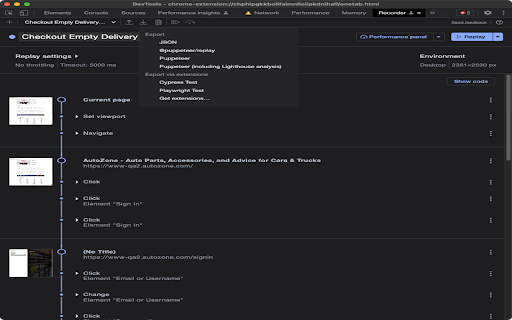
It says it does Playwright but it's unavailable in the dropdown menu. Only JSON and Puppeteer are available.
This is an extension for exporting Playwright code from the built-in Chrome Recorder feature. It does this job. I would give 3 stars because it uses an old version of Playwright code in the export (e.g. it uses type() function, which was deprecated as of v1.38). But I'm giving 2 stars because, like Jeremy, I find the description above to be egregiously wrong. Playwright Recorder is NOT "a developer tool that records user interaction". It does NOT "Record a user session". In fact, none of the items in the "This extension will allow you to:" list are part of this extension. The only thing this extension does is translate the built-in export code of the Chrome browser's own recorder feature into Playwright-ese. HOW TO USE 1. Install this extension. 2. Open Chrome Dev Tools and go to the Recorder tab 3. Record your Chrome session using the built-in recorder tool. 4. Use the built-in export button and choose "Playwright Test" from the dropdown
doesn't work
Details
| Version | 1.0.0 |
| Updated | May 2, 2023 |
| Size | 15.09KiB |
| First Seen | Mar 29, 2026 |
Popular in developer





Popular Extensions




