
Description
About Genius
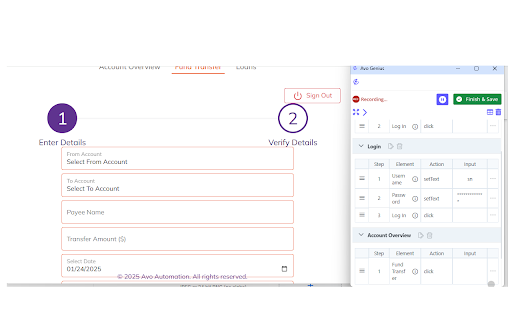
Avo Genius is a smart recorder which allow users to record end to end test scenarios on any Web App as they interact with application (E.g Salesforce, Fusion, any custom built Webapp).
Steps to use Avo Genius :-
1) Install the Extension in Chrome Browser.
2) Login to Avo Assure with valid credential.
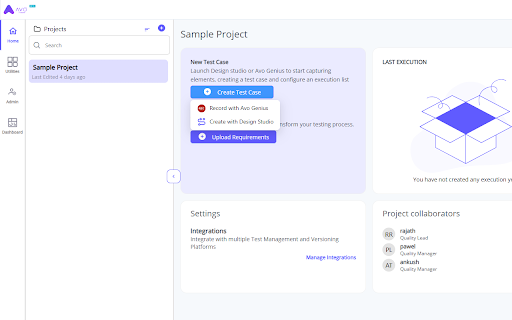
3) In the landing page, click on Create Testcase button and select "Record with Avo Genius"
4) Enter your application URL and click on "Start Recording"
5) Navigate the test scenario on Application under test, Avo Genius will create the automated testcase(s).



Reviews
Loading reviews...
Permissions (4)
Permissions
storageℹ Can store data locally in your browser system.display tabsℹ Can see your open tabs and their URLs windows
Details
| Version | 25.2.6 |
| Updated | Jul 10, 2025 |
| Size | 2.63MiB |
| First Seen | Apr 1, 2026 |
More by Avoautomation

Popular in workflow

Adobe Acrobat: PDF edit, convert, sign tools
by Adobe Inc.
331M
★ 4.40
workflow
331M
★ 4.40
workflow

AdBlock — block ads across the web
by AdBlock
63M
★ 4.48
workflow
63M
★ 4.48
workflow

迅雷下载支持
by Shenzhen Xunlei Network Technology Co., Ltd.
59M
★ 2.77
workflow
59M
★ 2.77
workflow

Adblock Plus - free ad blocker
by eyeo GmbH
41M
★ 4.39
workflow
41M
★ 4.39
workflow

Chrome Remote Desktop
by Chrome Remote Desktop Release Managers
38M
★ 3.14
workflow
38M
★ 3.14
workflow
Popular Extensions
Adobe Acrobat: PDF edit, convert, sign tools
by Adobe Inc.
331M
★ 4.40
workflow
331M
★ 4.40
workflow
AdBlock — block ads across the web
by AdBlock
63M
★ 4.48
workflow
63M
★ 4.48
workflow
迅雷下载支持
by Shenzhen Xunlei Network Technology Co., Ltd.
59M
★ 2.77
workflow
59M
★ 2.77
workflow

Grammarly: AI Writing Assistant and Grammar Checker App
by Grammarly
42M
★ 4.50
communication
42M
★ 4.50
communication
Adblock Plus - free ad blocker
by eyeo GmbH
41M
★ 4.39
workflow
41M
★ 4.39
workflow