
⚠️Not updated in over 2 years ⚠️Very few reviews for its user base
Description
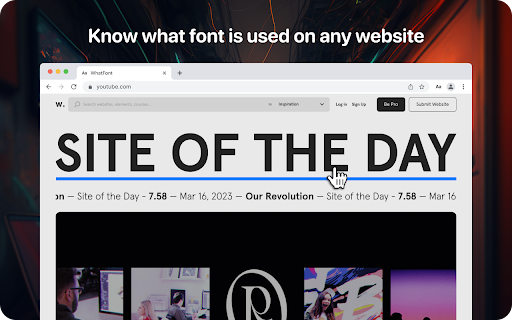
Lets you know what font is used on any website
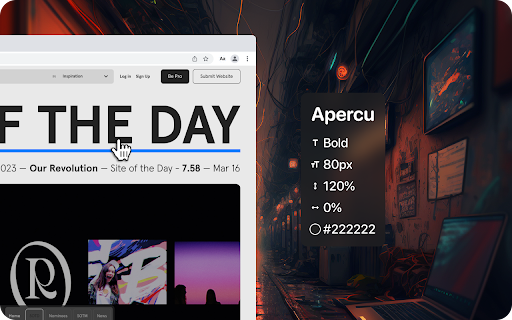
Using the WhatFont extension, you can find out the following details: font family, style, weight, size, line height, color which is used on any site. Just find the text you need, activate the WhatFont extension and all the necessary information will appear on your monitor.
The WhatFont extension for Google Chrome is a powerful tool that allows users to quickly and easily identify the fonts used on any website and enables users to identify the font style, size, color, and italics used on a website by simply hovering over the text.
How To Use:
1. Activate extension WhatFont by clicking on its icon in the right-top
2. For information click on the font
3. To disable the functionality - click "Exit What Font" on the right-top of the browser.
WhatFont is especially useful for designers, developers, and anyone who works with typography. It provides an easy and efficient way to identify the fonts used on a website, which can be a valuable resource for creating your own designs. Additionally, this extension can help you improve your understanding of typography, allowing you to make informed decisions about font choices.
In summary, WhatFont is an essential tool for anyone who wants to identify the font details used on a website. Its simple and intuitive interface makes it easy to use, and its comprehensive font information is sure to be helpful for designers and developers alike.
Reviews (1 cached)
★☆☆☆☆2025-07-11
Zachary Ellis
It doesn't work at all. Zero stars.
Permissions (4)
Permissions
activeTabℹ Can access the current tab when you click the extension scriptingℹ Can inject scripts into web pages storageℹ Can store data locally in your browser unlimitedStorage
Details
| Version | 1.0.0 |
| Updated | Mar 27, 2023 |
| Size | 89.51KiB |
| First Seen | Mar 26, 2026 |
Popular in developer

GoFullPage - Full Page Screen Capture
by GoFullPage
10M
★ 4.89
developer
10M
★ 4.89
developer

TouchEn PC보안 확장
by 라온시큐어
8M
★ 1.33
developer
8M
★ 1.33
developer

React Developer Tools
by Meta
5M
★ 3.95
developer
5M
★ 3.95
developer

Meta Pixel Helper
by Meta
4M
★ 3.91
developer
4M
★ 3.91
developer

ColorZilla
by colorzilla.com
4M
★ 4.59
developer
4M
★ 4.59
developer
Popular Extensions

Adobe Acrobat: PDF edit, convert, sign tools
by Adobe Inc.
331M
★ 4.40
workflow
331M
★ 4.40
workflow

AdBlock — block ads across the web
by AdBlock
62M
★ 4.48
workflow
62M
★ 4.48
workflow

迅雷下载支持
by Shenzhen Xunlei Network Technology Co., Ltd.
59M
★ 2.77
workflow
59M
★ 2.77
workflow

Grammarly: AI Writing Assistant and Grammar Checker App
by Grammarly
42M
★ 4.50
communication
42M
★ 4.50
communication

Adblock Plus - free ad blocker
by eyeo GmbH
41M
★ 4.39
workflow
41M
★ 4.39
workflow