
Description


Reviews (11 cached)
Not working - Pick element showing error
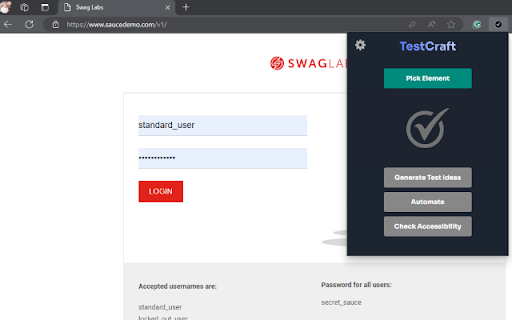
Hi Team, I have added the extension in chrome browser but am not able to pick an element and the other fields.
I can't get this application to work on Linux. I've tried it on many websites and I always get the same error. Error: Something happened , please try again :( What should I do about it?
Did not work for me. I could pick element but on generate-ideas the window showed error. I see this issue has been reported earlier and the fix was provided as well. But it isn't working and i get same error.
Wanted to experiment with this extension on Picked element > Generate test ideas => only this error in new window : "Something happened, please try again :( " in console of that window : Access to fetch at 'https://api.testcraft.app/api/generate-ideas' from origin 'chrome-extension://anbeiondiglbpedgjgehgihgeejjkiik' has been blocked by CORS policy: Response to preflight request doesn't pass access control check: No 'Access-Control-Allow-Origin' header is present on the requested resource. If an opaque response serves your needs, set the request's mode to 'no-cors' to fetch the resource with CORS disabled. I've tried on: https://www.saucedemo.com/ I don't see any blocking JS injection...
its not working and not picking any element. Please get it fixed ASAP
What I understood so far is that this extension lists out the test cases against a UI element but it cannot design a test case based on test scenario. Is this true?
I couldn't pick the elements for chain test cases, such as navigating from one page to another. For example, Login Inputs -> Submit -> Navigate. These three actions are considered chain test cases and couldn't be picked at the same time.
Could you please let me know how can I integrate it with Jira. I am not getting any option for paid trial version.
TestCraft is a good tool for codeless test automation, especially for teams that want to create test cases quickly without writing code. The AI-powered test maintenance feature is beneficial, reducing the effort required to update tests when the UI changes. The drag-and-drop interface is simple and user-friendly, making it easy for manual testers to start with automation. That said, there are some areas where it can improve: - Compatibility for Functional Testing: While it performs well for basic testing, it needs better support for advanced functional test cases in more complex applications. - Suggestion: Adding a Record and Playback feature for functional and UI testing would make it much easier to create and manage test flows, especially for repetitive tasks. Other Suggestions: - Better Reporting: The reporting is decent, but more detailed and customizable reports would help teams analyze test results more effectively. - Improved Browser Support: Extending compatibility to more browsers and devices would make it suitable for a wider range of projects. - Built-in Debugging Tools: Adding tools to debug issues directly while editing test cases would save a lot of time. - Offline Option: Allowing tests to be created or backed up offline would be useful for teams working in environments with limited internet connectivity. In summary, TestCraft is a promising tool for automation, but adding these features would make it even better and more reliable for a variety of use cases.
Its really amazing extension w.r.t playwright JS/TS and creating the POM is really helpful But if this can add it will be helpful 1.There should be option to edit the test ideas where user can add his/her ideas and w.r.t to those it can generate automation scripts 2.And if this can add (maybe its wrong suggestion to) ,but if we can option to assert in the page by selecting any button in this extension and then it will add in the test ideas
Permissions (2)
Permissions
Details
| Version | 1.2.4 |
| Updated | Mar 5, 2025 |
| Size | 928KiB |
| First Seen | Mar 29, 2026 |
Popular in developer





Popular Extensions




