
iLaunch: Manage Bookmark,History,Tab and More
v1.3.1 Updated Apr 5, 2022 2.07MiB
⚠️Not updated in over 2 years ⚠️Requests 2 sensitive permissions
Description
With commands, you can use browser like a pro.
Using iLaunch, you can use browser like a professional, with shortcut commands, quickly start and manage open tabs, bookmarks, browsing history, efficiently manage your extensions, you can also perform all sorts of actions and more, it is your efficiency multiplier tool.
Quick start hotkey by default
Windows: alt+Q
Mac: control+Q
You can also visit "chrome://extensions/shortcuts" management interface to set it by yourself
●Shortcut command
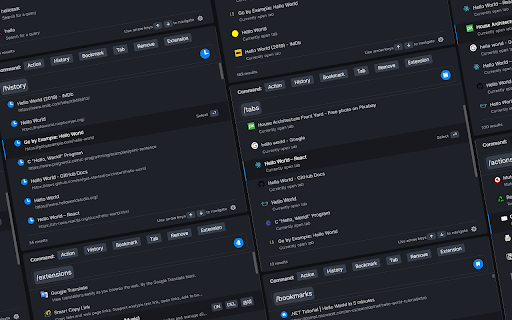
"/action" - enter "/a" quick start.
Integrate more than 50 actions to improve efficiency, such as mute tabs, create various documents, full screen, clear cache, etc.
"/bookmarks" - enter the "/b" quick start.
With this command you can quickly search and browse your bookmarks.
"/extensions" - enter the "/e" quick start.
With this command, you can quickly manage your extensions.
"/history" - enter the "/h" quick start.
With this command, you can quickly search your history.
"/tabs" - enter the "/t" quick start.
With this command, you can quickly switch, open, search tabs.
"/remove" - enter the "/r" quick start.
With this command, you can quickly search and close open tabs and delete useless bookmarks.
More shortcut commands are under development.
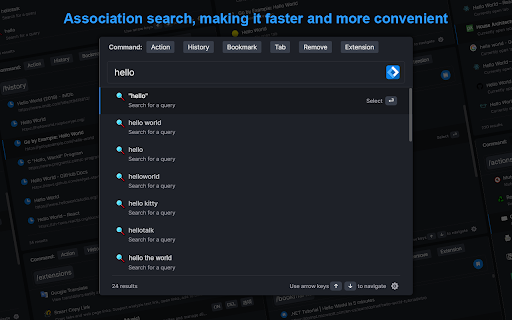
●Associative search
Support search engine customization, and it can intelligently associative search to quickly find what you need.
●Multiple themes
It contains multiple themes, light mode, dark mode..., you can use different color schemes according to your own preferences.
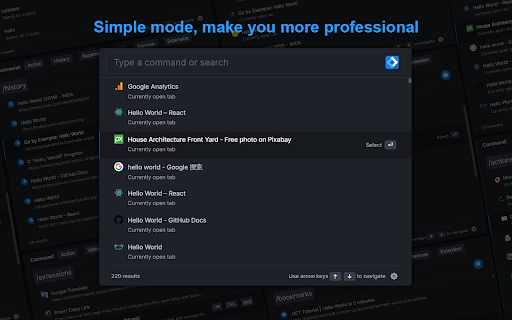
●Minimalist mode
Hide shortcut command buttons to let you use browser like a pro.
iLaunch lets you use browser more efficiently.


Reviews
Loading reviews...
Permissions (10)
Permissions
activeTabℹ Can access the current tab when you click the extension bookmarksℹ Can read and modify your bookmarks browsingDataℹ Can delete browsing history and data historyℹ Can read and modify your browsing history managementℹ Can manage other installed extensions scriptingℹ Can inject scripts into web pages search storageℹ Can store data locally in your browser tabsℹ Can see your open tabs and their URLs unlimitedStorage
Details
| Version | 1.3.1 |
| Updated | Apr 5, 2022 |
| Size | 2.07MiB |
| First Seen | Mar 27, 2026 |
More by talentranslate


Popular in workflow

Adobe Acrobat: PDF edit, convert, sign tools
by Adobe Inc.
331M
★ 4.40
workflow
331M
★ 4.40
workflow

AdBlock — block ads across the web
by AdBlock
63M
★ 4.48
workflow
63M
★ 4.48
workflow

迅雷下载支持
by Shenzhen Xunlei Network Technology Co., Ltd.
59M
★ 2.77
workflow
59M
★ 2.77
workflow

Adblock Plus - free ad blocker
by eyeo GmbH
41M
★ 4.39
workflow
41M
★ 4.39
workflow

Chrome Remote Desktop
by Chrome Remote Desktop Release Managers
39M
★ 3.14
workflow
39M
★ 3.14
workflow
Popular Extensions
Adobe Acrobat: PDF edit, convert, sign tools
by Adobe Inc.
331M
★ 4.40
workflow
331M
★ 4.40
workflow
AdBlock — block ads across the web
by AdBlock
63M
★ 4.48
workflow
63M
★ 4.48
workflow
迅雷下载支持
by Shenzhen Xunlei Network Technology Co., Ltd.
59M
★ 2.77
workflow
59M
★ 2.77
workflow

Grammarly: AI Writing Assistant and Grammar Checker App
by Grammarly
42M
★ 4.50
communication
42M
★ 4.50
communication
Adblock Plus - free ad blocker
by eyeo GmbH
41M
★ 4.39
workflow
41M
★ 4.39
workflow