
Description


Reviews (22 cached)
Junk extension. Junk product. Tried to make it work many times, never works. Connects to phone just fine but never PC. Not worth the time or money.
It wont even open now - only ever worked every once in a while and would disconnect often
This plugin is garbage, doesn't want to open despite being granted permissions. Why does everyone have to contact support to make this work? I've made the dice work with FoundryVTT but I'm also an IT Engineer and would not recommend this product for people who do not have a firm understanding of IP networking. These dice could have been so awesome but they fall short in so many ways. Still good for Backgammon and the other games in the iOS/Android app.
I would love to be able to use this product more regularly in my games, but it is a pain to get it to connect to my VTT which happens to be Roll20 and I can't get it to connect without using my phone first. AND then it only stays connected for like a minute and then is trying to reconnect, and again I need use the app on my phone to get this reconnect. I'm not sure why some products have no issues with this connection and other have a ton of issues based off comments/reviews. If this connection error is due to the product or the web extension was fixed I would have no issues changing my review to a 5 star as the product, I believe, otherwise is a great product.
If you have multiple sets of dice you have to hope they actually light up when they pair and, even then, you must stare at them when you choose to pair them because you cannot unpair a dice once it's paired (even if you disable bluetooth on your machine, uninstall the extension, and close/reopen the browser). If you are lucky enough to get the dice to light up when they pair, you have to roll a nat 20 in order to get your dice roll to work. Having spent over $100 on these, I am incredibly frustrated. Unless you want to play the games in their dice app on your phone, you're out of luck. If it helps anyone else, I'm "using" these on the most updated version of Foundry, in a Chrome browser, with the dice about a foot away from a bluetooth receiver. Save your money and the space on your harddrive.
The extension says ''please open a supported platform'' when trying to open the extension. So i just can't connect.
In early November, I tried to get this to work on Windows, and failed. Extension fails to recognize dice. I have sent error report to providers today.
Unable to get dice registered with extension despite trying for an hour. No troubleshooting tips or guides given or any way to attempt to figure out the problem.
Faces don't match on roll. Got it connected to Roll 20, and more often then not the rolled face will be wrong, roll a 3? get a 19. Roll an 8, get a 20. It does show numbers on the Roll 20 chat, but if the face is wrong, what's the point?
I bought these specifically to use with Roll20 and the extensions seems broken, I can't get the pop up open to connect. Shame, such a great idea. Should really not advertise that they work with specific VTT's if they aren't going to support them.
Refuses to function in any version of Chrome on Linux, native Chromium or Flatpak Chrome. Extension activates on Roll20 but does not pair. Very disappointing.
Wanting to change this review when the error is fixed. Followed all the steps. Have the D20 device and have it working on the phone. The dice works in the app, the chrome extension is installed. The website is https and secure, the devices are on the same router, but the chrome and the dice refuse to sync.
Seems to go to sleep or stop responding (Using with Foundry VTT) after a while and you have to re-pair the dice for it to work. Not great when your in the middle of session
Extension does not work. Having loaded the extension in an open roll20 game, the bluetooth pop up window to connect new dice doesn't appear and so the dice cannot be connected. Does the extension need an update? I installed it today. I have tried the following links/guides but they have not been able to resort the problem: https://getgocube.com/godice-discord/index.html https://www.youtube.com/watch?v=yEMSHip9UYs&t=2s
Very Short Bluetooth range. After a lot of frustration I finally got them to work on my PC with the Chrome extension. I couldn't get them to pair with my built in Bluetooth. It worked great on my Laptop and on my Cell Phone. It occurred to me that it might be a range issue. So I disabled my built in Bluetooth, got a USB Bluetooth adapter, and a USB extension cord. I put the Bluetooth Adapter right next to my rolling tray, and what do you know everything works as intended. So you could either do what I did or get one of those High Gain Bluetooth adapters if you're using a PC. Please upvote if this helps. It would have helped me out to know this.
i can't select all the dice some dice selections don't let me click them at all so no 4-8 for some reason
great idea bad programing I can't select d4, d6, or d8 dice so my options are 10 and up and I definitely need to be able to select those. please fix I'd love to use this extension.
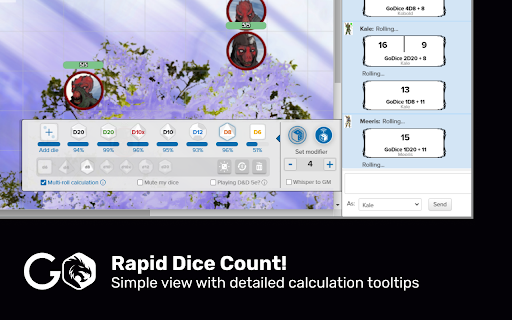
Three stars because of how bad the Chrome extension is set up. In Roll20, for example, after installing extension, you then have to enable the dice by reopening the extension from the Chrome bar while in the campaign. The small extension subwindow that is in the campaign does absolutely nothing to tell you this. I figured this out by checking the extension and double checking that this is how it worked via the GoDice YT page. If they could rework this to be more intuitive for the user by having the popup able to pair the dice or at least add a blurb to the pop up window in the VTT telling you to go pair the dice via the extension, that would be great.
Okay extension, except for the fact I can't seem to pair more than five dice at once in roll20. Adding any beyond that just seems to result in nothing happening.
If I were rating this on the ability to go from physical to digital alone, it would definitely be 5/5, but there are a lot of user-friendly features that I think could be added here. Important note, I've only used this for Roll20 integration. I don't even really have to list them all because, well, the GoDice mobile app kind of already has all the features I think would be useful. Renaming dice, being able to check activation, disconnecting from them, cup rolling to prevent extraneous rolls, being able to roll one dice a set amount of times before sending the results, etc. Personally, I think that the little modifier tab in Roll20 could be extended out to the full settings tab that you get when clicking on the extension, so that everything GoDice can be in one place. Overall, I'm grateful for the utilization of the physical product with Roll20, but there are a lot of features I would like to see added.
I wish the role integration was a little more seamless into the vtts that are supported. Being able to pick what type of role and it adding the modifier automatically. I wish that there was a tie in to D&D beyond so I could use these with abovevtt as well. The shells can be a little tricky to remove the dice with sweaty palms. I also wish for the function to mute rolls when trying to get shells off to charge the die. they work well sometimes dc with low activity or low battery.
is there a possibility to use the same dice (since i only have 1 d20 shell) to share it for other players and have the initiative tracked manually for every pg or just some user friendly interface to faster it up ?
Permissions (1)
Permissions
Details
| Version | 1.7 |
| Updated | Jul 30, 2024 |
| Size | 104KiB |
| First Seen | Mar 27, 2026 |
Popular in fun





Popular Extensions




