
Tab to Window/Popup - Keyboard Shortcut
Description
Reviews (8 cached)
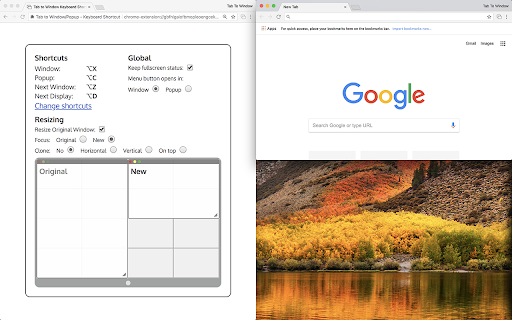
I would like it to not resize the new window to half my screen vertically.
useful but annoying: every time i start chrome, it keeps opening a tab to explain the shortcuts.
Great but stopped working. Uninstalled/reinstalled and works again. Wonder why.Now stopped again. Great concept but not reliable.
Creates a popup and allows to toggle between popup and tab mode, and does this with no glitches at all and flexible settings! However, no option to merge the popup back to original window, so for me personally not very useful.
Alt-X and Alt-C do the same
Unfortunately on OSX Yosemite, if using the extension while Chrome is in Full Screen mode then all tabs are popped out to their own single-tab Full Screen... so, use the extension 12 times and you end up with 12 Full Screen Chrome desktops which you then have to organize into proper tab group. Not at all a time saver. Would be better if tabs would orient to the Chrome instance ID and just co-locate to one or the other... but I see challenges with implementing there, too.
Great extension for users with one monitor. Like another user said, however, it needs support for dual monitors in the form of being able to either split it (maximized) on the other monitor, or turning off the resize feature and simply stack that tab on top of the existing window. I'll give it a 5/5 when that issue is fixed. It would already be a 5/5 for me if I only had 1 monitor. Edit: It also needs to not resize the original window. I found out that I can make both as large as my window, but they should be maximized, and not simply the same size as the screen.
It does work...didn't realize it just was not accepting my input to change the keystroke. Wish it allowed me to configure where the new window goes tho. Or at least just left it in place. I never understand why these tools insist on assuming they know better than you where your windows should be.
Permissions (3)
Permissions
Details
| Version | 3.3.3 |
| Updated | Aug 5, 2024 |
| Size | 186KiB |
| First Seen | Mar 30, 2026 |
Popular in workflow




Popular Extensions
