
⚠️Requests 2 sensitive permissions
Description
.legal is a free Chrome extension built by dotlegal for GDPR website auditing.
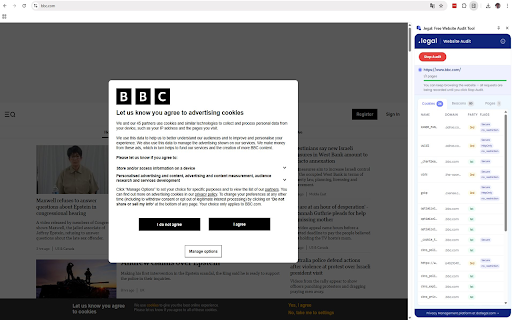
Whether you are a data protection officer preparing a compliance report, a web developer reviewing your own site before launch, or a legal/compliance team documenting cookie usage across multiple domains, .legal gives you a fast, reliable way to see exactly what cookies and tracking beacons a website sets on a clean first visit — all without leaving your browser.
Simply open the .legal side panel, start an audit, and within seconds you get a structured breakdown of every tracker and cookie detected. Results can be exported in the EDPS Website Evidence Collector (WEC) JSON format for further analysis or record-keeping.
KEY FEATURES
Beacon and tracker detection — Every network request made during a page load is matched against the industry-standard EasyPrivacy and Fanboy Annoyance filter lists, identifying third-party tracking pixels, analytics scripts, and advertising beacons.
Cookie enumeration — All cookies set by the audited site are collected and automatically classified as first-party or third-party, giving you a clear picture of the site's cookie footprint.
Clean first-visit simulation — Before each audit, .legal clears the site's cookies, cache, and storage data, then reloads the page. This simulates what a new visitor would experience, which is essential for accurate GDPR compliance checks.
Cookie consent banner detection — .legal detects the presence of cookie consent dialogs (CMPs) on the audited page, so you can verify whether a consent mechanism is in place.
WEC-compatible JSON export — Export your audit results in a JSON format compatible with the EDPS Website Evidence Collector. This makes it easy to integrate .legal into existing compliance workflows and documentation.
100% local processing — All audit data stays in your browser. Nothing is transmitted to dotlegal or any third party. Your browsing activity, cookies, and URLs never leave your device.
HOW IT WORKS
1. Navigate to any website you want to audit.
2. Open the .legal side panel and click "Start Audit".
3. The extension clears the site's cookies and storage, then reloads the page to simulate a first-time visit.
4. While the page loads, .legal monitors all network requests against EasyPrivacy and Fanboy Annoyance filter lists to detect third-party tracking beacons.
5. It also enumerates all cookies set by the site, classifying them as first-party or third-party.
6. Click "Stop Audit" when done. Review results in the Beacons, Cookies, and Pages tabs.
7. Export results as a JSON file compatible with the EDPS Website Evidence Collector (WEC) format.
SINGLE PURPOSE
This extension serves one purpose: auditing websites for GDPR compliance by detecting tracking beacons and enumerating cookies. It does not block ads, modify page content, or alter browsing behaviour in any way outside of an active audit.
FILTER LISTS
Tracking detection uses the open-source EasyPrivacy and Fanboy Annoyance filter lists, fetched from easylist.to and cached locally for 7 days. These are data files (plain-text rule sets), not executable code. No filter list data leaves your browser.
PRIVACY
.legal processes all data entirely within your browser. No audit data, browsing history, cookies, or URLs are transmitted to dotlegal or any third party. See our privacy policy for full details.
Built by .legal A/S — dotlegal.com


Reviews
Loading reviews...
Permissions (8)
Permissions
activeTabℹ Can access the current tab when you click the extension browsingDataℹ Can delete browsing history and data cookiesℹ Can read and modify browser cookies scriptingℹ Can inject scripts into web pages sidePanel storageℹ Can store data locally in your browser tabsℹ Can see your open tabs and their URLs webRequestℹ Can observe and analyze network traffic
Details
| Version | 2.5.1 |
| Updated | Feb 14, 2026 |
| Size | 175KiB |
| First Seen | Mar 30, 2026 |
Popular in developer

GoFullPage - Full Page Screen Capture
by GoFullPage
10M
★ 4.89
developer
10M
★ 4.89
developer

TouchEn PC보안 확장
by 라온시큐어
8M
★ 1.33
developer
8M
★ 1.33
developer

React Developer Tools
by Meta
5M
★ 3.95
developer
5M
★ 3.95
developer

Meta Pixel Helper
by Meta
4M
★ 3.90
developer
4M
★ 3.90
developer

ColorZilla
by colorzilla.com
4M
★ 4.59
developer
4M
★ 4.59
developer
Popular Extensions

Adobe Acrobat: PDF edit, convert, sign tools
by Adobe Inc.
322M
★ 4.40
workflow
322M
★ 4.40
workflow

AdBlock — block ads across the web
by AdBlock
62M
★ 4.48
workflow
62M
★ 4.48
workflow

迅雷下载支持
by Shenzhen Xunlei Network Technology Co., Ltd.
59M
★ 2.77
workflow
59M
★ 2.77
workflow

Grammarly: AI Writing Assistant and Grammar Checker App
by Grammarly
42M
★ 4.50
communication
42M
★ 4.50
communication

Adblock Plus - free ad blocker
by eyeo GmbH
40M
★ 4.39
workflow
40M
★ 4.39
workflow