
Description
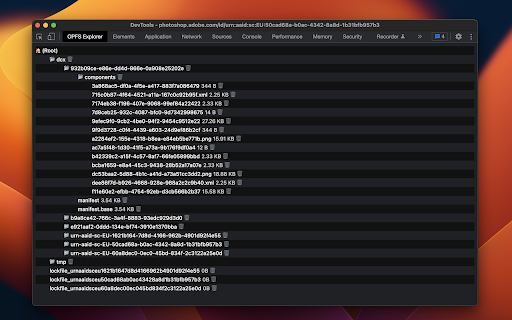
OPFS Explorer is a Chrome DevTools extension that allows you to explore the Origin Private File System (OPFS, https://fs.spec.whatwg.org/) of a web application.
To use it, open Chrome DevTools and click on the OPFS Explorer tab. The extension will automatically analyze the OPFS of the current web application and display the file hierarchy. You can then click on any file to download its contents or delete the file (which may fail if the file is locked). Note that deleting files may cause the application to break.
You can test the extension on the demo page (https://tomayac.github.io/opfs-explorer/).
The source code is on GitHub (https://github.com/tomayac/opfs-explorer).

Reviews (4 cached)
★☆☆☆☆2026-02-26
Oskar Artur
You cannot even download the file....
★☆☆☆☆2024-10-09
Cody Mullins
Doesn't work. Nothing shows up.
★★☆☆☆2024-10-16
Nikolay Durygin
Freezes and crashes my Chrome all the time on Mac
★★☆☆☆2023-09-20
Markus Krainz
1. Very basic explorer that works with the tomayac test page. Seems to only support very simple listing, deleting and "downloading" of files. But not creating new files or copying files into OPFS. 2. Hangs forever on "⌛Analyzing Origin Private File System" if the page you're opening it on doesn't make use of OPFS. It would be better to show an empty filesystem instead of hanging forever. 3. Also it doesn't seem to show the OPFS files of a browser extension that is storing data in OPFS. It just hangs on "⌛Analyzing Origin Private File System" again. Apparently it's not useful for debugging browser extensions.
Details
| Version | 1.9.0 |
| Updated | Jul 3, 2025 |
| Size | 15.54KiB |
| First Seen | Mar 30, 2026 |
More by Thomas Steiner

Popular in developer

GoFullPage - Full Page Screen Capture
by GoFullPage
10M
★ 4.89
developer
10M
★ 4.89
developer

TouchEn PC보안 확장
by 라온시큐어
8M
★ 1.33
developer
8M
★ 1.33
developer

React Developer Tools
by Meta
5M
★ 3.95
developer
5M
★ 3.95
developer

Meta Pixel Helper
by Meta
4M
★ 3.91
developer
4M
★ 3.91
developer

ColorZilla
by colorzilla.com
4M
★ 4.59
developer
4M
★ 4.59
developer
Popular Extensions

Adobe Acrobat: PDF edit, convert, sign tools
by Adobe Inc.
331M
★ 4.40
workflow
331M
★ 4.40
workflow

AdBlock — block ads across the web
by AdBlock
62M
★ 4.48
workflow
62M
★ 4.48
workflow

迅雷下载支持
by Shenzhen Xunlei Network Technology Co., Ltd.
59M
★ 2.77
workflow
59M
★ 2.77
workflow

Grammarly: AI Writing Assistant and Grammar Checker App
by Grammarly
42M
★ 4.50
communication
42M
★ 4.50
communication

Adblock Plus - free ad blocker
by eyeo GmbH
41M
★ 4.39
workflow
41M
★ 4.39
workflow