
⚠️Not updated in over a year
Description
Customize Your ChatGPT Interface
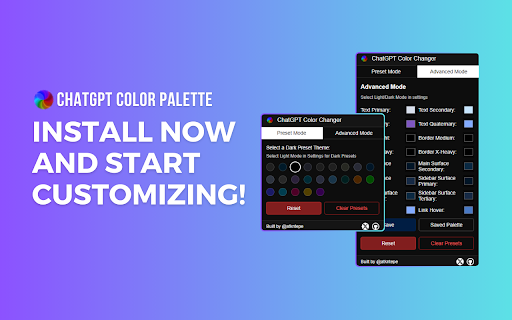
ChatGPT Color Palette is a Chrome extension that lets you personalize the colors of your ChatGPT interface. Choose between dark and light themes or create your custom color palette to enhance your ChatGPT experience.
Features:
- Preset Mode: Quickly apply predefined color themes, including Dark, Light, and various popular themes.
- Advanced Mode: Fine-tune individual color elements like primary, secondary, and tertiary colors for full control over your interface.
- Easy Reset: Instantly revert to default colors with a single click.
- Save and Apply: Save your custom palette and apply it anytime easily.
- Clear Presets: Remove saved palettes to start fresh.
Why Choose ChatGPT Color Palette?
- Flexibility: Customize every aspect of your ChatGPT interface to suit your preferences.
- Convenience: Save and switch between different color palettes effortlessly.
- Enhanced Experience: Make your ChatGPT interface visually appealing and personalized to your style.
-Transform your ChatGPT interface into a visually stunning and personalized workspace with the ChatGPT Color Palette extension.
Install now and start customizing!
What's New in Version 0.3.0:
- Added More Presets: We now have 24 presets for dark mode and 23 for light mode. Users should select the mode from ChatGPT settings to access light or dark modes.
- Simplified Preset Changes: The advanced mode is now adaptive to the selected preset, making it easier to fine-tune your interface.
Enjoy a wider variety of preset themes to personalize your ChatGPT experience.

Reviews
Loading reviews...
Permissions (3)
Permissions
activeTabℹ Can access the current tab when you click the extension scriptingℹ Can inject scripts into web pages storageℹ Can store data locally in your browser
Details
| Version | 0.3.1 |
| Updated | May 27, 2024 |
| Size | 115KiB |
| First Seen | Mar 30, 2026 |
More by atkntepe


Popular in accessibility

Read&Write for Google Chrome™
by Texthelp
17M
★ 3.44
accessibility
17M
★ 3.44
accessibility

360 Internet Protection
by qihoosafe
17M
★ 4.54
accessibility
17M
★ 4.54
accessibility

Screenshot reader™
by Texthelp
7M
★ 2.57
accessibility
7M
★ 2.57
accessibility

OrbitNote
by Texthelp
7M
★ 2.95
accessibility
7M
★ 2.95
accessibility

Volume Master
by Peta Sittek
6M
★ 4.81
accessibility
6M
★ 4.81
accessibility
Popular Extensions

Adobe Acrobat: PDF edit, convert, sign tools
by Adobe Inc.
331M
★ 4.40
workflow
331M
★ 4.40
workflow

AdBlock — block ads across the web
by AdBlock
62M
★ 4.48
workflow
62M
★ 4.48
workflow

Grammarly: AI Writing Assistant and Grammar Checker App
by Grammarly
42M
★ 4.50
communication
42M
★ 4.50
communication

Adblock Plus - free ad blocker
by eyeo GmbH
41M
★ 4.39
workflow
41M
★ 4.39
workflow

Chrome Remote Desktop
by Chrome Remote Desktop Release Managers
38M
★ 3.14
workflow
38M
★ 3.14
workflow