
⚠️Not updated in over a year
Description
Quick JIRA (short just quiji) is designed to speed up your workflow.
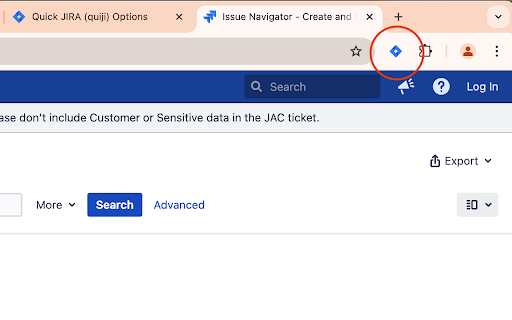
With the simple button you can access any JIRA tickets within seconds, instead of typing the whole time in the address bar.
You just type the ticket ID and hit enter and are directly on the JIRA ticket page.
Alternatively you can use the omnibox by typing the keyword 'jira' first and then your ticket ID
You can switch between the current and the new tab as your default action.
Quick JIRA is equipped with the following features
● button for current tab
● button for new tab
● button to re-open last ticket
● hotkey to open the dialog (CTRL + SHIFT + K)
● hotkeys to open the selected text as a ticket in the current (ALT + K) or a new tab (ALT + SHIFT +K)
● omnibox command: jira
● options page to select JIRA URL and default action of the enter key
● right click (context menu) integration
● fully localized into English
++++
Support (and source code) can be found at GitHub: https://github.com/timbru31/quickjira
Follow me on X: https://x.com/timbru31
++++
I am not affiliated with Atlassian in any way.
The JIRA logo belongs to Atlassian and was obtained from the press kit.


Reviews (3 cached)
★★★☆☆2025-12-30
Fabrice M
I like this extension, but I wish I could disable the omnibox behavior. I often search Google for Jira problems, and the first word "jira" triggering the "quiji" search is a real pain.
★★★☆☆2022-04-13
Mathias Böhmer
Jumping quickly into tickets works great, thanks. But what's annoying is, that the extension highjacks the chrome omnibox and this cannot be changed/deactivated. Whenever I type "jira" in the chrome address bar, it triggers the quiji search. I never want to use this search.
★★★☆☆2017-01-16
Fiqi Fitransyah
It's pretty cool. It help me to go to certain issue easier
Permissions (5)
Permissions
activeTabℹ Can access the current tab when you click the extension commands contextMenusℹ Can add items to the right-click menu scriptingℹ Can inject scripts into web pages storageℹ Can store data locally in your browser
Details
| Version | 1.0.0 |
| Updated | Sep 25, 2024 |
| Size | 44.15KiB |
| First Seen | Mar 30, 2026 |
More by Tim 'timbru31' Prüssing

Popular in workflow

Adobe Acrobat: PDF edit, convert, sign tools
by Adobe Inc.
322M
★ 4.40
workflow
322M
★ 4.40
workflow

AdBlock — block ads across the web
by AdBlock
62M
★ 4.48
workflow
62M
★ 4.48
workflow

迅雷下载支持
by Shenzhen Xunlei Network Technology Co., Ltd.
59M
★ 2.77
workflow
59M
★ 2.77
workflow

Adblock Plus - free ad blocker
by eyeo GmbH
40M
★ 4.39
workflow
40M
★ 4.39
workflow

Chrome Remote Desktop
by Chrome Remote Desktop Release Managers
37M
★ 3.13
workflow
37M
★ 3.13
workflow
Popular Extensions
Adobe Acrobat: PDF edit, convert, sign tools
by Adobe Inc.
322M
★ 4.40
workflow
322M
★ 4.40
workflow
AdBlock — block ads across the web
by AdBlock
62M
★ 4.48
workflow
62M
★ 4.48
workflow
迅雷下载支持
by Shenzhen Xunlei Network Technology Co., Ltd.
59M
★ 2.77
workflow
59M
★ 2.77
workflow

Grammarly: AI Writing Assistant and Grammar Checker App
by Grammarly
42M
★ 4.50
communication
42M
★ 4.50
communication
Adblock Plus - free ad blocker
by eyeo GmbH
40M
★ 4.39
workflow
40M
★ 4.39
workflow