
⚠️Not updated in over a year
Description
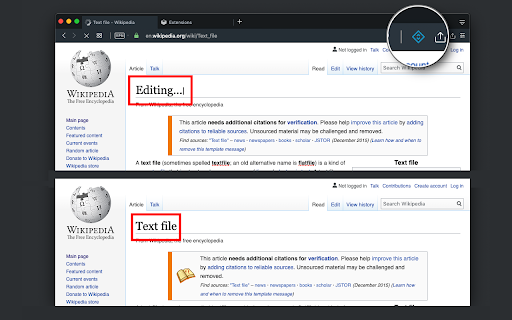
This extension modifies the current page's attributes to act like a content edible document (Similar to MS Word, or Open Office). This allows the user to:
1. Edit the page content
2. Drag and drop assets
3. Remove elements that cause chaos on the page
4. Insert <div>, <pre>, <paragraph>, and heading elements.
5. Convert font styling to bold or italic.
6. Add a link to the selected text.
7. Insert bulleted and numbered lists.
8. Increase and decrease indentation.
9. Insert an image.
10. Convert selected text to a blockquote.
11. Turn spellcheck on and off.
12. Remove formatting.
With this extension, you can edit the entire document and when it is ready, toggle back to the read-only mode (normal operation mode). The modified document can be printed or saved like any page.
Usage Instruction:
1. To enable the extension, press the toolbar button once. When the document is editable, the toolbar button is blue, and you will get a desktop notification
2. To switch back to the normal mode, press the toolbar button one more time. In the normal mode, the toolbar color is gray.
Notes:
1. You can save the modified document in HTML or MHTML or print it. To save in MHTML you will need to install an extension.
2. To change the formatting of a text into bold, select the desired section, and press Ctrl + B or Command + B. For italics, press Ctrl + I or Command + I. Alternatively, the extension inserts a helper toolbar so that you can access the rich text editing tools from a floating panel.

Reviews (2 cached)
★★★☆☆2023-10-30
SetupEditor
please add option for change color of text and one option for change font. Great tool
★★★☆☆2022-04-02
Quincy
doesn't save changes when you reload
Permissions (4)
Permissions
activeTabℹ Can access the current tab when you click the extension notificationsℹ Can show desktop notifications scriptingℹ Can inject scripts into web pages storageℹ Can store data locally in your browser
Details
| Version | 0.2.4 |
| Updated | Feb 19, 2025 |
| Size | 64.37KiB |
| First Seen | Mar 24, 2026 |
More by brian.girko

Alarm, Timer and Stopwatch
by brian.girko
80K
★ 4.42
workflow
80K
★ 4.42
workflow

Multiple Search and Highlight
by brian.girko
20K
★ 4.20
workflow
20K
★ 4.20
workflow

Open in Brave™ Browser
by brian.girko
10K
★ 3.14
tools
10K
★ 3.14
tools

Desktop Screen Recorder
by brian.girko
10K
★ 3.82
social
10K
★ 3.82
social

Window Resizer
by brian.girko
3K
★ 4.57
workflow
3K
★ 4.57
workflow
Popular in developer

TouchEn PC보안 확장
by 라온시큐어
8M
★ 1.33
developer
8M
★ 1.33
developer

React Developer Tools
by Meta
5M
★ 3.95
developer
5M
★ 3.95
developer

WhatFont
by Chengyin Liu
3M
★ 4.01
developer
3M
★ 4.01
developer

Take Webpage Screenshots Entirely - FireShot
by Evgeny Vokilsus
3M
★ 4.79
developer
3M
★ 4.79
developer

Lighthouse
by lighthouse-extension-owners
1M
★ 4.42
developer
1M
★ 4.42
developer
Popular Extensions

Adobe Acrobat: PDF edit, convert, sign tools
by Adobe Inc.
331M
★ 4.40
workflow
331M
★ 4.40
workflow

Grammarly: AI Writing Assistant and Grammar Checker App
by Grammarly
42M
★ 4.50
communication
42M
★ 4.50
communication

Chrome Remote Desktop
by Chrome Remote Desktop Release Managers
38M
★ 3.14
workflow
38M
★ 3.14
workflow

Microsoft Single Sign On
by Microsoft
36M
★ 2.27
workflow
36M
★ 2.27
workflow

Cisco Webex Extension
by cisco.chromestore
23M
★ 2.34
social
23M
★ 2.34
social