
⚠️Not updated in over a year
Description
# Variable URL
Do you have a set of links with a common, but variable, component? Consider the following table:
||one url|another url|
|--|--|--|
|1|someuniversity.edu/students/AdamApplegate/summary|someuniversity.edu/students/AdamApplegate/grades/1|
|2|someuniversity.edu/students/BarbaraBillings/summary|someuniversity.edu/students/BarbaraBillings/grades/1|
If you want to bookmark a link for the student summary, and another link for the student's grade on the first assignment, you will end up needing to duplicate those bookmarks for each student. This quickly becomes infeasible to the point that bookmarks are dismissed as not a useful approach to navigating these pages. However, if there is not an admin panel, some use cases may not have a better option either.
With Variable URL, you can bookmark the set of pages once, and define the variable component inside of a chrome extension.
## How To Use
First, go to `chrome://extensions`. Search for and add VariabURL.
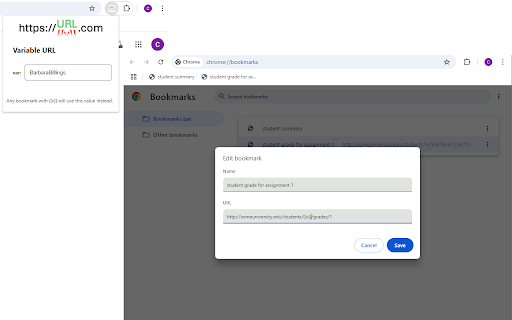
In the (normal, existing) chrome bookmark manager, add or edit bookmarks to replace the variable component with `{{v}}`. Extending the example above, these bookmarks might be:
- `someuniversity.edu/students/{{v}}/summary`
- `someuniversity.edu/students/{{v}}/grades/1`
Using the extensions widget to the right of the address bar in chrome, select the VariabURL extension, and enter a value for the variable. Be sure to hit `Enter`, `Tab`, or otherwise click outside of the text box to confirm the value.
You're ready to go! Your links will now use the value defined in the VariabURL extension whenever navigating to a URL with `{{v}}` in it. From a practical perspective, this is mainly bookmarks, but any links or redirects constructed this way will use the variable value as well. If you are having unexpected behavior outside of the use of your bookmarks based on a URL including `{{v}}` in a literal sense, you may need to disable the extension.
Reviews
Loading reviews...
Permissions (2)
Permissions
storageℹ Can store data locally in your browser webNavigationℹ Can monitor navigation events
Details
| Version | 1.0.1 |
| Updated | Oct 22, 2024 |
| Size | 40.89KiB |
| First Seen | Mar 24, 2026 |
Popular in functionality

Hola VPN - Your Website Unblocker
by Hola VPN LTD.
5M
★ 4.84
functionality
5M
★ 4.84
functionality

Video Speed Controller
by igrigorik
3M
★ 4.54
functionality
3M
★ 4.54
functionality

SponsorBlock for YouTube - Skip Sponsorships
by Ajay
2M
★ 4.65
functionality
2M
★ 4.65
functionality

OneTab
by OneTab
2M
★ 4.45
functionality
2M
★ 4.45
functionality

VPN Chrome extension - Best VPN by uVPN
by uVPN
900K
★ 4.52
functionality
900K
★ 4.52
functionality
Popular Extensions

Adobe Acrobat: PDF edit, convert, sign tools
by Adobe Inc.
331M
★ 4.40
workflow
331M
★ 4.40
workflow

AdBlock — block ads across the web
by AdBlock
62M
★ 4.48
workflow
62M
★ 4.48
workflow

Grammarly: AI Writing Assistant and Grammar Checker App
by Grammarly
42M
★ 4.50
communication
42M
★ 4.50
communication

Chrome Remote Desktop
by Chrome Remote Desktop Release Managers
38M
★ 3.14
workflow
38M
★ 3.14
workflow

Microsoft Single Sign On
by Microsoft
36M
★ 2.27
workflow
36M
★ 2.27
workflow