
⚠️Not updated in over 2 years
Description
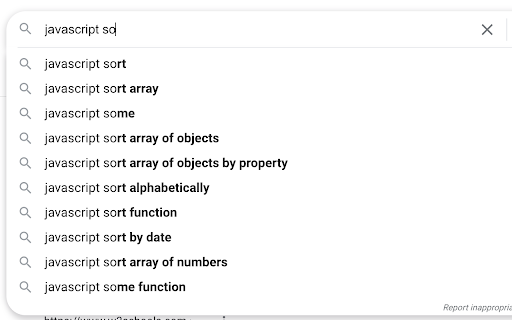
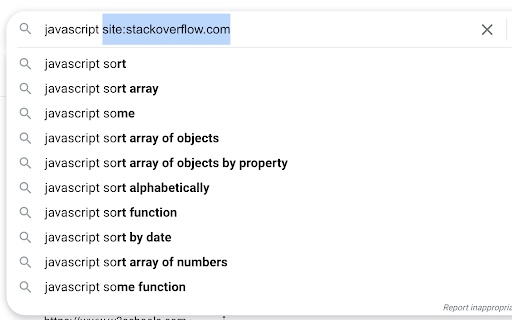
Expand a snippet of text to a longer form, using a hotkey (e.g., "so" → "site:stackoverflow.com"). Works in most text inputs, such as search boxes and multi-line comment fields.
Adding a text snippet:
• Click/open the extension.
• In the first box: enter the abbreviated text, without spaces, to be replaced a longer form in the second text box.
• In the second box: enter the expanded form, replacing the "prefix" text from the first box.
To use a saved snippet:
• In any input box, type your prefix text and use the assigned shortcut (default is "Ctrl+Shift+G".
• For the expansion to work, the prefix text must be separated from other words by a space.
• The caret (blinking text cursor) must be on or around the prefix word. For example, lets say the pipe character (|) is your caret placement:
how to exit vim? so| (valid)
how to exit vim? s|o (valid)
how to exit vim? |so (valid)
how to exit vim?| so (invalid)
To remove a text snippet:
• Click/open the extension.
• Check any boxes you'd like removed.
• Click the "Remove" button and reopen the extension.
Notes and limitations:
• Expansion won't work in some input fields.
• Expansion won't work in the Omnibox (Chrome's address bar/search bar).
• Expansion won't work in the startup page search bar.
• The prefix text doesn't need to be highlighted.
• The prefix-expansion pair is saved locally on your browser.
Change Notes:
[1.1.0]
• Changes: 2nd input box now changed to <pre> to allow multi-line expansions.
• Bug fix: Long expansions in the extension are now scrollable.
• Bug fix: Removing local storage items doesn't refresh list.
Check the source code on GitHub:
https://github.com/ssmooncoder/text-expander
Reviews
Loading reviews...
Permissions (3)
Permissions
activeTabℹ Can access the current tab when you click the extension scriptingℹ Can inject scripts into web pages storageℹ Can store data locally in your browser
Details
| Version | 1.1.0 |
| Updated | Jun 15, 2021 |
| Size | 7.0KiB |
| First Seen | Mar 26, 2026 |
More by moondev

Popular in accessibility

Read&Write for Google Chrome™
by Texthelp
17M
★ 3.44
accessibility
17M
★ 3.44
accessibility

360 Internet Protection
by qihoosafe
17M
★ 4.54
accessibility
17M
★ 4.54
accessibility

Screenshot reader™
by Texthelp
7M
★ 2.57
accessibility
7M
★ 2.57
accessibility

OrbitNote
by Texthelp
7M
★ 2.95
accessibility
7M
★ 2.95
accessibility

Volume Master
by Peta Sittek
6M
★ 4.81
accessibility
6M
★ 4.81
accessibility
Popular Extensions

Adobe Acrobat: PDF edit, convert, sign tools
by Adobe Inc.
331M
★ 4.40
workflow
331M
★ 4.40
workflow

Grammarly: AI Writing Assistant and Grammar Checker App
by Grammarly
42M
★ 4.50
communication
42M
★ 4.50
communication

Chrome Remote Desktop
by Chrome Remote Desktop Release Managers
38M
★ 3.14
workflow
38M
★ 3.14
workflow

Microsoft Single Sign On
by Microsoft
36M
★ 2.27
workflow
36M
★ 2.27
workflow

Cisco Webex Extension
by cisco.chromestore
23M
★ 2.34
social
23M
★ 2.34
social