
✅Recently updated
Description
Trustifi makes it easy for you to get the email protection and control you need with the ultimate add-in for Gmail, including alerts, traceability, monitoring and awareness, while being straightforward, transparent and simple enough to apply all this security at the click of a button.
---
Encryption
• NSA-grade email encryption, plus full DLP with sophisticated rules engine to support any use case
• Secure mobile relay for full protection on any device
• Recall, block, modify and set expirations for already sent and delivered emails
Data Loss Prevention
• 100% compliant with HIPAA/ HITECH, PII, GDPR, FSA, FINRA, LGPD, CCPA and more
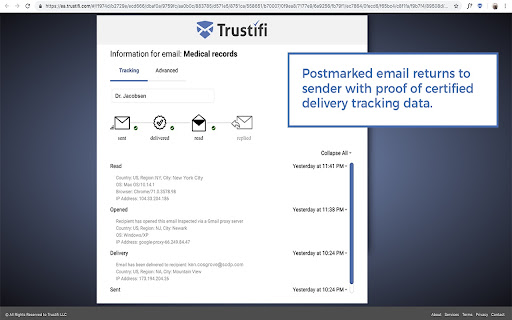
• Real-time knowledge about when emails have been received, opened and read with certified delivery and tracking
• Two-factor authentication on the recipient (even without registering)
Advanced Threat Protection
• Malware, ransomware, virus detection, BEC attack prevention
• Spoofing, phishing, fraud detection and spam filtering
• Whitelisting, blacklisting and many other configuration options
Productivity Focused Email Security Features
• Block emails for everyone or specific recipients
• Edit content after an encrypted email has been sent
• Add, edit, or delete attachments after an encrypted email has been sent
• Postmarked proof, track and see where emails are opened
• Provides visibility and rapid response into all email-based threats and attacks
---
How to get started:
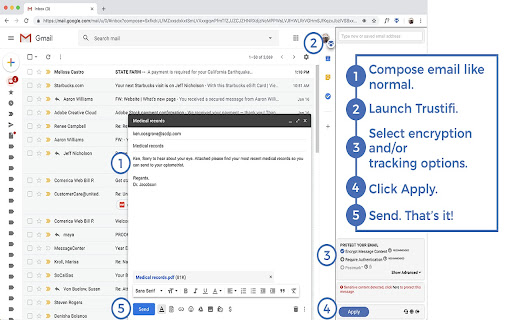
1. Install the Trustifi add-in on your Gmail and Login
2. Sign up directly from the Addon or at https://app.trustifi.com to get your free plan
3. Verify your email address (by clicking on the link within the email we'll send you)
4. When composing a new mail, open the Trustifi task pane (look for the Trustifi icon)
6. Add/Select recipients, choose protection methods from the task pane and click Apply.
7. Write your email, add any attachments (for extra privacy - add the attachments directly to the task pane), and send!
8. Comeback to a previously sent email, open the Trustifi task pane to view the email's reports for Tracking, Controlling, Recall, Postmark, Encrypted Reply and more.


Reviews
Loading reviews...
Permissions (5)
Permissions
background downloadsℹ Can manage and monitor downloads identityℹ Can use your Google account identity storageℹ Can store data locally in your browser tabsℹ Can see your open tabs and their URLs
Details
| Version | 1.2.418 |
| Updated | Mar 4, 2026 |
| Size | 3.46MiB |
| First Seen | Mar 26, 2026 |
Popular in workflow

Adobe Acrobat: PDF edit, convert, sign tools
by Adobe Inc.
330M
★ 4.40
workflow
330M
★ 4.40
workflow

Chrome Remote Desktop
by Chrome Remote Desktop Release Managers
38M
★ 3.14
workflow
38M
★ 3.14
workflow

MetaMask
by metamask
13M
★ 2.68
workflow
13M
★ 2.68
workflow

Microsoft Power Automate
by Microsoft Corporation
10M
★ 1.99
workflow
10M
★ 1.99
workflow

Screencastify - Screen Video Recorder
by castify-ext-dev
9M
★ 3.95
workflow
9M
★ 3.95
workflow
Popular Extensions
Adobe Acrobat: PDF edit, convert, sign tools
by Adobe Inc.
330M
★ 4.40
workflow
330M
★ 4.40
workflow
Chrome Remote Desktop
by Chrome Remote Desktop Release Managers
38M
★ 3.14
workflow
38M
★ 3.14
workflow

Cisco Webex Extension
by cisco.chromestore
24M
★ 2.34
social
24M
★ 2.34
social

Kami for Google Chrome™
by Kami
17M
★ 4.56
education
17M
★ 4.56
education

Read&Write for Google Chrome™
by Texthelp
17M
★ 3.44
accessibility
17M
★ 3.44
accessibility