
Description
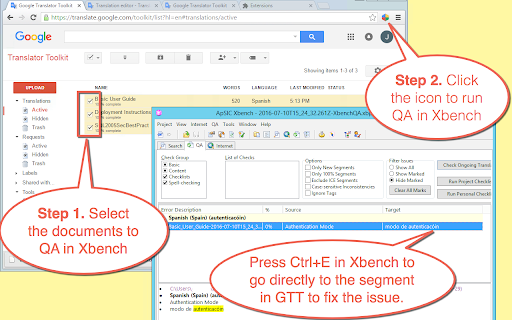
Instantly run QA with ApSIC Xbench on Google Polyglot files in four easy steps:
1. Go to the list of Google Polyglot documents
2. Select the documents to include for the Xbench QA.
3. Click the extension icon and wait for the documents to be downloaded.
4. Run QA with Xbench by double-clicking on the .xbp file that is downloaded.
To fix a translation issue found in Xbench, just select it in Xbench and press Ctrl+E. The Chrome browser will open the Polyglot document right at the segment.
NOTE: This extension requires Xbench 3.0 build 1602 or later installed on the machine.
Reviews (1 cached)
★★★☆☆2021-11-25
015-ES419_0169 RWS
An essential tool for our work. However, we've been running into some issues: — When selecting multiple files (like 27 files) in Polyglot and pressing the QA button, sometimes Chrome doesn't download all the xbpol files, and stops after 15 files or so. No xbp file is created either. — Non-breaking spaces appear in Xbench as “ ” instead of the proper character, requiring extensive modification of existing checklists. Here are some feature suggestions that would be really nice to have: — A keyboard shortcut. — The ability to run QA in all projects currently opened (i.e. in all tabs currently opened) as a single Xbench project.
Permissions (4)
Permissions
declarativeContentℹ Can show the extension icon based on page content declarativeNetRequestWithHostAccess downloadsℹ Can manage and monitor downloads scriptingℹ Can inject scripts into web pages
Details
| Version | 1.0.20 |
| Updated | Apr 5, 2025 |
| Size | 14.96KiB |
| First Seen | Mar 27, 2026 |
More by ApSIC, S.L.

Popular in workflow

Adobe Acrobat: PDF edit, convert, sign tools
by Adobe Inc.
331M
★ 4.40
workflow
331M
★ 4.40
workflow

Chrome Remote Desktop
by Chrome Remote Desktop Release Managers
38M
★ 3.14
workflow
38M
★ 3.14
workflow

Microsoft Single Sign On
by Microsoft
36M
★ 2.27
workflow
36M
★ 2.27
workflow

MetaMask
by metamask
13M
★ 2.68
workflow
13M
★ 2.68
workflow

Microsoft Power Automate
by Microsoft Corporation
10M
★ 1.99
workflow
10M
★ 1.99
workflow
Popular Extensions
Adobe Acrobat: PDF edit, convert, sign tools
by Adobe Inc.
331M
★ 4.40
workflow
331M
★ 4.40
workflow

Grammarly: AI Writing Assistant and Grammar Checker App
by Grammarly
42M
★ 4.50
communication
42M
★ 4.50
communication
Chrome Remote Desktop
by Chrome Remote Desktop Release Managers
38M
★ 3.14
workflow
38M
★ 3.14
workflow
Microsoft Single Sign On
by Microsoft
36M
★ 2.27
workflow
36M
★ 2.27
workflow

Cisco Webex Extension
by cisco.chromestore
23M
★ 2.34
social
23M
★ 2.34
social