
⚠️Not updated in over 2 years ✅Highly rated
Description
Angular State Inspector for Angular
Supports all versions of Angular:
- AngularJs
- Angular 2+
- Angular Ivy
- Hybrid apps (AngularJs + Angular)
Extends the Chrome Developer Tools for Angular web apps.
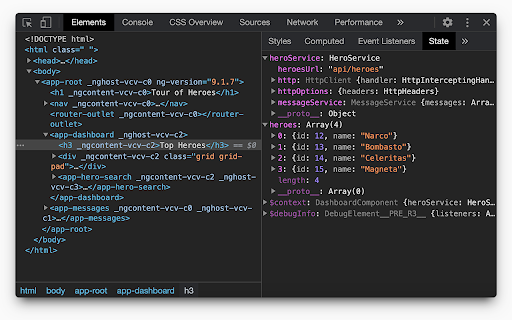
Adds new panel "State" to Elements tab, that displays the state of selected element.
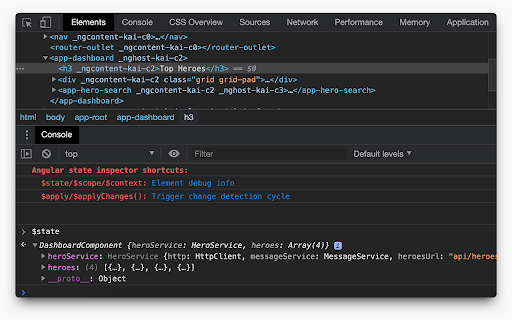
Prints state of selected element in console by calling "$state" variable.
Depending on angular version it can show:
- Component state
- Directives
- Context, like ngForOf or ngIf values
- Event listeners
If they are applicable to the current element.
Angular State Inspector also allows you to modify the values in the "State" panel (double click on value) and from console(e.g. $state.title = 'new value').
To apply changes just call $apply() in console.
See all supported commands in chrome console.
Version 1.4.6:
- Show info message if $ctrl is not available in selected scope.
- Update $state object even if it's not available.
Version 1.4.5:
- [ivy] Show info from ng.getComponent(). If it's null then show OwningComponent state.
Version 1.4.4:
- update extension logo
Version 1.4.3:
- Return result emoji on `$apply()` call
Version 1.4.2:
- Fixed props editing and change detection
Version 1.4.1:
- Print always up to date state in console
Version 1.4:
- Full support angular 9 Ivy api
Version 1.3:
- Added experimental support of Ivy
- Added shortcuts that you can use in console
Reviews (5 cached)
★☆☆☆☆2020-11-30
SANDEEP AGRAWAL
I do not see any 'State' panel in the Element tab for the chrome "Version 86.0.4240.198" for my angular app loaded in the page. I think the extension is only compatible with some older versions of the browser.
★★☆☆☆2025-04-23
Alejandro Panta
Signal values don't refresh
★★☆☆☆2021-09-07
Joshua Josephson
Love it but it still doesn't work for me on chrome93 (M1 chip) so I had to bend over backwards to disallow auto-updates and install 91.
★★★☆☆2024-06-25
Eetu Hannula
Doesn't seem to refresh values unless you select the component again. Otherwise nice.
★★★☆☆2023-03-21
Martin Spierings
Nice extension though I would like to disable the console message about state and would rather have it in the state panel as a hint somewhere.
Details
| Version | 1.4.6 |
| Updated | Aug 23, 2021 |
| Size | 36.35KiB |
| First Seen | Mar 27, 2026 |
Popular in developer

TouchEn PC보안 확장
by 라온시큐어
8M
★ 1.33
developer
8M
★ 1.33
developer

React Developer Tools
by Meta
5M
★ 3.95
developer
5M
★ 3.95
developer

Lighthouse
by lighthouse-extension-owners
1M
★ 4.42
developer
1M
★ 4.42
developer

Контур.Плагин
by kontur.extension
1M
★ 3.11
developer
1M
★ 3.11
developer

Similarweb - Website Traffic & SEO Checker
by Similarweb
1M
★ 4.66
developer
1M
★ 4.66
developer
Popular Extensions

Adobe Acrobat: PDF edit, convert, sign tools
by Adobe Inc.
331M
★ 4.40
workflow
331M
★ 4.40
workflow

Grammarly: AI Writing Assistant and Grammar Checker App
by Grammarly
42M
★ 4.50
communication
42M
★ 4.50
communication

Chrome Remote Desktop
by Chrome Remote Desktop Release Managers
38M
★ 3.14
workflow
38M
★ 3.14
workflow

Microsoft Single Sign On
by Microsoft
36M
★ 2.27
workflow
36M
★ 2.27
workflow

Cisco Webex Extension
by cisco.chromestore
23M
★ 2.34
social
23M
★ 2.34
social