
Description
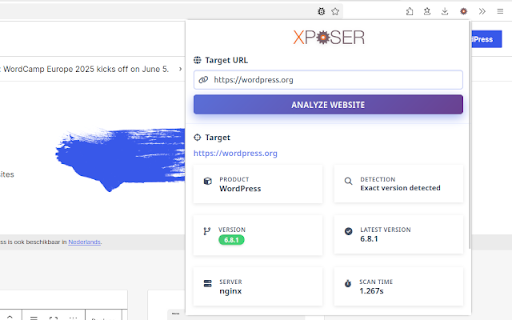
Have you ever wondered what version of Wordpress a site is running? Now there is an easy way to find out. The Xposer extension makes it convenient to call out to the xposer.io API from the website you are currently viewing. Just click the extension icon and click 'Expose'. The product and exact version of the website you are viewing will be revealed to you.
As a developer you can use this information to offer the owner of the site an upgrade of the detected product.
As a site owner you can check if you are running the most recent version of the product.
The version is not gleaned from the meta tags of the website, but by checking of key characteristics of each known product.
- Drupal
- Joomla
- WordPress
- TYPO3
- Magento 2
- and more!
More products and capabilities will be added in the near future.


Reviews
Loading reviews...
Permissions (2)
Permissions
activeTabℹ Can access the current tab when you click the extension storageℹ Can store data locally in your browser
Details
| Version | 4.0.0 |
| Updated | Jun 4, 2025 |
| Size | 759KiB |
| First Seen | Mar 26, 2026 |
Popular in developer

React Developer Tools
by Meta
5M
★ 3.95
developer
5M
★ 3.95
developer

Lighthouse
by lighthouse-extension-owners
1M
★ 4.42
developer
1M
★ 4.42
developer

Контур.Плагин
by kontur.extension
1M
★ 3.11
developer
1M
★ 3.11
developer

Similarweb - Website Traffic & SEO Checker
by Similarweb
1M
★ 4.66
developer
1M
★ 4.66
developer

Clear Cache
by Little Void LLC (Ben Bojko)
1M
★ 4.45
developer
1M
★ 4.45
developer
Popular Extensions

Adobe Acrobat: PDF edit, convert, sign tools
by Adobe Inc.
331M
★ 4.40
workflow
331M
★ 4.40
workflow

Chrome Remote Desktop
by Chrome Remote Desktop Release Managers
38M
★ 3.14
workflow
38M
★ 3.14
workflow

Microsoft Single Sign On
by Microsoft
36M
★ 2.27
workflow
36M
★ 2.27
workflow

Cisco Webex Extension
by cisco.chromestore
24M
★ 2.34
social
24M
★ 2.34
social

Kami for Google Chrome™
by Kami
19M
★ 4.56
education
19M
★ 4.56
education