
Description
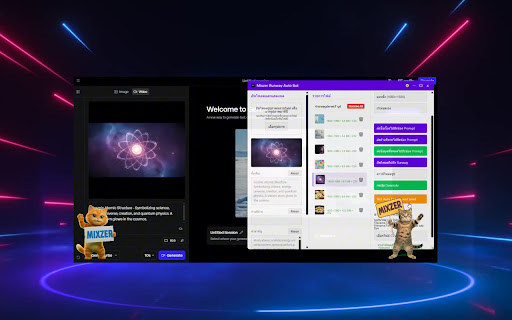
Mixzer Runway Auto Bot - AI Image Generation Automation Assistant
Powerful automation tool for Runway ML that streamlines batch image uploads, metadata management, and AI image generation with advanced retry mechanisms and workflow optimization.
Detailed Description
🚀 Supercharge Your Runway ML Workflow with Mixzer Runway Auto Bot
Mixzer Runway Auto Bot is a comprehensive Chrome Extension designed to revolutionize your Runway ML experience, making AI image generation faster, more efficient, and hassle-free. Perfect for content creators, graphic designers, digital artists, and anyone working with large volumes of AI-generated images.
🎯 Key Features
📁 Advanced File Management
Batch upload multiple images simultaneously
Intuitive drag & drop interface
Visual file list with thumbnails and size information
Automatic state saving and restoration
Support for JPG, PNG, and WebP formats
🏷️ Intelligent Metadata Management
Automatic EXIF data extraction from image files
CSV import for bulk metadata (Title, Description, Keywords)
Smart prompt generation from metadata fields
One-click copy functionality for quick data transfer
Customizable field selection for automated workflows
🖼️ Smart Image Processing
Automatic resizing to standard dimensions (1920x1080, 1080x1920)
Auto-crop for horizontal and vertical orientations
High-quality image preview
Local storage of resized images
Batch processing capabilities
⚡ Advanced Autorun System
Continuous automated image processing
Configurable timing delays and batch sizes
Smart Retry Mechanism for Generate button clicks
Real-time progress tracking and status updates
Error handling with automatic recovery
🔄 Robust Retry Functionality
Automatic retry when Generate button fails to respond
Configurable retry count (1-10 attempts)
Customizable delay between retries (5-120 seconds)
Visual countdown timer during retry delays
Intelligent failure detection and recovery
🎨 Customizable User Interface
Adjustable window transparency
Font size and color customization
Resizable and draggable floating window
Multi-language support (Thai/English)
Responsive design for different screen sizes
📊 Workflow Optimization
Round-based processing with pause intervals
Random timing variations to avoid detection
Configurable prompt field selection
Custom text append functionality
Comprehensive settings management
💡 How to Use
Open Runway ML in your browser
Click the Extension icon to launch Mixzer Bot
Drag & drop images or click to select files
Import CSV data (optional) for metadata automation
Configure settings according to your workflow needs
Start Autorun or process images individually
Monitor progress through real-time status updates
Reviews
Loading reviews...
Permissions (5)
Permissions
activeTabℹ Can access the current tab when you click the extension downloadsℹ Can manage and monitor downloads storageℹ Can store data locally in your browser tabsℹ Can see your open tabs and their URLs webNavigationℹ Can monitor navigation events
Details
| Version | 1.2 |
| Updated | May 28, 2025 |
| Size | 202KiB |
| First Seen | Mar 22, 2026 |
More by mymixzer

Popular in developer

Lighthouse
by lighthouse-extension-owners
1M
★ 4.42
developer
1M
★ 4.42
developer

Контур.Плагин
by kontur.extension
1M
★ 3.11
developer
1M
★ 3.11
developer

Similarweb - Website Traffic & SEO Checker
by Similarweb
1M
★ 4.66
developer
1M
★ 4.66
developer

Clear Cache
by Little Void LLC (Ben Bojko)
1M
★ 4.45
developer
1M
★ 4.45
developer

SEO META in 1 CLICK
by Bilal Hadri
900K
★ 4.87
developer
900K
★ 4.87
developer
Popular Extensions

Adobe Acrobat: PDF edit, convert, sign tools
by Adobe Inc.
330M
★ 4.40
workflow
330M
★ 4.40
workflow

Chrome Remote Desktop
by Chrome Remote Desktop Release Managers
38M
★ 3.14
workflow
38M
★ 3.14
workflow

Cisco Webex Extension
by cisco.chromestore
24M
★ 2.34
social
24M
★ 2.34
social

Kami for Google Chrome™
by Kami
17M
★ 4.56
education
17M
★ 4.56
education

Read&Write for Google Chrome™
by Texthelp
17M
★ 3.44
accessibility
17M
★ 3.44
accessibility